
Last updated on
Nov 9, 2026

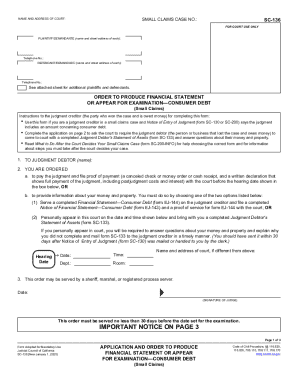
CA SC-134 2007 free printable template
pdfFiller is not affiliated with any government organization

Fill out
Complete the form online in a simple drag-and-drop editor.

eSign
Add your legally binding signature or send the form for signing.

Share
Share the form via a link, letting anyone fill it out from any device.

Export
Download, print, email, or move the form to your cloud storage.
Why pdfFiller is the best tool for your documents and forms


End-to-end document management
From editing and signing to collaboration and tracking, pdfFiller has everything you need to get your documents done quickly and efficiently.
Accessible from anywhere
pdfFiller is fully cloud-based. This means you can edit, sign, and share documents from anywhere using your computer, smartphone, or tablet.
Secure and compliant
pdfFiller lets you securely manage documents following global laws like ESIGN, CCPA, and GDPR. It's also HIPAA and SOC 2 compliant.
What is CA SC-134
The CA SC-134 is a legal document used by individuals in California to request a court hearing for a change in status regarding child custody or visitation.
pdfFiller scores top ratings on review platforms




Who needs CA SC-134?
Explore how professionals across industries use pdfFiller.

CA SC-134 is needed by:
-
Parents seeking custody changes
-
Guardians involved in custody disputes
-
Family law attorneys representing clients
-
Individuals preparing for family court hearings
-
Social workers advising families
Comprehensive Guide to CA SC-134
What is the CA SC-134?
The CA SC-134 form is an essential legal document in California, primarily used for various administrative purposes. This form is relevant to individuals and entities that need to declare certain information legally. The CA SC-134 finds its application in contexts such as business registrations or other official declarations that require accurate reporting.
Purpose and Benefits of the CA SC-134
The CA SC-134 serves as a foundational document for compliance with specific legal requirements. By completing the form accurately, users can avoid potential penalties associated with incorrect filings. Common scenarios where the CA SC-134 is crucial include business licensing and reporting changes in ownership or business structure.
Who Needs to Complete the CA SC-134?
Various individuals and entities may be required to complete the CA SC-134 form. This includes California residents, business owners, and organizations that need to report necessary changes. Occupations that commonly necessitate this form range from entrepreneurs to administrative personnel handling corporate records.
Eligibility Criteria for the CA SC-134
To file the CA SC-134, specific qualifications must be met. Individuals must be of legal age and meet residency requirements as outlined in the guidelines. Additionally, certain business types may be eligible to use this form, ensuring that only relevant entities participate in this process.
How to Fill Out the CA SC-134 Online (Step-by-Step)
-
Access the CA SC-134 through a reliable online platform such as pdfFiller.
-
Fill in the required fields, paying special attention to areas marked for critical information.
-
Review your entries to ensure all information is complete and accurate.
-
Utilize the editing tools for any necessary adjustments before finalizing the document.
-
Submit the completed form as prompted by the online platform.
Using pdfFiller enhances ease of completion through its user-friendly interface, allowing for smooth navigation and editing.
Common Errors and How to Avoid Them When Completing the CA SC-134
Common pitfalls when filling out the CA SC-134 include incomplete fields and inaccurate information. Ensuring that each section is fully addressed can prevent delays in processing. Tips for avoiding mistakes include cross-referencing information with original documents and following the guidelines for each step of the form.
Submission Methods for the CA SC-134
Users have multiple options for submitting the CA SC-134 after completion. Acceptable methods include online submissions, mailing the form, or delivering it in person to the relevant office. Each submission method may come with specific instructions, so it's essential to follow guidelines to ensure proper handling.
What Happens After You Submit the CA SC-134?
After submitting the CA SC-134, users can expect several outcomes. Processing times may vary based on the method of submission. It is advisable to keep a record of the submission for future reference, as follow-up steps or tracking options may be needed depending on the circumstances.
Security and Compliance for the CA SC-134
When using pdfFiller to complete the CA SC-134, users can rest assured that their information is secure. The platform employs 256-bit encryption and complies with regulations such as HIPAA and GDPR, ensuring the protection of sensitive documents throughout the filing process.
Streamline Your CA SC-134 Experience with pdfFiller
Utilizing pdfFiller significantly enhances the user experience when completing the CA SC-134. The platform provides features that simplify editing, eSigning, and document management, making the process more efficient. Users report completing forms faster and with greater accuracy due to the intuitive design and support offered by pdfFiller.
How to fill out the CA SC-134
-
1.Start by accessing pdfFiller and logging into your account. If you don’t have an account, create one using your email.
-
2.Use the search bar to find 'CA SC-134' form. Click on the form title to open it in the pdfFiller editor.
-
3.Review the form to understand the required fields. Gather any necessary information such as case numbers, personal details, and any prior court orders you may need.
-
4.Begin filling out the form by clicking on each field. Use pdfFiller’s text box to enter names, dates, and any relevant details.
-
5.If needed, utilize the commenting feature to add notes or instructions for yourself as you fill out the form.
-
6.Once all fields are completed, carefully review each entry for accuracy. Use the zoom feature to check your entries closely.
-
7.To finalize the form, use the 'Save' option and select 'Download' for a local copy or opt to 'Send' it directly to the relevant court or attorney.
-
8.Before submitting, confirm that all signatures and required documentation are included. Use pdfFiller's electronic signature feature if necessary.
-
9.When ready, choose an appropriate submission method such as printing or submitting via email, as specified by the court's requirements.

Who is eligible to use the CA SC-134 form?
The CA SC-134 form is intended for parents or guardians involved in a custody dispute in California. Individuals representing themselves or those seeking legal advice from attorneys can also use this form.
What is the deadline for submitting the CA SC-134 form?
There is no specific deadline mentioned in the metadata, but it is critical to submit the CA SC-134 form well ahead of any scheduled court hearings to allow for processing time.
How can I submit the completed CA SC-134 form?
You can submit the completed CA SC-134 form either by mailing it to the appropriate court address or by delivering it in person. Ensure you check with your local court for specific submission guidelines.
What supporting documents are required with the CA SC-134 form?
Typically, you may need to attach copies of any existing court orders, proof of residency, and identification documents. Check local court guidelines for specific requirements to ensure you include all necessary attachments.
What are common mistakes to avoid when filling out the CA SC-134 form?
Common mistakes include leaving fields blank, providing incorrect information, or failing to sign the form. Always review your entries carefully, and consider seeking legal advice if uncertain.
How long does it take to process the CA SC-134 form?
Processing times can vary by court. Generally, it may take a few weeks, depending on court volume and whether additional hearings are required. It's advisable to inquire directly with the court for estimates.
Can I modify the CA SC-134 form after submission?
Once the CA SC-134 form is submitted, modifications typically require filing a motion with the court. Consult with an attorney for the best course of action if amendments are necessary.
CA SC-134 Form Versions
Related Content
Related Forms



Related Catalogs
Get the latest insights from our blog


If you believe that this page should be taken down, please follow our DMCA take down process
here
.
This form may include fields for payment information. Data entered in these fields is not covered by PCI DSS compliance.