
Last updated on
Nov 6, 2026
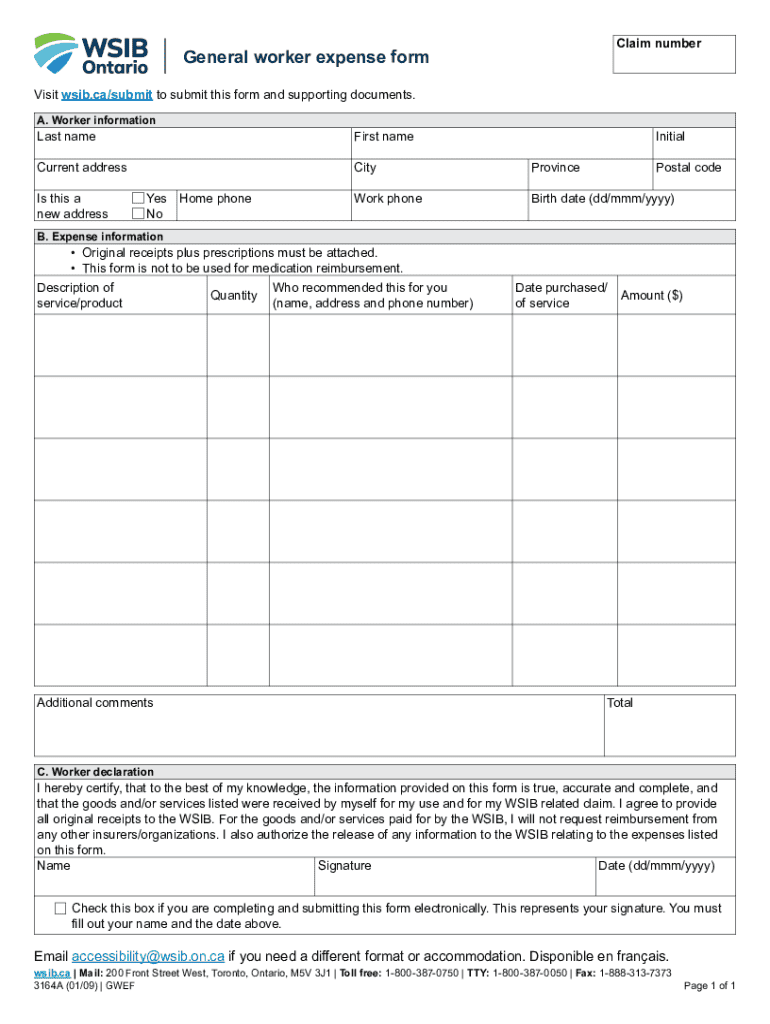
Canada WSIB Ontario 3164A 2009-2026 free printable template
We are not affiliated with any brand or entity on this form

Fill out
Complete the form online in a simple drag-and-drop editor.

eSign
Add your legally binding signature or send the form for signing.

Share
Share the form via a link, letting anyone fill it out from any device.

Export
Download, print, email, or move the form to your cloud storage.
Why pdfFiller is the best tool for your documents and forms


End-to-end document management
From editing and signing to collaboration and tracking, pdfFiller has everything you need to get your documents done quickly and efficiently.
Accessible from anywhere
pdfFiller is fully cloud-based. This means you can edit, sign, and share documents from anywhere using your computer, smartphone, or tablet.
Secure and compliant
pdfFiller lets you securely manage documents following global laws like ESIGN, CCPA, and GDPR. It's also HIPAA and SOC 2 compliant.
What is Canada WSIB Ontario 3164A
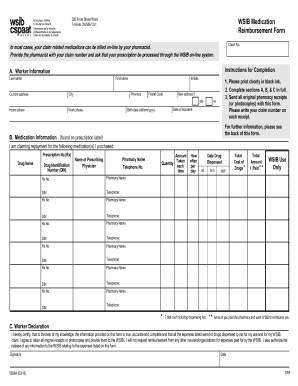
The General Worker Expense Form is an Expense Report Form used by workers in Ontario, Canada, to claim reimbursement for expenses related to a WSIB claim.
pdfFiller scores top ratings on review platforms




All of my forms have looked super professional, and when I applied for my new job, the HR department thought it was going the extra mile to type out my application instead of handwriting it.
Quick on the go use
This software allows for quick on the go use with only my cellphone.
No need to print, fill out, scan and email.
There are several applications I have not used with this software
Who needs Canada WSIB Ontario 3164A?
Explore how professionals across industries use pdfFiller.

Canada WSIB Ontario 3164A is needed by:
-
Workers in Ontario who have incurred work-related expenses
-
Employees seeking reimbursement for WSIB claims
-
Human Resource professionals assisting with expense claims
-
Financial departments processing employee reimbursements
-
WSIB representatives reviewing expense submissions
Comprehensive Guide to Canada WSIB Ontario 3164A
What is the General Worker Expense Form?
The General Worker Expense Form is a crucial document for workers in Ontario. It allows them to submit claims for reimbursement of expenses related to their Workplace Safety and Insurance Board (WSIB) claims. This form is primarily used by employees who have incurred expenses due to workplace injuries or illnesses that are eligible for compensation.
Workers fill out this form to ensure they receive the reimbursement they are entitled to, making it an essential part of the claims process. Understanding when and how to use the Ontario worker expense form is vital for maintaining financial stability during recovery.
Purpose and Benefits of the General Worker Expense Form
This form is integral in helping workers navigate the complexities of claiming reimbursements for expenses associated with WSIB claims. By utilizing the workplace safety insurance expense form, workers can ensure that their claims are processed efficiently and accurately.
Benefits of the General Worker Expense Form include:
-
Streamlined claims processing, reducing waiting times.
-
The ability to attach necessary documentation, such as receipts and prescriptions.
-
Enhanced clarity in documenting expenses related to their claims.
Key Features of the General Worker Expense Form
The General Worker Expense Form includes several important components and sections. Essential fillable fields on the form require detailed information, such as:
-
Last name, first name, and contact details.
-
Details of the service or product, including quantity and amount.
-
Declaration of accuracy and signature of the worker.
Providing accurate information and attaching original receipts is critical for avoiding any claims delays or complications. Each section is designed to ensure clear and thorough documentation of expenses incurred during the recovery process.
Who Needs the General Worker Expense Form?
Primarily, this form is intended for workers who are filing WSIB claims due to workplace injuries. Eligibility criteria typically include being an employee under the jurisdiction of WSIB and having incurred expenses directly related to their claim.
It's important for workers to recognize their rights regarding expense documentation, as proper submission helps facilitate faster claim approvals and reimbursements.
How to Fill Out the General Worker Expense Form Online (Step-by-Step)
Filling out the General Worker Expense Form online can be done seamlessly using pdfFiller. Here’s a step-by-step guide to ensuring accurate completion:
-
Access the form through pdfFiller’s platform.
-
Fill in your personal details, including name and contact information.
-
Enter the expense details, ensuring all amounts are accurately recorded.
-
Attach any necessary receipts or documents to support your claim.
-
Review all information for accuracy before submission.
-
Sign the form digitally to finalize your submission.
Submission Methods for the General Worker Expense Form
After completing the General Worker Expense Form, workers have various submission methods available. These methods include:
-
Direct online submission through pdfFiller.
-
Emailing the completed form to the designated WSIB office.
-
Mailing a physical copy to the appropriate office.
Tracking submissions is essential to ensure that claims are received and processed without delay.
Common Errors to Avoid When Submitting the General Worker Expense Form
When submitting the General Worker Expense Form, there are common mistakes to avoid to ensure your claim is not delayed or rejected. Key errors include:
-
Incomplete or inaccurate personal information.
-
Failure to attach the original receipts as proof of expenses.
-
Missing the required signature on the form.
Taking care to double-check all entries can significantly improve the chances of a successful claim submission.
Security and Compliance of the General Worker Expense Form
During the filling out process, pdfFiller ensures the security of documents through comprehensive privacy measures. The platform employs 256-bit encryption and adheres to privacy regulations such as HIPAA and GDPR, vital for protecting sensitive information.
Using tools like pdfFiller not only enhances user experience but also ensures compliance with security standards when handling sensitive documents.
Using pdfFiller for the General Worker Expense Form
Utilizing pdfFiller for completing the General Worker Expense Form comes with numerous benefits. The platform offers features that simplify the process, such as:
-
Easy document management to keep track of your forms.
-
Options for eSigning, which expedites submission.
-
Interactive tools for filling out and editing documents.
By leveraging these features, workers can maximize their efficiency in managing their expense claims.
Final Steps After Submission of the General Worker Expense Form
Once the General Worker Expense Form has been submitted, there are crucial final steps to take. These include:
-
Tracking the status of your application through the WSIB portal.
-
Retaining copies of all submitted documents for your records.
-
Following up with WSIB if there are delays in the claims process.
Being proactive can help ensure that your claims are processed in a timely manner.
How to fill out the Canada WSIB Ontario 3164A
-
1.Access the General Worker Expense Form on pdfFiller by navigating to the platform and searching for 'General Worker Expense Form.' Click to open the form.
-
2.Start by filling out the personal information fields such as 'Last name,' 'First name,' 'Initial,' 'Current address,' 'City,' 'Province,' and 'Postal code.' Use the provided fillable fields for efficient data entry.
-
3.Next, input your contact details including 'Home phone' and 'Work phone.' Make sure the phone numbers are accurate for potential follow-up by the WSIB.
-
4.Provide your 'Birth date' and be ready to detail the services or products related to the claims. Fill out the 'Description of service/product' field clearly to avoid confusion.
-
5.Record how many services or products were purchased by entering the 'Quantity' and specify who recommended the service by filling out 'Who recommended this for you.'
-
6.Indicate the 'Date purchased' for each item and accurately list the 'Amount ($)' spent. This information is crucial for matching expenses with receipts.
-
7.Include any 'Additional comments' that may be relevant to your claim, if applicable, before calculating the total amounts.
-
8.Review your completed form carefully, checking all entries against your original receipts and ensuring all required information is included.
-
9.Once satisfied, place your 'Name' and 'Signature' in the designated fields and enter today's 'Date.'
-
10.To finalize, save your completed form on pdfFiller, and opt to download it in your preferred format. You can also submit directly through the platform if available.

Who is eligible to use the General Worker Expense Form?
Workers in Ontario who have incurred expenses related to a workplace injury and are filing a WSIB claim are eligible to use the General Worker Expense Form.
What documents are required when submitting this form?
When submitting the General Worker Expense Form, you must attach original receipts and prescriptions that correspond to the expenses claimed to validate your reimbursement request.
How do I submit the General Worker Expense Form?
You can submit the General Worker Expense Form electronically via pdfFiller, or print it out for mailing to the appropriate WSIB office. Ensure all required documents are included.
What common mistakes should I avoid when filling out the form?
Common mistakes include missing required fields such as signature and date, providing inaccurate amounts, and failing to attach necessary receipts. Double-check for completeness before submission.
Is there a deadline for submitting the General Worker Expense Form?
While specific deadlines can vary, it is best to submit your General Worker Expense Form as soon as possible after incurring expenses to avoid delays in processing.
How long does it take to process my expense claim?
Processing times can vary depending on WSIB workload, but generally, it may take several weeks. It's advisable to check with WSIB for the most current processing times.
Can I make changes to the form after submission?
Once the General Worker Expense Form is submitted, changes may require resubmitting a corrected form. It's best to ensure accuracy before initial submission.
Canada WSIB Ontario 3164A Form Versions
Related Forms




Get the latest insights from our blog


If you believe that this page should be taken down, please follow our DMCA take down process
here
.
This form may include fields for payment information. Data entered in these fields is not covered by PCI DSS compliance.