
Last updated on
Oct 19, 2026
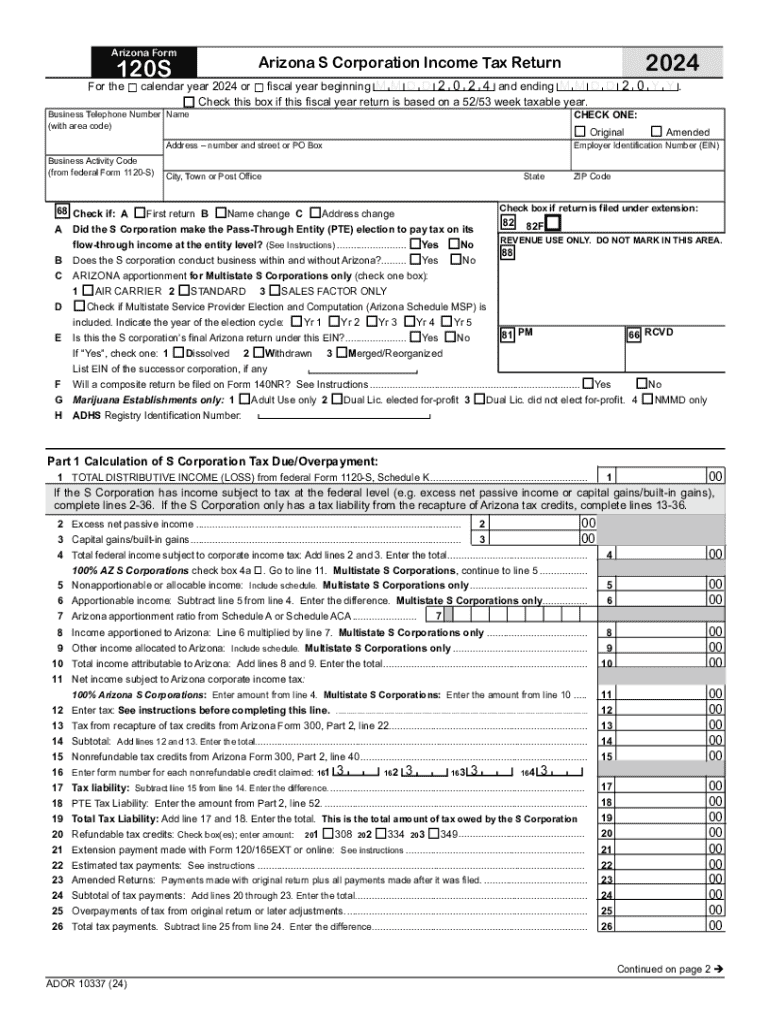
AZ Form 120S 2024 free printable template
pdfFiller is not affiliated with any government organization

Fill out
Complete the form online in a simple drag-and-drop editor.

eSign
Add your legally binding signature or send the form for signing.

Share
Share the form via a link, letting anyone fill it out from any device.

Export
Download, print, email, or move the form to your cloud storage.
Why pdfFiller is the best tool for your documents and forms


End-to-end document management
From editing and signing to collaboration and tracking, pdfFiller has everything you need to get your documents done quickly and efficiently.
Accessible from anywhere
pdfFiller is fully cloud-based. This means you can edit, sign, and share documents from anywhere using your computer, smartphone, or tablet.
Secure and compliant
pdfFiller lets you securely manage documents following global laws like ESIGN, CCPA, and GDPR. It's also HIPAA and SOC 2 compliant.
What is AZ Form 120S
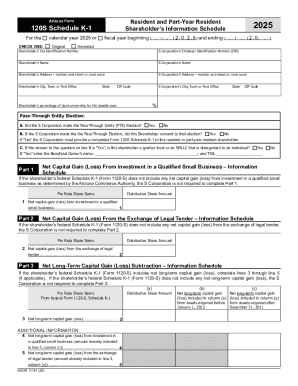
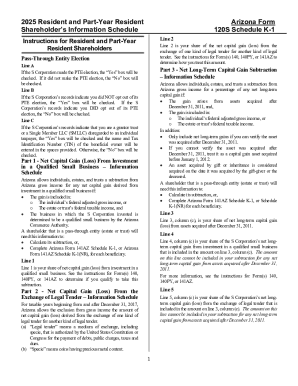
The Arizona Form 120S is a state income tax return used by S Corporations to report income and calculate their taxes for the 2024 tax year.
pdfFiller scores top ratings on review platforms




Who needs AZ Form 120S?
Explore how professionals across industries use pdfFiller.

AZ Form 120S is needed by:
-
S Corporations operating in Arizona
-
Tax professionals assisting clients with Arizona state tax submissions
-
Business owners seeking to understand their tax obligations in Arizona
-
CPA firms preparing tax returns for S Corporations in Arizona
-
Financial advisors guiding clients on state tax matters
Comprehensive Guide to AZ Form 120S
What is the Arizona Form 120S S Corporation Income Tax Return 2024?
The Arizona Form 120S is a state tax form specifically designed for S Corporations operating in Arizona. Its primary purpose is to assist these entities in reporting their income while accurately calculating their state tax liabilities. This tax return is essential for ensuring compliance with Arizona state income tax regulations.
Arizona S Corporations must file this return to fulfill their tax responsibilities. The form plays a critical role in determining how state income taxes are calculated based on the income reported by the corporation. For those looking for the Arizona 2024 tax form, Form 120S is a must-have to maintain adherence to tax laws in Arizona.
Purpose and Benefits of the Arizona Form 120S S Corporation Income Tax Return 2024
Filing the Arizona Form 120S helps report income generated by the S Corporation and subsequently determine the tax liabilities owed to the state. This process streamlines tax calculations, ensuring that S Corporations efficiently manage their tax responsibilities.
One significant advantage of using this Arizona corporate income tax return is the benefit of flow-through taxation. This allows income to pass directly to shareholders, avoiding double taxation. Additionally, entities can make a Pass-Through Entity (PTE) election, enabling the tax to be paid at the entity level rather than through individual returns.
Who Needs the Arizona Form 120S S Corporation Income Tax Return 2024?
Specific businesses are required to file the Arizona Form 120S, including all S Corporations that operate within the state. Additionally, certain eligibility criteria must be met, such as maintaining S Corporation status, to file this particular return.
Exceptions may exist for S Corporations that are not conducting business in Arizona or are exempt under state law. It is crucial for businesses to understand who needs to file the Arizona tax form in order to comply fully with state requirements.
Key Features of the Arizona Form 120S S Corporation Income Tax Return 2024
This return includes several essential sections that need attention during the filing process. Notable features consist of fields for total distributive income, tax credits, and the Employer Identification Number (EIN). These sections help ensure that all necessary financial information is accurately reported.
Moreover, the form may include instructions on how to file if the corporation operates on a fiscal year basis. Understanding these fields is critical for businesses to successfully complete the Arizona state income tax return.
How to Fill Out the Arizona Form 120S S Corporation Income Tax Return 2024 (Step-by-Step)
To successfully complete the Arizona Form 120S, follow these steps:
-
Gather all required financial documents and records.
-
Start filling out the form by entering the corporation’s name and Employer Identification Number (EIN).
-
Complete sections for total distributive income and any tax credits.
-
Double-check all entries for accuracy to avoid errors.
-
Review the form and ensure all signatures are provided before submission.
Accurate data input is vital to avoid common errors that can lead to delays or penalties. A meticulous approach to filling out the form ensures compliance with state tax regulations.
Submission Methods for the Arizona Form 120S S Corporation Income Tax Return 2024
There are various options available for submitting the Arizona Form 120S. Corporations can choose between online submissions through designated state portals or traditional paper submissions via mail. Each method has distinct advantages depending on a corporation’s preferences.
Be mindful of submission deadlines to avoid any late fees. Understanding when to file the Arizona state income tax return is crucial for maintaining good standing with the state tax authority.
Common Errors and How to Avoid Them on the Arizona Form 120S S Corporation Income Tax Return 2024
While completing the Arizona Form 120S, some frequent mistakes include missing signatures, incorrect financial data entry, and omitting required fields. Such errors can complicate the filing process and potentially lead to penalties.
To avoid mistakes, consider implementing these tips:
-
Validate all data before submitting.
-
Ensure that no fields are left blank unless specified as optional.
-
Have another individual review the completed form for additional accuracy.
How to Sign and Submit the Arizona Form 120S S Corporation Income Tax Return 2024
Signing the Arizona Form 120S requires adherence to specific guidelines. Depending on the submission method chosen, a digital signature may be required for online submissions, while wet signatures are necessary for paper forms.
In some cases, notarization may be required if specific instructions dictate such actions. Understanding how to sign Arizona Form 120S properly helps ensure a smooth and compliant submission process.
Using pdfFiller to Complete the Arizona Form 120S S Corporation Income Tax Return 2024
pdfFiller offers a user-friendly platform for filling out the Arizona Form 120S. Its fillable forms allow users to enter required information efficiently, while eSigning functionality makes it easy to complete submissions without hassle.
Security is a top priority; pdfFiller utilizes 256-bit encryption to safeguard sensitive tax documents. Leveraging pdfFiller’s tools can enhance the experience of completing and submitting forms effectively and securely.
Final Steps After Completing the Arizona Form 120S S Corporation Income Tax Return 2024
Once the Arizona Form 120S has been submitted, it is essential to keep track of the application status. Corporations should monitor their submissions to confirm acceptance by the state tax authority.
Additionally, if any amendments are necessary, understanding how to amend a form expedites corrections. Keeping a record of submitted tax documents is important for compliance and future reference, fulfilling record retention requirements effectively.
How to fill out the AZ Form 120S
-
1.To begin, access pdfFiller and use the search function to locate the Arizona Form 120S.
-
2.Open the form by clicking on its title to enter the interactive editing interface.
-
3.Before filling out the form, gather all necessary financial information, such as total income, deductions, and tax credits relevant for the tax year.
-
4.Navigate through the fields, starting with basic information like 'Name' and 'Address'. Use the interactive fields to input your details directly.
-
5.When entering numbers, make sure to double-check all financial entries for accuracy, as these will affect your tax calculations.
-
6.Utilize the available checkboxes to indicate whether you are using a 52/53 week taxable year, ensuring all applicable sections are filled out correctly.
-
7.Take advantage of pdfFiller's instructions and tooltips for guidance while completing sections related to income, credits, and tax liability.
-
8.After completing the form, review all sections thoroughly for any missing information or errors before moving on to finalization.
-
9.Save your work frequently as you complete the form to avoid losing any progress in case of session timeouts.
-
10.Once you’re satisfied with the entries, use the 'Save' feature to download a copy of your completed Form 120S.
-
11.If necessary, print the form directly from pdfFiller to submit physically, or proceed with electronic submission if allowed.

Who is eligible to file the Arizona Form 120S?
The Arizona Form 120S is intended for S Corporations operating in Arizona, which are structured as pass-through entities for tax purposes. Only those meeting S Corporation qualifications should use this form.
When is the Arizona Form 120S due?
The due date for filing the Arizona Form 120S typically coincides with the federal tax deadline, which is usually April 15. Check for any specific state extensions if needed.
How do I submit the Arizona Form 120S?
You can submit the Arizona Form 120S electronically or by mail. If filing electronically, adhere to the electronic submission guidelines provided by the Arizona Department of Revenue.
What supporting documents do I need for the Arizona Form 120S?
Generally, you will need supporting documents such as Schedule K-1s, income statements, and any relevant tax credit documentation when filing the Arizona Form 120S to substantiate your entries.
What are common mistakes to avoid when completing the Arizona Form 120S?
Common mistakes include incorrect entries of financial figures, failing to check necessary boxes, and neglecting to include all supporting documents. Always double-check your work before submission.
How long does it take to process the Arizona Form 120S?
Processing times can vary but generally take several weeks. Check the Arizona Department of Revenue’s website for updates and estimated processing times for electronic versus paper submissions.
Is notarization required for the Arizona Form 120S?
No, notarization is not required for the Arizona Form 120S. Ensure that all information is complete, as accuracy is crucial for processing.
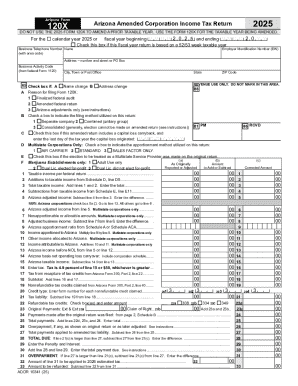
AZ Form 120S Form Versions
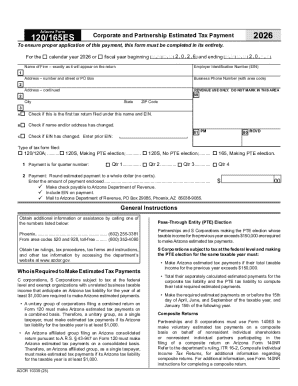
Related Forms


Get the latest insights from our blog



If you believe that this page should be taken down, please follow our DMCA take down process
here
.
This form may include fields for payment information. Data entered in these fields is not covered by PCI DSS compliance.