
Last updated on
Oct 30, 2026
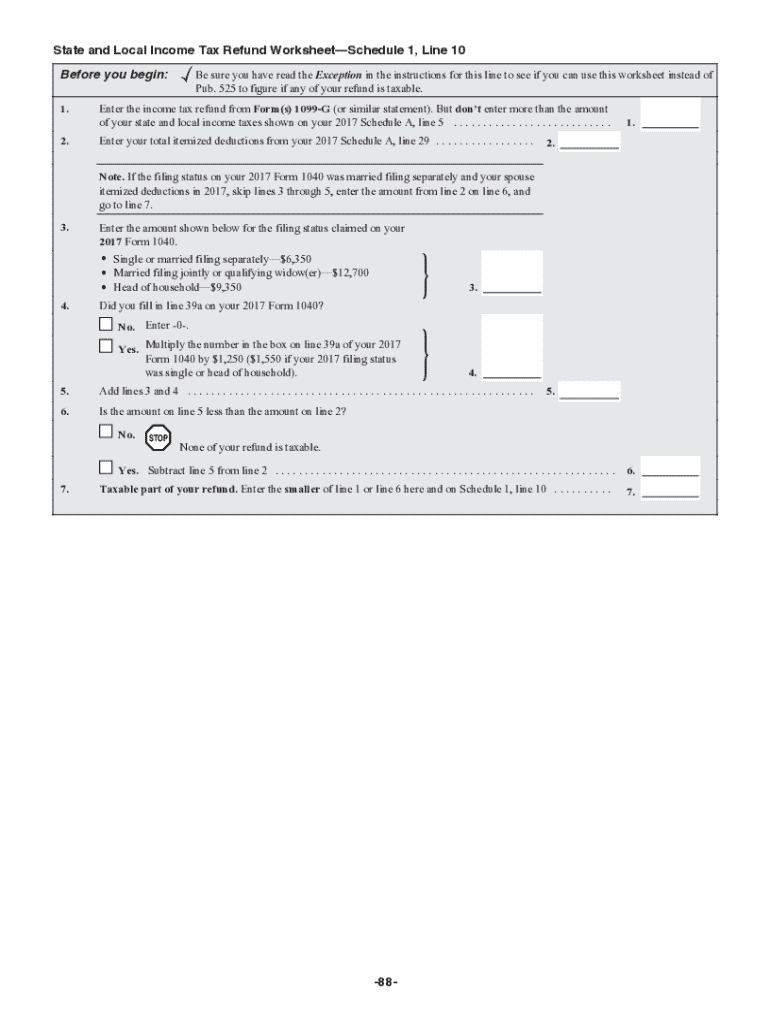
IRS State and Local Income Tax Refund Worksheet Schedule 1 Line 10 2017-2026 free printable temp...
pdfFiller is not affiliated with IRS

Fill out
Complete the form online in a simple drag-and-drop editor.

eSign
Add your legally binding signature or send the form for signing.

Share
Share the form via a link, letting anyone fill it out from any device.

Export
Download, print, email, or move the form to your cloud storage.
Why pdfFiller is the best tool for your documents and forms


End-to-end document management
From editing and signing to collaboration and tracking, pdfFiller has everything you need to get your documents done quickly and efficiently.
Accessible from anywhere
pdfFiller is fully cloud-based. This means you can edit, sign, and share documents from anywhere using your computer, smartphone, or tablet.
Secure and compliant
pdfFiller lets you securely manage documents following global laws like ESIGN, CCPA, and GDPR. It's also HIPAA and SOC 2 compliant.
What is IRS State and Local Income Tax Refund Worksheet Schedule 1 Line 10
The State and Local Income Tax Refund Worksheet is a tax document used by individuals in the US to determine the taxable portion of a state or local income tax refund.
pdfFiller scores top ratings on review platforms




Who needs IRS State and Local Income Tax Refund Worksheet Schedule 1 Line 10?
Explore how professionals across industries use pdfFiller.

IRS State and Local Income Tax Refund Worksheet Schedule 1 Line 10 is needed by:
-
Taxpayers who received a state or local income tax refund
-
Individuals filing their federal tax return
-
Tax professionals assisting clients with refunds
-
Those who received Form 1099-G from state authorities
-
Filers of Schedule A for itemized deductions
-
Personal finance advisors supporting clients with tax filings
Comprehensive Guide to IRS State and Local Income Tax Refund Worksheet Schedule 1 Line 10
Understanding the State and Local Income Tax Refund Worksheet
The State and Local Income Tax Refund Worksheet is a crucial document for taxpayers in the United States. This worksheet serves to determine if any part of a state or local income tax refund is taxable. It's fundamental for reporting taxable refunds on federal tax returns, specifically utilizing forms such as Form 1099-G, Schedule A, and Form 1040.
Utilizing this worksheet accurately helps ensure compliance with tax obligations and aids in preventing potential tax penalties associated with incorrect reporting. By consolidating tax refund calculations in one document, it enhances user convenience.
Purpose and Benefits of the Worksheet
This worksheet plays a vital role in clarifying an individual's tax obligations concerning state and local refunds. Using the worksheet helps taxpayers understand how their refunds might impact taxable income, ensuring accuracy for their returns.
One notable benefit is the avoidance of tax penalties due to accurate reporting. Additionally, having all necessary calculations for tax refunds in a single location helps streamline the completion process for users, making it more manageable during tax season.
Who Needs the State and Local Income Tax Refund Worksheet?
The State and Local Income Tax Refund Worksheet is essential for anyone who received a refund from state or local tax payments. Specifically, individuals who itemized deductions in previous tax years should take special note, as this can significantly influence their tax return outcome.
However, not all taxpayers may need to use this worksheet. For those who did not receive any refunds or who took the standard deduction, the worksheet may be unnecessary.
Eligibility and Documentation Requirements
To successfully fill out the State and Local Income Tax Refund Worksheet, users must gather several essential documents. These include Form 1099-G, which reports the amount of the state or local tax refund, as well as Schedule A for itemized deductions.
Moreover, claim eligibility for refunds requires understanding key criteria, along with preparatory information necessary for accurate worksheet completion. This ensures that users can readily assess their tax situations against required standards.
Step-by-Step Guide to Filling Out the Worksheet Online
Filling out the State and Local Income Tax Refund Worksheet online is a straightforward process. Follow these steps for successful completion:
-
Access the worksheet through a reliable platform such as pdfFiller.
-
Input the income tax refund information as indicated from Form(s) 1099-G.
-
Complete the total itemized deductions from your 2017 Schedule A, line 29.
-
Verify each entry before finalizing your submission.
During this process, be mindful of common errors such as miscalculating deduction amounts. Utilizing tools available through pdfFiller can enhance the ease of filling out and validating entries.
Navigating Submission Processes for the Worksheet
Once the State and Local Income Tax Refund Worksheet is filled out, users must consider their submission options. Submissions can be made either online via the IRS portal or by mailing a physical copy to the appropriate tax office.
Timeliness is crucial; thus, be aware of submission deadlines that may apply. Moreover, tracking your submission status is essential to ensure that your tax return is processed efficiently.
Security Measures When Handling Your Tax Documents
When engaging with sensitive tax documents, it’s critical to ensure security measures are in place. Platforms like pdfFiller adhere to stringent encryption standards, ensuring compliance with regulations that protect user data.
Data protection is paramount; thus, using tools that offer secure handling of tax documents reassures users about their privacy throughout the process.
Utilizing pdfFiller for Your Tax Needs
pdfFiller provides a robust platform for managing tax forms efficiently. The service includes key features that simplify the process of filling and filing tax-related forms, making it accessible to all users.
Users can also benefit from testimonials showcasing successful submissions, proving the effectiveness of the platform. The ability to convert and share completed forms easily further enhances its practicality.
Sample Filled Worksheet for Reference
To aid in accurately completing the State and Local Income Tax Refund Worksheet, a sample filled-out version can serve as a valuable reference. This example illustrates how to properly complete each section of the worksheet.
By annotating different areas, users can gain clarity on what is expected. This will assist them in ensuring that their personal details align accurately with the provided sample.
How to Fill Out Small Business Tax Forms Online with pdfFiller
Struggling with your Schedule C or not sure how to file business taxes as a sole proprietor, LLC, or self-employed professional? This step-by-step pdfFiller tutorial walks you through completing IRS Schedule C quickly and accurately — no printing, no scanning, no stress. Whether you're handling small business tax deductions, tracking self-employed taxes, or preparing your full business tax return, pdfFiller makes it simple right in your browser.

How to fill out the IRS State and Local Income Tax Refund Worksheet Schedule 1 Line 10
-
1.Access the State and Local Income Tax Refund Worksheet on pdfFiller by searching for it in the form library or using the direct link provided on the tax forms page.
-
2.Open the form and familiarize yourself with its layout. Look for sections where you can input data, keeping an eye on any highlighted fields that indicate required information.
-
3.Gather necessary documents such as Form 1099-G, Schedule A, and your Form 1040. Ensure you have your tax refund amount from your state or local tax authority available.
-
4.Begin filling out the worksheet by entering your refund amount as specified in the instructions. Locate the section labeled 'Enter the income tax refund from Form(s) 1099-G' and input the relevant figure.
-
5.Continue through the form, entering your total itemized deductions as detailed on your 2017 Schedule A, line 29. This is critical for calculating your taxable refund.
-
6.Check all entered information carefully to ensure accuracy. Make corrections as needed by clicking on the relevant fields and editing them in pdfFiller.
-
7.Once you've completed the form, review it to confirm that all required fields are filled and no information is missing.
-
8.To save your completed worksheet, use the 'Save' feature in pdfFiller. Consider downloading a copy for your records by selecting the 'Download' option.
-
9.If you're ready to submit your form, check the submission guidelines provided by the IRS or your tax authority for specific protocols.
-
10.Finally, after ensuring everything is correct, choose how you want to submit it—via email, upload, or printing for mailed submission.

Who needs to complete the State and Local Income Tax Refund Worksheet?
Anyone who received a state or local income tax refund and needs to determine if that refund is taxable on their federal tax return should complete this worksheet.
What documents do I need to complete the worksheet?
You will need Form 1099-G showing your refund amount, Schedule A for itemized deductions, and your completed Form 1040 to accurately fill out the worksheet.
Is there a deadline for completing this form?
Generally, the worksheet should be completed when preparing your federal tax return. Ensure you meet the submission deadline for your return, typically April 15th each year.
How do I submit the worksheet after completing it?
Once filled out, review the form for accuracy. You can either submit it electronically if instructed, or include it with your federal tax return if required.
Are there common mistakes to avoid while filling out this form?
Common mistakes include entering incorrect refund amounts, neglecting to include total itemized deductions, and failing to check for missing information before submission.
What if I make an error on the worksheet after submitting?
If you notice an error after submission, you may need to amend your federal tax return. Consult IRS guidelines on how to file an amendment using Form 1040-X.
How can I ensure my submission is processed timely?
To promote faster processing, submit your completed worksheet electronically, double-check your entries for accuracy, and file well before the deadline.
IRS State and Local Income Tax Refund Worksheet Schedule 1 Line 10 Form Versions
Related Content
Related Forms

Get the latest insights from our blog


If you believe that this page should be taken down, please follow our DMCA take down process
here
.
This form may include fields for payment information. Data entered in these fields is not covered by PCI DSS compliance.