
Last updated on
Nov 6, 2026

Get the free Parental Approval for Minor to Travel and Medical Authorization
We are not affiliated with any brand or entity on this form

Fill out
Complete the form online in a simple drag-and-drop editor.

eSign
Add your legally binding signature or send the form for signing.

Share
Share the form via a link, letting anyone fill it out from any device.

Export
Download, print, email, or move the form to your cloud storage.
Why pdfFiller is the best tool for your documents and forms


End-to-end document management
From editing and signing to collaboration and tracking, pdfFiller has everything you need to get your documents done quickly and efficiently.
Accessible from anywhere
pdfFiller is fully cloud-based. This means you can edit, sign, and share documents from anywhere using your computer, smartphone, or tablet.
Secure and compliant
pdfFiller lets you securely manage documents following global laws like ESIGN, CCPA, and GDPR. It's also HIPAA and SOC 2 compliant.
What is Minor Travel Authorization
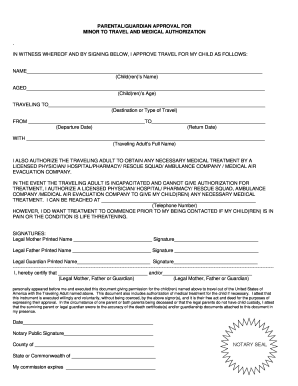
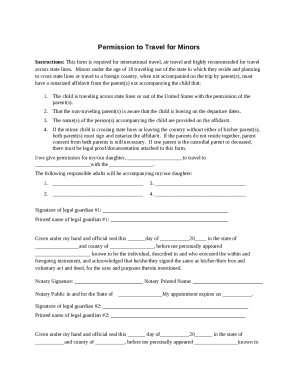
The Parental Approval for Minor to Travel and Medical Authorization is a legal document used by parents and guardians to grant permission for a minor to travel and authorize medical treatment.
pdfFiller scores top ratings on review platforms




After a bit tinkering around it works very well.
it is easy to use and it gives you a lot of tools to work with in order to get your work done
Ive been using it for awhile and I love it its so easy to use and its everything you need in one place
easy to use, good feature set. Erase is a little tricky
I am using this program as my online office
Easy to navigate to fill out forms…
easy to navigate to fill out forms compared to other app
Who needs Minor Travel Authorization?
Explore how professionals across industries use pdfFiller.

Minor Travel Authorization is needed by:
-
Parents needing to travel with minors.
-
Guardians responsible for minors' travel arrangements.
-
Families planning international trips with children.
-
Individuals helping arrange travel for a child.
-
Legal representatives managing child custody cases.
-
Travel agencies organizing trips for minors.
Comprehensive Guide to Minor Travel Authorization
What is the Parental Approval for Minor to Travel and Medical Authorization?
The Parental Approval for Minor to Travel and Medical Authorization form serves a crucial purpose in safeguarding the rights and welfare of children during travel. This legal document ensures that minors have the necessary parental consent when traveling outside the United States, whether with one or both parents or with a guardian. Its legal significance cannot be understated, as it provides a clear record of parental consent required for minor travel and medical decisions.
Approval forms must typically include signatures from both legal parents or guardians. If one parent is deceased, a certified death certificate is also required. The form acts as a protective measure for children, ensuring that there is no ambiguity regarding travel permissions, thereby preventing potential legal issues that could arise during travel.
Why You Need the Parental Approval for Minor to Travel and Medical Authorization
Having legal documentation for a minor's travel is paramount for various reasons. A travel consent form is essential to mitigate risks associated with traveling without proper authorization. These risks can include legal disputes and complications with authorities, particularly at international borders.
In addition to travel concerns, the medical authorization form is vital in emergencies. It empowers the designated adult to make medical decisions on behalf of the minor should a situation arise that requires immediate attention. This safeguard can make all the difference in a medical crisis, ensuring the child receives the necessary care swiftly.
Who Needs to Use the Parental Approval for Minor to Travel and Medical Authorization?
This form is primarily intended for legal parents and guardians of minors. It is particularly necessary in situations where a minor might travel with adults who are not their parents, such as family friends or relatives. Such scenarios include school trips, vacationing with extended family, or even routine visits.
Additionally, understanding who qualifies to sign the form is key; generally, this includes biological parents or legal guardians. Exceptions may apply in cases involving custody arrangements or legal guardianship, thus requiring careful consideration of individual circumstances.
Key Features of the Parental Approval for Minor to Travel and Medical Authorization
The essential components of this form include traveler details, particularly the child's name and age, as well as the adult's identification information. Another crucial element is the section for medical treatment authorizations, which allows the traveling adult to seek medical assistance on behalf of the child.
This form also usually requires notarization to ensure its legality. Notarized travel consent enhances the validity of the document, helping to prevent unauthorized use. The form includes various fields and checkboxes that further clarify the permissions granted, making it easier to fill out.
How to Fill Out the Parental Approval for Minor to Travel and Medical Authorization Online
Filling out the form online using pdfFiller is a straightforward process. Begin by gathering all necessary information, such as the minor's travel details and the identities of the legal parents or guardians.
Once you have all the details, navigate to the pdfFiller platform and select the fillable form. Follow these steps:
-
Open the form and enter the child's information.
-
Input the names and signatures of the parents or guardians.
-
Fill in any medical authorization details.
-
Review for accuracy before submission.
Common Mistakes to Avoid When Completing the Parental Approval for Minor to Travel and Medical Authorization
When filling out the form, users often make frequent errors that can lead to complications. Common mistakes include failing to provide necessary signatures or omitting critical details about the minor and accompanying adult.
To ensure accuracy, consider using a review checklist that emphasizes required fields. This checklist could include:
-
Verify all names are spelled correctly.
-
Ensure all sections, especially medical authorizations, are completed.
-
Confirm that signatures are obtained from all legal signers.
How to Sign and Notarize the Parental Approval for Minor to Travel and Medical Authorization
Signing requirements vary between eSignatures and wet signatures. It is essential to understand the digital signature versus wet signature requirements pertinent to your state and legal context.
The notarization process adds another layer of authenticity to the form, ensuring that all signatures are valid and legally recognized. This step is significant for legal validity; therefore, familiarizing yourself with proper notarization practices is advisable.
What to Do After Submitting the Parental Approval for Minor to Travel and Medical Authorization
Once you have submitted the form, there are essential steps to follow. Track the submission to confirm that all procedures have been fulfilled correctly, as well as any potential follow-ups that may be needed.
Moreover, retaining a copy of the submitted form is crucial for both personal records and any future reference. This practice can prove beneficial in case of disputes or clarifications needed regarding travel permissions.
Security and Privacy of Your Parental Approval for Minor to Travel and Medical Authorization
pdfFiller prioritizes document security and data protection. Users can rest assured knowing that submitted forms are protected by 256-bit encryption, ensuring confidentiality and compliance with regulations such as HIPAA and GDPR.
Furthermore, pdfFiller’s security features are designed to keep sensitive information safe, allowing parents and guardians to handle their documents without fear of compromise.
Get Started with pdfFiller for Your Parental Approval for Minor to Travel and Medical Authorization
Using pdfFiller offers numerous benefits for filling out the Parental Approval for Minor to Travel and Medical Authorization. The platform provides a user-friendly environment for editing, securely storing, and sharing important documents.
Taking immediate action to complete this form not only secures your child's travel plans but also provides peace of mind for any potential needs during the journey.
How to fill out the Minor Travel Authorization
-
1.To start, access pdfFiller and search for 'Parental Approval for Minor to Travel and Medical Authorization'. Open the form in your browser.
-
2.Once the form is loaded, familiarize yourself with its sections. Identify where to fill in the child's name, age, and travel details.
-
3.Before you begin filling out the form, gather necessary information: the child's travel itinerary, the name of the accompanying adult, and details about medical treatment authorization.
-
4.Begin completing the form by entering the child's information accurately. Use the fillable fields and dropdown options provided by pdfFiller for a smooth entry.
-
5.Next, provide the travel details, including the destination and travel dates. Ensure that all trip-related information is current and valid.
-
6.After filling in the child and travel details, move to the section requiring signatures. If you require parental or guardian approval, ensure all necessary signers have access to the form.
-
7.Review all completed sections for accuracy and clarity, paying attention to spelling and the correctness of all entered information.
-
8.Once you are satisfied with the form, utilize pdfFiller's tools to save your progress. Click 'Save' to store it in your account, or choose 'Download' to get a copy on your device.
-
9.Finally, when you're ready to submit, select the appropriate submission method based on your needs—either print the form to sign it or send it via email directly through pdfFiller.

What are the eligibility requirements for using this form?
This form is typically utilized by legal parents or guardians of a minor child. To complete it, the signatories must be verified as the child's legal guardians or parents.
Is there a deadline for submitting this form?
While specific deadlines may not be mandated, it is advisable to complete this form well ahead of travel dates to ensure all parties have adequate time for review and necessary notarizations.
What are the submission methods for this form?
The form can be submitted in various ways. You may print it for physical signatures, email it if electronic signatures suffice, or ask a notary to finalize it in person before submission.
What supporting documents are required?
To complete this form, you may need copies of identification for the legal parents or guardians. If one parent is deceased, you'll need a certified death certificate.
What common mistakes should I avoid when filling out this form?
Ensure that all names are spelled correctly and that dates are accurate. Failing to obtain all required signatures is a common error and can delay your travel plans.
What is the typical processing time for this form?
Processing time may vary, but once you gather all signatures and necessary documents, the immediate processing time is generally quick—allow for a few hours to finalize.
Are there any fees associated with notarizing this form?
Yes, there are typically fees associated with notarization, varying by state and notary service. Expect to pay small fees to have signatures notarized if required.
Related Forms




Get the latest insights from our blog


If you believe that this page should be taken down, please follow our DMCA take down process
here
.
This form may include fields for payment information. Data entered in these fields is not covered by PCI DSS compliance.