
Last updated on
Nov 6, 2026
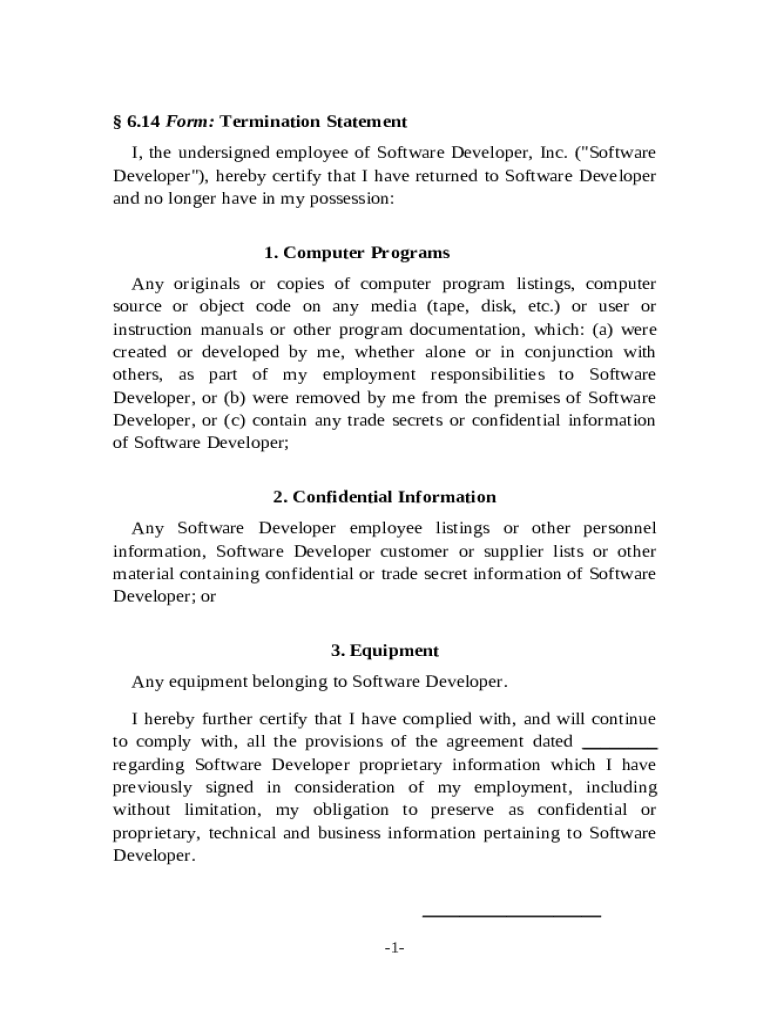
Get the free Employee Termination Statement
We are not affiliated with any brand or entity on this form

Fill out
Complete the form online in a simple drag-and-drop editor.

eSign
Add your legally binding signature or send the form for signing.

Share
Share the form via a link, letting anyone fill it out from any device.

Export
Download, print, email, or move the form to your cloud storage.
Why pdfFiller is the best tool for your documents and forms


End-to-end document management
From editing and signing to collaboration and tracking, pdfFiller has everything you need to get your documents done quickly and efficiently.
Accessible from anywhere
pdfFiller is fully cloud-based. This means you can edit, sign, and share documents from anywhere using your computer, smartphone, or tablet.
Secure and compliant
pdfFiller lets you securely manage documents following global laws like ESIGN, CCPA, and GDPR. It's also HIPAA and SOC 2 compliant.
What is Termination Statement
The Employee Termination Statement is a formal document used by employees to certify the return of company property and compliance with confidentiality agreements upon termination of employment.
pdfFiller scores top ratings on review platforms




This is a very simply PDF filler form to use. Once you get use to the navigation of the site, you will love this program
Great GUI, intuitive and user-friendly design and operations.
It is very user-friendly. It is my go-to tool for editing PDF files.
Becoming more comfortable with it the more I use it and learning more ways to let it help me.
My computer showed a different layout to what I was being advised, but I eventually got it. I'll fill it in now and see how it goes. Thank you.
EXCELLENT Customer Service
I requested a refund on my annual subscription after it had been taken out of my account. I explained that I don't use the software, and did not need to have my subscription renewed. The person who helped me was very kind, and responded promptly. I had a full refund within 48 hours! EXCELLENT customer service!
Who needs Termination Statement?
Explore how professionals across industries use pdfFiller.

Termination Statement is needed by:
-
Employees of Software Developer, Inc. exiting the company
-
Human Resources professionals managing employee separations
-
Managers conducting employee terminations
-
Legal teams overseeing compliance with confidentiality policies
-
Companies requiring documentation for returned assets
Comprehensive Guide to Termination Statement
What is the Employee Termination Statement?
The Employee Termination Statement serves as a formal record for individuals leaving Software Developer, Inc. This document is essential for ensuring that all company property has been returned and confidentiality obligations are met. The Employee Termination Statement defines the specifics of the termination process for both the employer and the employee.
This statement holds significant importance as it facilitates a smooth transition during the employment termination process. It is intricately linked to the return of company property and the safeguarding of sensitive information, ensuring legal protection for both parties involved.
Purpose and Benefits of the Employee Termination Statement
This form is a crucial component in the employment exit process, as it certifies the return of company property. By utilizing the Employee Termination Statement, both employees and employers can avoid disputes in the future regarding what assets were returned or retained.
Moreover, this statement plays a vital role in protecting sensitive proprietary information. The documentation provides legal backing that is beneficial for both the employer and the departing employee, ensuring that rights and responsibilities are clear.
Key Features of the Employee Termination Statement
The Employee Termination Statement is designed with several essential features to facilitate ease of use:
-
Fillable fields for necessary information, including Employee Signature, Employee Name, and Date.
-
Clear instructions on how to complete the form to ensure accuracy.
-
A reference to relevant confidentiality agreements that underscore the importance of data protection.
These features make it straightforward for employees to fulfill their obligations efficiently.
Who Needs the Employee Termination Statement?
Every employee of Software Developer, Inc. is required to complete this form upon termination of employment. Its use extends beyond individual employees, as it is significant for HR departments and management to verify compliance with return policies.
Understanding who needs to use the Employee Termination Statement is essential; it has implications for various roles within the organization, ensuring that everyone adheres to standardized protocols.
How to Fill Out the Employee Termination Statement Online
Completing the Employee Termination Statement online is efficient and straightforward. Follow these steps to fill out the form using pdfFiller:
-
Access the Employee Termination Statement via pdfFiller.
-
Fill in the required fields such as Employee Name and Date.
-
Review the form for accuracy and completeness.
-
Follow any on-screen instructions to finalize your submission.
Double-checking your entries will help avoid any mistakes during the completion of the form.
Common Errors and How to Avoid Them
It is crucial to be aware of common errors made while completing the Employee Termination Statement. Keep the following tips in mind to ensure correct submission:
-
Review the form for misspelled names or incorrect dates.
-
Check that all required fields are filled out completely before submission.
-
Ensure the form is properly certified and signed by the employee.
Being vigilant about these factors can significantly reduce the chances of encountering issues during the form submission process.
How to Sign the Employee Termination Statement
When it comes to signing the Employee Termination Statement, you have options. Employees can choose between a digital signature or a traditional wet signature, depending on what is required. Utilizing eSign features provided by pdfFiller simplifies the signing process.
Having a signed document is vital for record-keeping purposes, ensuring that all parties involved have evidence of compliance with termination protocols.
Submitting the Employee Termination Statement
The submission process for the Employee Termination Statement involves several steps to ensure that your form is processed correctly:
-
Choose your preferred method for submitting the completed form, whether electronically or in-person.
-
Confirm the receipt of your submission to ensure it has been processed.
-
Maintain records of the submitted form for future reference.
Proper submission practices contribute to an organized termination process.
Security and Privacy Considerations for the Employee Termination Statement
When dealing with sensitive information, it's crucial to be aware of security measures surrounding the Employee Termination Statement. pdfFiller utilizes 256-bit encryption and adheres to compliance standards such as SOC 2 Type II and HIPAA to ensure document safety.
Emphasizing confidentiality during the termination process is critical as it helps safeguard proprietary information and any personal data of departing employees.
Make Your Employee Termination Process Smooth with pdfFiller
Utilizing pdfFiller can drastically improve the efficiency of your document management during the termination process. With features like cloud-based editing and easy form filling, employees can manage their paperwork seamlessly.
Customer testimonials highlight high satisfaction levels, indicating that many find the pdfFiller platform invaluable during their termination procedures. Implementing these tools can ensure a smooth transition for all parties involved.
How to fill out the Termination Statement
-
1.Access pdfFiller and log in to your account or create a new one if you don’t have an account yet.
-
2.Once logged in, use the search bar to locate the 'Employee Termination Statement' form or navigate through the employment forms category.
-
3.Open the form by clicking on it, and it will load in the pdfFiller editing interface.
-
4.Before filling out the form, gather necessary information such as your employee ID, name, date of termination, and details about returned company property.
-
5.Right-click in each fillable field to enter your information. Start with your name in the 'Employee Name' field, followed by the date.
-
6.Sign the document in the designated 'Employee Signature' field, ensuring your signature is clear and matches your identity.
-
7.Review all entries for accuracy, ensuring that all required fields have been completed correctly and that all company property has been accounted for.
-
8.Once you're satisfied with the form, click the 'Done' button to save your progress.
-
9.To download or submit your completed form, choose the relevant option from the toolbar, either to save it to your device or to send it directly to your HR department.

Who needs to fill out the Employee Termination Statement?
The Employee Termination Statement must be filled out by employees who are leaving the company to certify that they have returned all company property and confidential information.
Is there a deadline for submitting my termination statement?
It is recommended to submit the Employee Termination Statement on or before your last day of work to ensure all company property is accounted for and confirmation of compliance is documented.
What supporting documents do I need to provide with this form?
Generally, no specific supporting documents are required, but you should have a record of returned property or a copy of your confidentiality agreement to reference during completion.
Can I complete the Employee Termination Statement electronically?
Yes, you can complete the Employee Termination Statement electronically using pdfFiller, which allows you to fill out the form, sign it, and save or send it without printing.
What common mistakes should I avoid when filling out the form?
Common mistakes include leaving fields blank, signing in the wrong area, or not accurately listing returned company property, which can delay the processing of your termination.
How long does it take to process the Employee Termination Statement?
Processing times can vary by company policy, but expect confirmation of your form's acceptance to be completed within a few business days after submission.
What happens if I forget to sign the Employee Termination Statement?
If the Employee Termination Statement is not signed, it will be considered incomplete, and you may need to resubmit it correctly or face issues with your exit from the company.
Related Forms



Get the latest insights from our blog


If you believe that this page should be taken down, please follow our DMCA take down process
here
.
This form may include fields for payment information. Data entered in these fields is not covered by PCI DSS compliance.