
Last updated on
Nov 6, 2026

Canada Panorama Recreation Personal Training Client Package 2024-2026 free printable template
We are not affiliated with any brand or entity on this form

Fill out
Complete the form online in a simple drag-and-drop editor.

eSign
Add your legally binding signature or send the form for signing.

Share
Share the form via a link, letting anyone fill it out from any device.

Export
Download, print, email, or move the form to your cloud storage.
Why pdfFiller is the best tool for your documents and forms


End-to-end document management
From editing and signing to collaboration and tracking, pdfFiller has everything you need to get your documents done quickly and efficiently.
Accessible from anywhere
pdfFiller is fully cloud-based. This means you can edit, sign, and share documents from anywhere using your computer, smartphone, or tablet.
Secure and compliant
pdfFiller lets you securely manage documents following global laws like ESIGN, CCPA, and GDPR. It's also HIPAA and SOC 2 compliant.
What is Canada Panorama Recreation Personal Training Client Package
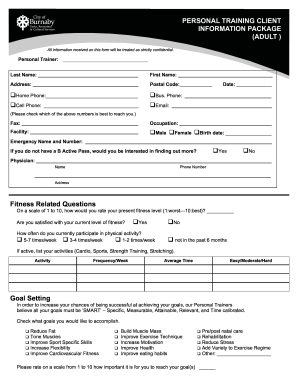
The Personal Training Client Package is a healthcare form used by clients to provide their health history and informed consent for personal training services at Panorama Recreation.
pdfFiller scores top ratings on review platforms




Who needs Canada Panorama Recreation Personal Training Client Package?
Explore how professionals across industries use pdfFiller.

Canada Panorama Recreation Personal Training Client Package is needed by:
-
Individuals seeking personal training services
-
Personal trainers requiring client health information
-
Recreation centers managing training programs
-
Sports organizations contracting personal trainers
-
Fitness coaches gathering client consent
Comprehensive Guide to Canada Panorama Recreation Personal Training Client Package
What is the Personal Training Client Package?
The Personal Training Client Package acts as an essential tool within personal training services, designed to collect vital information from clients. It serves to gather a comprehensive health history, session information, and obtain necessary consent from clients before engaging in training. This package is critical in establishing safety protocols and ensuring clear communication between trainers and clients.
By effectively using the health history form, the Personal Training Client Package helps trainers understand their clients' backgrounds, enabling tailored fitness regimens. The inclusion of informed consent protects both the client and trainer, fostering a professional training environment.
Purpose and Benefits of the Personal Training Client Package
The Personal Training Client Package is not just a form; it is a valuable resource for both trainers and clients. For clients, it provides benefits such as tracking their health and fitness journey and establishing a strong foundation for their training program. Trainers leverage the information provided to offer customized training plans that align with each client's unique needs.
This package also encourages transparent communication by clearly outlining the informed consent process. Clients feel more confident sharing their health information, while trainers gain critical insights to guide their approach.
Key Features of the Personal Training Client Package
This comprehensive form contains several key features designed to be user-friendly. Fillable fields allow clients to provide personal information, health history, and session scheduling details efficiently. Informed consent is clearly articulated within the document, ensuring both parties understand their responsibilities.
Each section requires signatures from both the participant and the trainer, verifying the accuracy of the provided information. This dual acknowledgment is crucial for the validity of the form's contents.
Who Needs the Personal Training Client Package?
The Personal Training Client Package is intended for individuals seeking personal training services at Panorama Recreation. It is essential for clients looking to embark on their fitness journeys while providing trainers with the necessary context for personalized programs.
Eligibility criteria apply to both clients and trainers. Additionally, family members may be required to complete multiple forms when seeking services together, ensuring all pertinent information is collected efficiently.
How to Fill Out the Personal Training Client Package Online (Step-by-Step)
Completing the Personal Training Client Package online is straightforward. Here are step-by-step instructions:
-
Access the form via pdfFiller.
-
Fill out your personal information, including Name, Birth Date, Phone Number, and Email.
-
Complete the health history section by answering all questions accurately.
-
Schedule your preferred training sessions through the designated fields.
-
Review all the provided information for accuracy.
-
Sign the form to acknowledge your consent and submit.
Taking the time to ensure each field is complete and accurate will facilitate a smooth onboarding process.
Common Errors and How to Avoid Them
Clients may encounter several common mistakes while filling out the Personal Training Client Package. Common issues include providing incomplete health history or session information, which can ultimately affect the training regimen.
The consequences of inaccuracies can lead to misinformed training decisions or delays in starting sessions. To avoid these pitfalls, clients should double-check all entries and ensure that all necessary fields are filled out accurately before submission.
Submission Methods for the Personal Training Client Package
Once the Personal Training Client Package is completed, users have multiple submission methods available. Clients can submit the form in person at the reception, online through pdfFiller, or via email.
Students should be aware of potential delays and processing times when submitting forms, as well as any documentation requirements outlined during the submission process.
Security and Compliance for the Personal Training Client Package
Users can trust in the safety of their personal information provided within the Personal Training Client Package. The handling of sensitive data is governed by robust security protocols, including 256-bit encryption and compliance with HIPAA and GDPR regulations.
Secure e-signatures and protected document sharing further enhance the safety of health information, allowing clients to complete the form with confidence.
What Happens After You Submit the Personal Training Client Package?
After the Personal Training Client Package is submitted, clients can expect a series of follow-up procedures. Trainers will typically reach out to confirm appointment scheduling and payment processes.
Additionally, certain verification processes may take place, ensuring that all health information is accurate and up-to-date. Clients should be prepared for their trainers to guide them through the next steps in their fitness journey.
Start Using pdfFiller to Complete Your Personal Training Client Package
pdfFiller empowers users to conveniently complete the Personal Training Client Package through its cloud-based platform. With features designed to simplify filling and eSigning forms, it offers a user-friendly experience that ensures documents are accurately managed.
Utilizing a secure platform like pdfFiller is imperative when handling personal documents, reinforcing trust and security throughout the form completion process.
How to fill out the Canada Panorama Recreation Personal Training Client Package
-
1.Access pdfFiller and search for the 'Personal Training Client Package' form using the search function.
-
2.Once opened, navigate through the document using the scroll bar or dedicated navigation tools in pdfFiller.
-
3.Before completing the form, gather essential personal information such as your full name, birth date, contact number, and email address.
-
4.Fill in the required fields, including personal details and checkboxes for preferred training days and times.
-
5.Make sure to read through the informed consent clauses and outline any health conditions accurately.
-
6.To finalize, review all entered information for accuracy and completeness, ensuring every section is addressed.
-
7.Once satisfied, save your completed form by clicking the 'Save' button, which maintains your progress in pdfFiller.
-
8.You can download the form in your desired format or submit it electronically via pdfFiller directly to Panorama Recreation.

Who is eligible to fill out the Personal Training Client Package?
Individuals aged 18 years and older seeking personal training services at Panorama Recreation can fill out the Personal Training Client Package. Minors may require parental consent.
What is the deadline for submitting the form?
It's advisable to submit the Personal Training Client Package at least 48 hours before your first training session to ensure adequate processing time.
How do I submit my completed form?
You can submit your completed Personal Training Client Package through pdfFiller by electronically sending it directly to Panorama Recreation or by printing and delivering it in person.
What supporting documents do I need to provide?
No additional supporting documents are typically required with the Personal Training Client Package, but include any necessary health reports if relevant to your training.
What common mistakes should I avoid while filling this form?
Ensure that all fields are filled correctly and your personal health history is accurately disclosed. Double-check signature requirements for both participant and trainer.
How long does it take to process the completed form?
Processing times may vary, but expect a response within 1-3 business days after submitting the Personal Training Client Package through appropriate channels.
What happens if I miss a session after submitting this form?
The Personal Training Client Package outlines policies for missed appointments, including cancellation fees and rescheduling guidelines, which you should review carefully.
Canada Panorama Recreation Personal Training Client Package Form Versions
Related Forms



Get the latest insights from our blog


If you believe that this page should be taken down, please follow our DMCA take down process
here
.
This form may include fields for payment information. Data entered in these fields is not covered by PCI DSS compliance.