
Last updated on
Oct 19, 2026
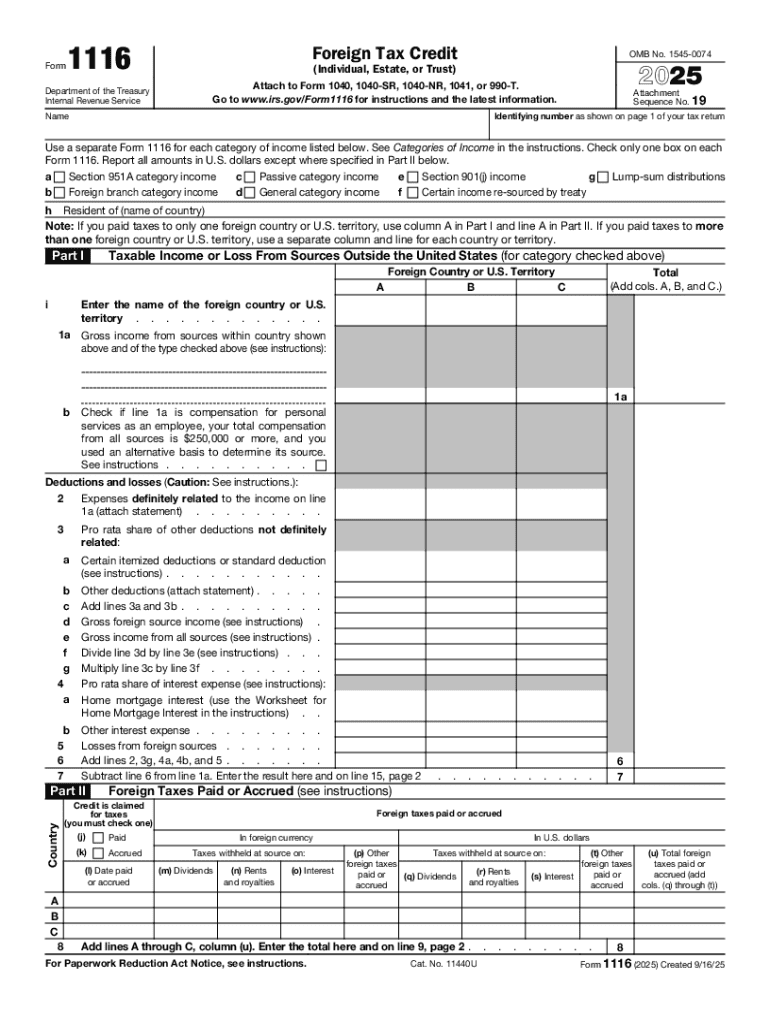
IRS 1116 2025-2026 free printable template
pdfFiller is not affiliated with IRS

Fill out
Complete the form online in a simple drag-and-drop editor.

eSign
Add your legally binding signature or send the form for signing.

Share
Share the form via a link, letting anyone fill it out from any device.

Export
Download, print, email, or move the form to your cloud storage.
Why pdfFiller is the best tool for your documents and forms


End-to-end document management
From editing and signing to collaboration and tracking, pdfFiller has everything you need to get your documents done quickly and efficiently.
Accessible from anywhere
pdfFiller is fully cloud-based. This means you can edit, sign, and share documents from anywhere using your computer, smartphone, or tablet.
Secure and compliant
pdfFiller lets you securely manage documents following global laws like ESIGN, CCPA, and GDPR. It's also HIPAA and SOC 2 compliant.
What is IRS 1116
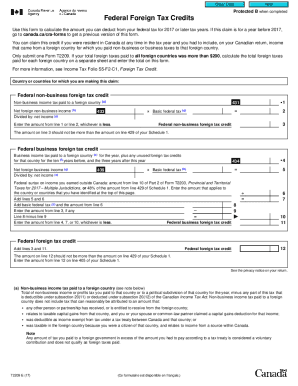
The Form 1116 Foreign Tax Credit is a U.S. federal tax form used by individuals to claim a credit for foreign taxes paid on income earned outside the United States.
pdfFiller scores top ratings on review platforms




Who needs IRS 1116?
Explore how professionals across industries use pdfFiller.

IRS 1116 is needed by:
-
U.S. citizens earning income abroad
-
Expats living in foreign countries
-
Individuals with foreign income sources
-
Estates claiming foreign tax credits
-
Trusts responsible for foreign income tax
-
Taxpayers filing Form 1040, 1040-SR, 1040-NR, 1041, or 990-T
Comprehensive Guide to IRS 1116
What is Form 1116 and Its Role in the Foreign Tax Credit?
Form 1116 is a U.S. federal tax form designed for individuals, estates, or trusts to claim a credit for foreign taxes paid on income earned abroad. This foreign tax credit form assists taxpayers in offsetting their U.S. tax liability for taxes that have already been paid to foreign governments. By using IRS Form 1116, taxpayers can effectively navigate the complexities of international taxation and ensure they receive appropriate credit for foreign taxes, thus reducing their overall U.S. tax burden.
Purpose and Benefits of Using Form 1116 for Foreign Tax Credit
Utilizing Form 1116 offers significant advantages for U.S. citizens generating income outside of the United States. Primarily, it allows individuals to lower their overall tax liability by crediting foreign income tax paid against their U.S. tax obligations. By filing this form, taxpayers can potentially experience substantial tax savings, especially those with considerable foreign income that would otherwise be double-taxed by both the U.S. and foreign tax authorities.
Who Needs to File IRS Form 1116?
IRS Form 1116 must be filed by individuals and entities who meet certain criteria regarding foreign income and taxes. Specifically, anyone who earns foreign income or has paid foreign taxes is likely required to complete this form. Additionally, those claiming the foreign income tax credit must adhere to the IRS Form 1116 instructions, which detail eligibility and the specific reporting requirements associated with the form.
Key Features of Form 1116
Understanding the key features of Form 1116 is critical for accurate filing. This form includes important sections such as categories of income that dictate how foreign taxes are reported. Taxpayers must provide detailed information, which may involve calculating the foreign tax credit based on various sources of income. Key fields include income types, foreign tax amounts, and any applicable deductions, ensuring comprehensive reporting of obligations.
How to Complete Form 1116 Online: A Step-by-Step Guide
Completing Form 1116 online can be simplified by following these steps:
-
Access a reliable online tax tool that supports IRS Form 1116.
-
Gather all essential information related to your foreign income and taxes paid.
-
Input personal details, including your identifying number as shown on your tax return.
-
Fill in the sections for each category of foreign income accurately.
-
Review all entered information for accuracy before submission.
-
Submit the completed form electronically or prepare for necessary printing if filing by mail.
Common Errors When Filing Form 1116 and How to Avoid Them
Many individuals encounter frequent errors when filing Form 1116. To avoid common pitfalls, consider implementing these validation tips:
-
Ensure all personal and tax information is entered correctly.
-
Double-check the calculations for foreign tax credits to avoid misreporting.
-
Review entries against the IRS Form 1116 instructions for completeness.
-
Use a checklist for required documents to support your claims.
Submission Methods for Form 1116: What You Need to Know
When it comes to submitting Form 1116, taxpayers have options. You can choose between e-filing and paper filing, depending on your preference and the tools you are using. Be aware of the submission deadlines to avoid late filings, which can incur penalties. Additionally, consider potential fees associated with electronic filing services which may vary.
Security and Compliance Considerations When Using Form 1116
Handling Form 1116 requires careful attention to data security. It is crucial to use platforms that offer robust security features to protect sensitive financial information. pdfFiller implements 256-bit encryption and complies with SOC 2 Type II standards, ensuring that users' data remains secure during the form-filling process. Understanding these security protocols can help in mitigating risks associated with digital tax submissions.
Supporting Documents Required for Form 1116
To successfully file Form 1116, several supporting documents must be gathered. Necessary items include proof of foreign income, evidence of foreign taxes paid, and relevant statements from foreign tax authorities. Each document plays a vital role in substantiating the claims made on the form, making it essential to collect and organize these materials prior to submission.
Your Path to Easy Document Management with pdfFiller
Utilizing pdfFiller can enhance your experience when filling out Form 1116. The platform offers comprehensive capabilities like editing and eSigning, streamlining the process of managing tax documents. Additionally, its cloud storage feature ensures that your forms are accessible and secure, providing peace of mind as you navigate your tax obligations.
How to Fill Out Small Business Tax Forms Online with pdfFiller
Struggling with your Schedule C or not sure how to file business taxes as a sole proprietor, LLC, or self-employed professional? This step-by-step pdfFiller tutorial walks you through completing IRS Schedule C quickly and accurately — no printing, no scanning, no stress. Whether you're handling small business tax deductions, tracking self-employed taxes, or preparing your full business tax return, pdfFiller makes it simple right in your browser.

How to fill out the IRS 1116
-
1.To begin, navigate to pdfFiller and search for 'Form 1116 Foreign Tax Credit'. Click on the form to open it in the editor.
-
2.Once opened, review the instructions provided on the form. Familiarize yourself with the sections that require detailed information.
-
3.Before filling out the form, gather essential information such as identifying your foreign income, taxes paid, and deductions.
-
4.Begin entering your name and identifying number at the top of the form. Ensure that this information matches your tax return.
-
5.Locate the section where you need to list the foreign country or U.S. territory where the income was earned. Fill in the required field accurately.
-
6.Follow the prompts to provide details regarding your foreign income, including amounts and dates. Use separate forms for different types of income as necessary.
-
7.Complete checkboxes based on your circumstances, such as compensation from personal services as an employee, if applicable.
-
8.Once you have filled all required sections, review the form thoroughly for any errors or missing information.
-
9.After ensuring all data is correct, use the 'Save' option to keep your changes. You can also print or download a copy for your records.
-
10.To submit the completed form, follow the procedures for your specific filing situation, such as online submission or mail as directed by the IRS.

Who is eligible to file Form 1116?
Form 1116 is for U.S. citizens and residents who have paid foreign taxes on income earned outside the United States and want to claim a foreign tax credit.
What is the deadline for submitting Form 1116?
Form 1116 is due on the tax filing deadline, typically April 15. Make sure to check for any extensions or specific deadlines related to your case.
How do I submit Form 1116?
You can submit Form 1116 by attaching it to your federal tax return, such as Form 1040. Ensure that all required sections are complete before submission.
What supporting documents do I need?
You will need records of foreign taxes paid, details of foreign income, and any applicable statements or supporting tax documents for accuracy.
What common mistakes should I avoid?
Avoid inaccuracies in reporting foreign income and taxes. Ensure you complete all sections of the form and adhere to guidelines regarding separate forms for different income categories.
What are the processing times for Form 1116?
Processing times for Form 1116 can vary, but expect several weeks after submission for the IRS to process your foreign tax credit claims, especially during peak tax season.
How can I find instructions for filling out Form 1116?
Instructions for Form 1116 are typically included with the form itself and can also be found on the IRS website. Additionally, resources like pdfFiller may offer guidance within the form.
IRS 1116 Form Versions
Related Forms




Get the latest insights from our blog


If you believe that this page should be taken down, please follow our DMCA take down process
here
.
This form may include fields for payment information. Data entered in these fields is not covered by PCI DSS compliance.