
Last updated on
Oct 19, 2026
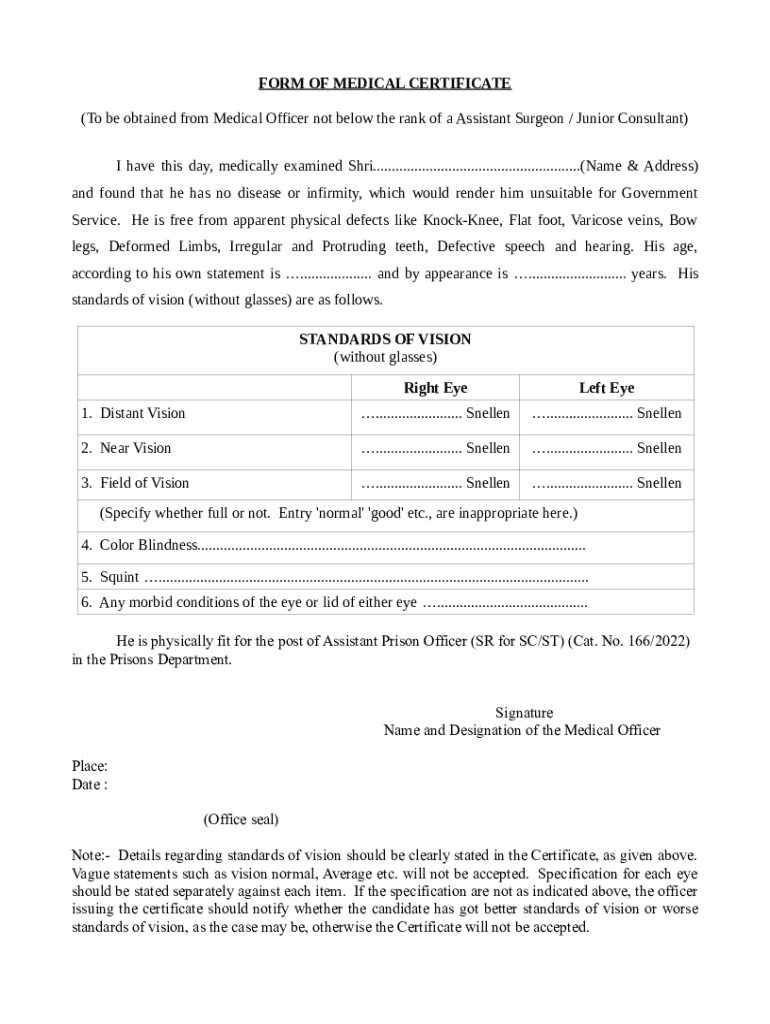
Get the free Medical Certificate for Government Service
We are not affiliated with any brand or entity on this form

Fill out
Complete the form online in a simple drag-and-drop editor.

eSign
Add your legally binding signature or send the form for signing.

Share
Share the form via a link, letting anyone fill it out from any device.

Export
Download, print, email, or move the form to your cloud storage.
Why pdfFiller is the best tool for your documents and forms


End-to-end document management
From editing and signing to collaboration and tracking, pdfFiller has everything you need to get your documents done quickly and efficiently.
Accessible from anywhere
pdfFiller is fully cloud-based. This means you can edit, sign, and share documents from anywhere using your computer, smartphone, or tablet.
Secure and compliant
pdfFiller lets you securely manage documents following global laws like ESIGN, CCPA, and GDPR. It's also HIPAA and SOC 2 compliant.
What is Medical Certificate
The Medical Certificate for Government Service is a medical consent form used by government agencies to certify that an individual is physically fit for a specific position.
pdfFiller scores top ratings on review platforms




Who needs Medical Certificate?
Explore how professionals across industries use pdfFiller.

Medical Certificate is needed by:
-
Assistant Prison Officers requiring medical certification
-
Job applicants for various government posts
-
Medical Officers signing off on health assessments
-
Human Resources departments in government institutions
-
Public service candidates undergoing medical evaluations
Comprehensive Guide to Medical Certificate
What is the Medical Certificate for Government Service?
A medical certificate for government service is a formal document that certifies an individual's physical fitness to perform specific job duties within government positions. Its primary purpose is to ensure that candidates, particularly those applying to become an Assistant Prison Officer, meet the necessary health standards for employment. This ensures that government services maintain a workforce capable of fulfilling their responsibilities effectively.
Purpose and Benefits of the Medical Certificate for Government Service
Physical fitness is crucial for fulfilling various roles within the government sector. A medical certificate serves as official validation of a candidate's health status, providing numerous benefits for employment opportunities. Having this document may enhance a candidate's qualifications, facilitating a smoother hiring process in government roles that require physical readiness.
-
Verification of health status for job readiness
-
Improved chances of employment in competitive government positions
-
Confidence for candidates and employers alike regarding fitness to work
Key Features of the Medical Certificate for Government Service
The medical certificate includes specific fields that must be filled out accurately. Key components of the form encompass the individual's name and address, age, and vision standards. A crucial requirement is a signature from a qualified Medical Officer, as this attests to the authenticity of the certificate and ensures compliance with health regulations.
-
Name & Address
-
Age
-
Standards of vision
-
Signature from a qualified medical authority
Who Needs the Medical Certificate for Government Service?
Certain government roles necessitate the completion of a medical certificate, with the position of Assistant Prison Officer being a prime example. Individuals looking to apply for government service roles must generally meet specific eligibility criteria, including the completion of this medical assessment, to ensure they are physically capable of carrying out their duties.
How to Fill Out the Medical Certificate for Government Service Online
Completing the medical certificate digitally can be achieved easily through platforms like pdfFiller. The process involves several steps to ensure accuracy and completeness.
-
Access the medical certificate form on pdfFiller.
-
Fill in your name, address, age, and other required details.
-
Verify the accuracy of your medical information.
-
Submit and sign the form electronically.
Utilizing an online platform like pdfFiller streamlines the process and enhances user efficiency while providing guidance for avoiding common errors.
Common Errors and How to Avoid Them When Filling Out the Certificate
When completing the medical certificate, individuals often make several errors that may lead to rejection. Awareness of these common pitfalls can help ensure the form is filled out correctly.
-
Inaccurate personal information, such as misspelled names or incorrect ages
-
Omitting required medical details
-
Neglecting to have the form signed by the Medical Officer
How to Sign the Medical Certificate for Government Service
Understanding the signing options available is essential for finalizing the medical certificate. Digital signatures and traditional wet signatures serve different purposes, but both are valid forms of authentication for this document. pdfFiller offers various signing options that comply with official requirements.
-
Choose between digital and wet signatures based on preference.
-
Follow the platform's guidelines to ensure your signature is recognized.
Submission Methods for the Medical Certificate for Government Service
Once completed, there are multiple methods to submit the medical certificate. Candidates can choose between online submissions via designated platforms or in-person delivery to specific government locations. Compliance with necessary deadlines is crucial to ensure timely processing of applications.
Post-Submission Process and What Happens Next
After submitting the medical certificate, candidates should expect a process of verification. This includes receiving confirmation of submission, tracking the status of the application, and understanding potential reasons for rejection.
-
Track your application status through the designated portal.
-
Be aware of common rejection reasons, such as incomplete information.
Enhancing Security and Compliance When Handling Medical Certificates
Handling sensitive documents like medical certificates requires adherence to security protocols. pdfFiller offers robust security features to protect personal information while complying with privacy standards such as HIPAA and GDPR. This enhances the confidentiality and integrity of medical records.
Utilizing pdfFiller for Effortless Form Completion
pdfFiller stands out as an efficient tool for completing the Medical Certificate for Government Service. Its user-friendly interface allows for easy editing, eSigning, and sharing of documents, ensuring a streamlined experience for users. The platform's focus on security aligns with the need for safe document management.
How to fill out the Medical Certificate
-
1.Access pdfFiller and log in to your account. Use the search bar to find 'Medical Certificate for Government Service' and open the form.
-
2.Navigate through the form fields, which include sections for the applicant's name, address, age, and vision standards. Use the filling tools provided by pdfFiller.
-
3.Before filling out the form, gather necessary information such as your personal details and any medical records related to your physical fitness that may be required.
-
4.Carefully input all required information into the respective fields, ensuring accuracy. Utilize option prompts and auto-fill features from pdfFiller as needed.
-
5.Review the completed form thoroughly. Ensure all sections are filled out correctly and that there are no errors or missing information.
-
6.Once satisfied with your entries, utilize the options in pdfFiller to save your progress, download the form as a PDF file, or submit it directly through the platform.

Who needs the Medical Certificate for Government Service?
The form is essential for anyone applying for government positions that require a medical fitness assessment, including roles like Assistant Prison Officer.
Are there any specific eligibility requirements?
Yes, applicants must meet the health requirements specified by the government and obtain a signature from a qualified Medical Officer.
How do I submit the completed Medical Certificate?
You can save and submit the completed form via pdfFiller, or print it out and submit it directly to the relevant government agency as required.
What supporting documents do I need?
You may need to provide previous medical records or a description of your medical history as determined by the Medical Officer completing the certificate.
What common mistakes should I avoid when filling out the form?
Ensure all fields are completed accurately, including names, ages, and medical standards. Double-check for spelling errors and omissions to avoid delays.
How long does it take to process the Medical Certificate?
Processing times can vary depending on the medical facility's workflow, but typically allow several days for review and approval by the Medical Officer.
Is notarization required for this form?
No, notarization is not required for the Medical Certificate for Government Service per the information provided.
Related Forms



Get the latest insights from our blog


If you believe that this page should be taken down, please follow our DMCA take down process
here
.
This form may include fields for payment information. Data entered in these fields is not covered by PCI DSS compliance.