
Last updated on
Oct 31, 2026
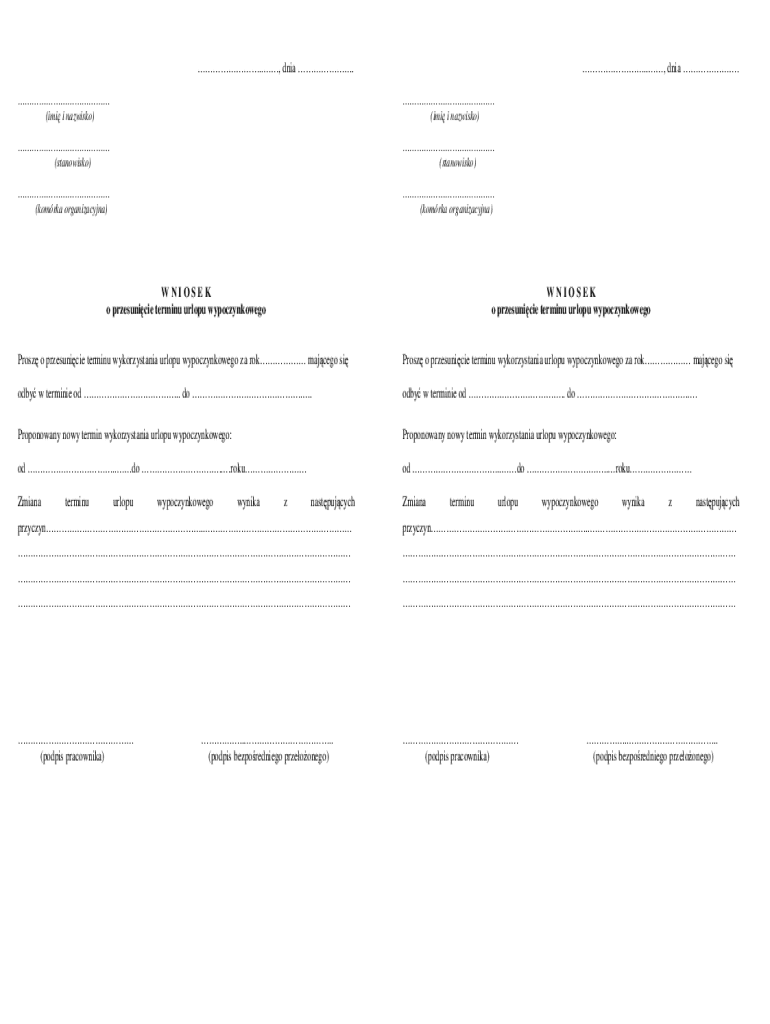
Get the free Vacation Leave Transfer Request Form
We are not affiliated with any brand or entity on this form

Fill out
Complete the form online in a simple drag-and-drop editor.

eSign
Add your legally binding signature or send the form for signing.

Share
Share the form via a link, letting anyone fill it out from any device.

Export
Download, print, email, or move the form to your cloud storage.
Why pdfFiller is the best tool for your documents and forms


End-to-end document management
From editing and signing to collaboration and tracking, pdfFiller has everything you need to get your documents done quickly and efficiently.
Accessible from anywhere
pdfFiller is fully cloud-based. This means you can edit, sign, and share documents from anywhere using your computer, smartphone, or tablet.
Secure and compliant
pdfFiller lets you securely manage documents following global laws like ESIGN, CCPA, and GDPR. It's also HIPAA and SOC 2 compliant.
What is Leave Transfer Request
The Vacation Leave Request Form is an employment document used by employees to request changes in their vacation schedule.
pdfFiller scores top ratings on review platforms




Who needs Leave Transfer Request?
Explore how professionals across industries use pdfFiller.

Leave Transfer Request is needed by:
-
Employees wishing to alter their vacation plans
-
Supervisors needing to approve vacation changes
-
HR personnel managing employee leave records
-
Managers overseeing team schedules
-
Payroll departments tracking vacation liabilities
Comprehensive Guide to Leave Transfer Request
What is the Vacation Leave Request Form?
The Vacation Leave Request Form is a crucial document for employees seeking to request vacation leave. This form not only facilitates a formal request but also plays a vital role in ensuring that vacations are appropriately planned and scheduled within the organization. Submitting this form helps maintain workflow and scheduling integrity, aiding both employees and employers in managing time off effectively.
Proper use of the Vacation Leave Request Form underscores the importance of organized planning for vacations and ensures that management can accommodate staffing needs.
Purpose and Benefits of the Vacation Leave Request Form
The primary purpose of the Vacation Leave Request Form is to promote an organized approach to managing employee vacations and time off. By utilizing this form, employees can communicate their time-off needs clearly, which in turn assists management in planning workloads effectively.
Moreover, this form serves legal protections for employees, ensuring that their right to take leave is recognized and respected. It streamlines the entire process of requesting time off, making it efficient for both employees and management.
Who Needs the Vacation Leave Request Form?
The Vacation Leave Request Form is essential for employees across various sectors and job roles. Organizations that have established vacation policies require their staff to utilize this document to formally request time off.
Understanding when the form is mandatory is crucial; employees must submit the form for scheduled vacations as per company guidelines, while in some scenarios, its use may be optional.
Eligibility Criteria for the Vacation Leave Request Form
Eligibility to submit the Vacation Leave Request Form generally depends on an employee's status within the organization. Most companies specify requirements for both full-time and part-time employees regarding who can utilize this form.
Additionally, specific eligibility guidelines may vary depending on company policies, and there are general rules governing who qualifies to submit requests for vacation leave.
How to Fill Out the Vacation Leave Request Form Online (Step-by-Step)
Filling out the Vacation Leave Request Form online requires attention to detail. Here’s a step-by-step guide:
-
Access the form through the pdfFiller platform.
-
Complete the necessary fields, including your name, job title, and requested leave dates.
-
Provide a reason for your vacation request in the designated area.
-
Review all entries for accuracy to avoid common pitfalls.
-
Utilize pdfFiller's user-friendly features to edit and finalize your document.
Understanding these steps ensures proper completion and enhances your experience with the online form-filling process.
Common Errors and How to Avoid Them
When completing the Vacation Leave Request Form, various common errors may occur. Employees often overlook specific sections, such as providing accurate dates or failing to include essential information.
To mitigate these mistakes, it is advisable to double-check all entries for clarity and completeness. Prioritizing thorough responses can prevent delays in processing your leave request.
Submission Methods and Delivery for the Vacation Leave Request Form
Submitting the Vacation Leave Request Form can be done through multiple methods, depending on company policies. Employees may choose between digital submission via platforms like pdfFiller or physical delivery of printed forms.
It is important to adhere to submission timelines as dictated by organizational policies. Should you require assistance, consider reaching out through designated contact methods.
What Happens After You Submit the Vacation Leave Request Form?
After submitting the Vacation Leave Request Form, employees can expect a timeline for approval or feedback from their supervisors. Regular follow-ups regarding the application status are crucial to ensure proper communication is maintained.
In case of an approval or denial, understanding the possible next steps can help manage expectations regarding your vacation plans.
Security and Compliance for the Vacation Leave Request Form
Security is a paramount concern when dealing with sensitive forms like the Vacation Leave Request. pdfFiller implements robust security protocols, including encryption and compliance with regulations such as HIPAA and GDPR, to ensure confidential handling of these documents.
Employees are assured that their vacation leave requests are treated with the utmost confidentiality, reinforcing safer digital practices in managing sensitive information.
Experience the Ease of Using pdfFiller for Your Vacation Leave Request Form
Utilizing pdfFiller for your Vacation Leave Request Form offers numerous advantages. The platform is designed for user-friendly experiences, with capabilities allowing for easy editing, eSigning, and seamless document management.
Many users have found success in completing their forms efficiently using pdfFiller. The ease with which you can fill out your Vacation Leave Request Form will make the process straightforward and stress-free.
How to fill out the Leave Transfer Request
-
1.Access the Vacation Leave Request Form on pdfFiller by navigating to the designated section or searching using the form's name.
-
2.Open the form and familiarize yourself with the layout, including fields for original and proposed vacation dates, as well as reason sections.
-
3.Gather all necessary information beforehand, including original vacation dates and proposed new dates, ensuring clarity in your reasoning for the change.
-
4.Utilize pdfFiller's interface to fill in each section methodically. Click on the designated fields and input your information precisely.
-
5.Take advantage of any checkbox options for reasons or additional notes, guaranteeing all sections are relevantly addressed.
-
6.After completing the form, review all entries to confirm that everything is accurately filled out, ensuring no fields are left blank.
-
7.Finalize the form by checking for any errors or omissions, ensuring all necessary details are included for both your and your supervisor's signatures.
-
8.Save your work frequently to avoid data loss. Once satisfied with the filled-out form, use pdfFiller's save or download options to keep a copy.
-
9.Submit the completed form through pdfFiller, or follow your workplace’s specific submission methods for vacation requests.

Who is eligible to use the Vacation Leave Request Form?
Any employee wishing to change their vacation schedule can use the Vacation Leave Request Form. The form requires signatures from both the employee and their supervisor for approval.
Is there a deadline for submitting the Vacation Leave Request Form?
It is advisable to submit the Vacation Leave Request Form as early as possible, ideally well ahead of the intended change in vacation dates, to allow for processing time and any necessary discussions with your supervisor.
How should I submit the completed Vacation Leave Request Form?
The completed Vacation Leave Request Form should be submitted according to your organization's procedures, which may involve emailing it to HR or handing it directly to your supervisor.
Do I need to provide any supporting documents with my request?
Typically, no additional supporting documents are required with the Vacation Leave Request Form, but it’s good practice to provide any relevant context or documentation that supports your request.
What are common mistakes to avoid when filling out this form?
Common mistakes include failing to fill in all required fields, unclear reasoning for the date change, and neglecting to secure necessary signatures before submission. Double-check your entries to minimize errors.
How long does it take for my request to be processed?
Processing times for the request can vary based on your supervisor's availability and internal HR policies. Generally, you should expect a response within a week, but it can take longer during busy seasons.
What is the format of the Vacation Leave Request Form?
The Vacation Leave Request Form is a structured document with blank fields for personal input, checkboxes for options, and instructions to guide employees in putting forward their vacation change requests.
Related Forms



Get the latest insights from our blog


If you believe that this page should be taken down, please follow our DMCA take down process
here
.
This form may include fields for payment information. Data entered in these fields is not covered by PCI DSS compliance.