
Last updated on
Oct 31, 2026
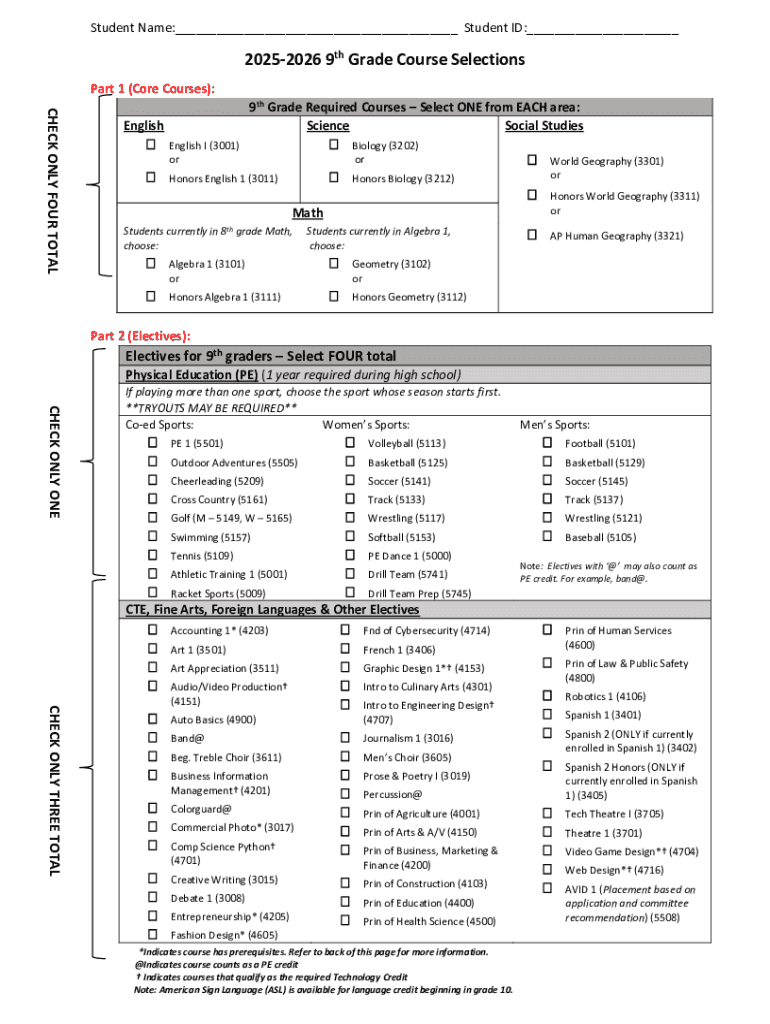
Get the free 2025-2026 9th Grade Course Selections
We are not affiliated with any brand or entity on this form

Fill out
Complete the form online in a simple drag-and-drop editor.

eSign
Add your legally binding signature or send the form for signing.

Share
Share the form via a link, letting anyone fill it out from any device.

Export
Download, print, email, or move the form to your cloud storage.
Why pdfFiller is the best tool for your documents and forms


End-to-end document management
From editing and signing to collaboration and tracking, pdfFiller has everything you need to get your documents done quickly and efficiently.
Accessible from anywhere
pdfFiller is fully cloud-based. This means you can edit, sign, and share documents from anywhere using your computer, smartphone, or tablet.
Secure and compliant
pdfFiller lets you securely manage documents following global laws like ESIGN, CCPA, and GDPR. It's also HIPAA and SOC 2 compliant.
What is 9th Grade Course Selections
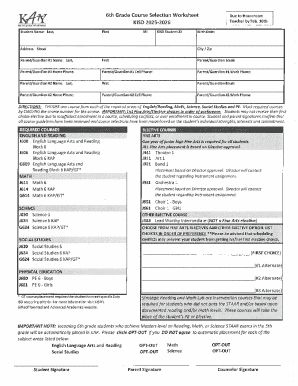
The 2025-2026 9th Grade Course Selections is an education form used by students to select their core courses and electives for the upcoming school year.
pdfFiller scores top ratings on review platforms




Who needs 9th Grade Course Selections?
Explore how professionals across industries use pdfFiller.

9th Grade Course Selections is needed by:
-
High school freshmen preparing for course registration
-
Parents of 9th-grade students involved in course selections
-
School counselors assisting students with enrollment
-
Educational administrators overseeing registration processes
-
Teachers providing input on elective choices
Comprehensive Guide to 9th Grade Course Selections
What is the 2 9th Grade Course Selections Form?
The 2 9th Grade Course Selections Form is a crucial tool designed for students entering high school, facilitating their course registration process. This form allows students to choose their core courses in subjects such as English, Science, Social Studies, and Math, as well as a variety of elective options. Successfully completing this form is vital for students transitioning to high school, as it directly influences their educational pathways in the coming years.
Purpose and Benefits of the 2 Course Selections
Selecting courses wisely has significant implications for a student's educational journey. Responsible course selection enables students to align their studies with future academic ambitions, ensuring compliance with graduation requirements. Furthermore, a diverse array of elective options fosters student engagement, allowing individuals to pursue personal interests that can enrich their high school experience.
How to Fill Out the 2 9th Grade Course Selections Form Online
To successfully complete the 2 9th Grade Course Selections Form using pdfFiller, follow these steps:
-
Access the course selection form on pdfFiller.
-
Fill in personal details, including your Student Name and ID.
-
Select core courses and check the boxes next to your chosen electives.
-
Review your selections and ensure they align with your future goals.
Utilize the tips provided in the form to guide your elective choices based on your interests and aspirations.
Key Features of the 2 9th Grade Course Selections Form
This form includes several features that enhance the course selection experience:
-
Fillable fields for entering personal information and course selections.
-
Checkboxes to easily select required and elective courses.
-
Information regarding graduation requirements to keep students on track.
-
Space for listing alternate course choices if primary selections are unavailable.
-
Accessibility for edits and fast submission via the pdfFiller platform.
Who Needs the 2 9th Grade Course Selections Form?
The 2 9th Grade Course Selections Form is essential for all incoming 9th grade students and their guardians. This form plays a pivotal role in the enrollment process for high schools, ensuring students are prepared for their academic journey. Teachers and counselors also play a critical role in guiding students through the course selection process, offering insights based on individual abilities and future aspirations.
Submission Methods and Important Deadlines
Students can submit the course selection form using two primary methods: via pdfFiller or through alternative submission channels provided by their school. Adhering to submission deadlines is crucial; missing these dates can lead to complications in course registration, potentially impacting a student's high school experience. Be sure to check your school's specific deadlines to ensure timely submission.
Common Errors and How to Avoid Them
While filling out the 2 9th Grade Course Selections Form, students often encounter common mistakes, such as neglecting to select alternate courses. To avoid delays in registration, it is essential to review the form meticulously. Here are some tips for ensuring accuracy:
-
Double-check all selections before submission.
-
Make sure to include alternates for electives in case your first choices are unavailable.
-
Ensure all personal information is correctly filled out to avoid processing delays.
Security and Compliance When Using the 2 Course Selections Form
When filling out sensitive information on the 2 9th Grade Course Selections Form, security and compliance are paramount. pdfFiller utilizes robust security measures to protect student data, including 256-bit encryption and compliance with HIPAA and GDPR regulations. Protecting student confidentiality is crucial, ensuring that educational documentation remains secure.
Enhance Your Course Selection Experience with pdfFiller
Utilizing pdfFiller for completing the 2 9th Grade Course Selections Form enhances the overall experience. The platform offers features such as eSignature options and cloud storage, making it easy to fill, save, and share documents securely. With trusted document handling practices, pdfFiller ensures sensitive documents are managed with the highest reliability.
Sample of a Completed 2 9th Grade Course Selections
To assist users further, a sample filled-out 2 9th Grade Course Selections Form is available. This example illustrates effective choices and whether good practices are followed in course selection. Users can easily replicate this format using pdfFiller, showcasing how the platform simplifies the filling process while ensuring all requirements are met.
How to fill out the 9th Grade Course Selections
-
1.Access the 2025-2026 9th Grade Course Selections form on pdfFiller by visiting the site and searching for the form name in the search bar.
-
2.Once opened, familiarize yourself with the form layout, which includes sections dedicated to core courses and electives.
-
3.Gather required information such as your full name, student ID, and desired courses before you begin filling out the form.
-
4.Start by filling in your 'Student Name' and 'Student ID' in the designated fillable fields using the pdfFiller interface.
-
5.Refer to the instructions on the form to select your core courses from the provided checkboxes, ensuring you make selections from English, Science, Social Studies, and Math.
-
6.Next, identify four total elective choices. Place a checkmark beside your preferred electives and indicate any alternate elective options as instructed.
-
7.Review the graduation requirements listed on the form to confirm that your selections meet the necessary criteria for your educational advancement.
-
8.Once all fields are completed, review the entire form carefully to ensure accuracy and completeness before submission.
-
9.After a thorough review, use pdfFiller's options to save your finished form, download it in your desired format, or submit it according to your school's procedures.

Who is eligible to fill out the 9th Grade Course Selections form?
The 2025-2026 9th Grade Course Selections form is designed for high school freshmen or students entering the 9th grade for the upcoming school year.
What is the deadline for submitting the course selections form?
While the specific deadline is not listed, students typically should submit their course selection forms as early as possible to ensure enrollment in preferred classes.
How do I submit the completed form?
You can submit your completed 9th Grade Course Selections form through pdfFiller by downloading it and sending it to your school or submitting it directly online if your school provides that option.
What supporting documents may be required with my course selections?
Generally, no additional documents are required specifically for the course selections form, but it may be beneficial to have previous academic records or recommendations handy.
What are common mistakes to avoid when filling out the form?
Common mistakes include forgetting to fill out required fields, making duplicates of course selections, and failing to review course prerequisites before selecting classes.
How long does it take to process course selections once submitted?
Processing times for course selection forms vary by school, but typically it takes a few weeks after submission for students to receive confirmation of their enrolled courses.
What if I need to change my course selections after submission?
If you need to make changes to your course selections, contact your school counselor as soon as possible to discuss the options available for adjustments.
Related Forms




Get the latest insights from our blog


If you believe that this page should be taken down, please follow our DMCA take down process
here
.
This form may include fields for payment information. Data entered in these fields is not covered by PCI DSS compliance.