
Last updated on
Oct 20, 2026

Get the free Fairfax County Public Schools Course Selection Sheet
We are not affiliated with any brand or entity on this form

Fill out
Complete the form online in a simple drag-and-drop editor.

eSign
Add your legally binding signature or send the form for signing.

Share
Share the form via a link, letting anyone fill it out from any device.

Export
Download, print, email, or move the form to your cloud storage.
Why pdfFiller is the best tool for your documents and forms


End-to-end document management
From editing and signing to collaboration and tracking, pdfFiller has everything you need to get your documents done quickly and efficiently.
Accessible from anywhere
pdfFiller is fully cloud-based. This means you can edit, sign, and share documents from anywhere using your computer, smartphone, or tablet.
Secure and compliant
pdfFiller lets you securely manage documents following global laws like ESIGN, CCPA, and GDPR. It's also HIPAA and SOC 2 compliant.
What is Eighth Grade Course Form
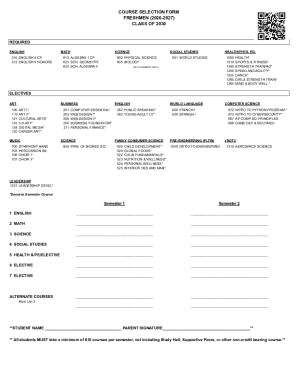
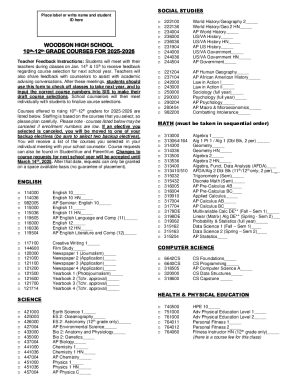
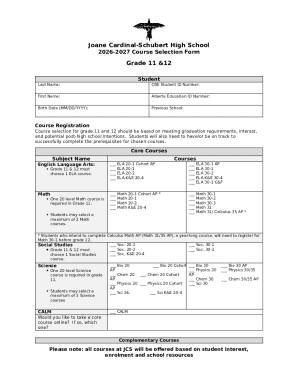
The Fairfax County Public Schools Course Selection Sheet is a fillable document used by eighth-grade students and their parents/guardians to choose required and elective courses for the upcoming school year.
pdfFiller scores top ratings on review platforms




Who needs Eighth Grade Course Form?
Explore how professionals across industries use pdfFiller.

Eighth Grade Course Form is needed by:
-
Eighth-grade students in Fairfax County
-
Parents/Guardians of eighth-grade students
-
School administrators
-
Counselors advising course selections
-
Educational institutions in Virginia
-
Educational planners and advisors
Comprehensive Guide to Eighth Grade Course Form
What is the Fairfax County Public Schools Course Selection Sheet?
The Fairfax County Public Schools Course Selection Sheet serves as a crucial document for eighth-grade students, enabling them to select their required and elective courses for the upcoming academic year. This form outlines the necessary coursework that students must complete and showcases various elective options, helping them make informed choices about their education.
Signatures from both students and their parents or guardians are mandatory on the form, emphasizing the collaborative nature of this process and ensuring that guardians are informed about their child's academic path.
Purpose and Benefits of the Fairfax County Public Schools Course Selection Sheet
This form plays a vital role in the educational journey of students, as it facilitates informed course selection that contributes to both academic success and personal growth. By using the student course selection form, families ensure that they are aware of all required courses and can explore additional electives that align with student interests and career aspirations.
Furthermore, the Fairfax County Public Schools Course Selection Sheet encourages parental involvement, enabling guardians to play an active role in their child's educational choices, thus strengthening the connection between home and school.
Key Features of the Fairfax County Public Schools Course Selection Sheet
The Course Selection Sheet includes a variety of important sections designed to streamline the selection process. These section descriptions cover required courses, elective options, and necessary student information fields.
-
Fillable format for easy online completion.
-
Instructions provided for both students and parents on accurately filling out the form.
-
Key sections highlight core curriculum and elective options.
This structured approach simplifies the task of selecting courses, making the process more efficient and understandable.
Who Needs the Fairfax County Public Schools Course Selection Sheet?
The Fairfax County Public Schools Course Selection Sheet is primarily intended for eighth-grade students who are preparing for their high school journey. Parents and guardians also play an essential role in this process, as their input and approval are necessary for successful course enrollment.
Understanding the significance of this form is crucial for both students and parents, as it ensures that everyone is aware of the academic requirements that must be met as students transition to high school.
How to Fill Out the Fairfax County Public Schools Course Selection Sheet Online (Step-by-Step)
Filling out the Course Selection Sheet online is a straightforward process that can be completed in just a few steps. Begin by accessing the pdfFiller platform to locate the form.
-
Open the pdfFiller site and search for the Fairfax County Public Schools Course Selection Sheet.
-
Fill out each field accurately, paying close attention to student information details such as 'Student Last Name (print)' and 'Student ID #'.
-
Utilize checkboxes for course selections and ensure that all entries are complete before submission.
After completing the form, reviewing for accuracy and completeness is essential to prevent any errors that could affect course enrollment.
Submission Methods for the Fairfax County Public Schools Course Selection Sheet
Once the Course Selection Sheet is completed, several submission methods are available. Students can submit the form online via pdfFiller, ensuring convenience and accessibility.
-
Print the form and mail it to the designated school office.
-
Be aware of submission deadlines to avoid any late fees or complications.
Timely submission of the Course Selection Sheet is critical to securing the desired courses for the upcoming school year.
Security and Compliance When Using the Fairfax County Public Schools Course Selection Sheet
Security is a top priority when using the Fairfax County Public Schools Course Selection Sheet. pdfFiller employs robust security measures, including advanced encryption and compliance with regulations such as HIPAA and GDPR.
Safeguarding sensitive information is critical, and users are encouraged to manage personal information wisely throughout the process. By adhering to best practices, families can ensure their data remains secure while filling out the form.
Sample or Example of a Completed Fairfax County Public Schools Course Selection Sheet
To assist users in understanding how to properly complete the form, a sample or example of a filled-out Fairfax County Public Schools Course Selection Sheet is available for reference. This demonstration highlights key sections and common selections, providing valuable context for users.
Utilizing pdfFiller tools will further enrich the experience, ensuring that families can replicate the process seamlessly.
Why Use pdfFiller to Complete Your Fairfax County Public Schools Course Selection Sheet?
Choosing pdfFiller for the Fairfax County Public Schools Course Selection Sheet offers numerous advantages, including ease of use and advanced editing capabilities. The platform allows for secure eSigning, making the process quick and efficient without needing any downloads.
Accessing the form from any device enhances convenience, and pdfFiller maximizes the efficiency of course selection for families navigating this essential educational task.
How to fill out the Eighth Grade Course Form
-
1.Access the Fairfax County Public Schools Course Selection Sheet on pdfFiller by searching for the form title in the search bar.
-
2.Once the form opens, familiarize yourself with the layout. You will see sections for required courses, elective options, and spaces for student and parent/guardian information.
-
3.Prepare the necessary information before starting. Gather your student ID number, the names, and emails of the student and parent/guardian, and any preferred elective course details.
-
4.Begin filling out the form by clicking on the blank fields to enter the required information. Use pdfFiller's auto-fill feature if available for faster completion.
-
5.For course selections, check the appropriate boxes for both required and elective courses. Make sure to review your selections to ensure accuracy before proceeding.
-
6.After entering all required information, revisit each section to confirm that there are no missing or incorrect entries.
-
7.To finalize the form, navigate to the signature fields where students and parents will need to sign either electronically or by printing the document.
-
8.Once all signatures are completed and the form is reviewed, save your progress on pdfFiller. You can either download the completed form or opt to submit it electronically based on your school’s guidelines.

Who is required to sign the Fairfax County Course Selection Sheet?
Both the student and the parent/guardian must sign the Fairfax County Course Selection Sheet. Signatures from both parties confirm agreement and approval of the selected courses.
Is there a deadline for submitting the Course Selection Sheet?
Yes, it is crucial to check with Fairfax County Public Schools regarding the submission deadline for the Course Selection Sheet. Typically, deadlines are set before the start of the new school year.
How do I submit the Course Selection Sheet once completed?
After completing and signing the Course Selection Sheet, you can submit it to your school’s main office. Alternatively, some schools may allow electronic submission through pdfFiller or email.
What supporting documents are necessary with the Course Selection Sheet?
Usually, no additional supporting documents are required along with the Course Selection Sheet. However, confirm with your school if there are specific requirements based on unique circumstances.
What common errors should I avoid when filling out the form?
Ensure that you do not leave any blank fields, especially where signatures are required. Double-check course selections and make sure student and parent information is correct to prevent any processing delays.
How long does it take for the Course Selection Sheet to be processed?
Processing times may vary by school, but generally, it can take a few days to a week to process the Course Selection Sheet. If you have concerns, contact your school's registrar.
Can I make changes to my course selections after submitting?
Changes may be possible, depending on school policy. Contact your school counselor immediately to discuss any changes and the procedure for updating your Course Selection Sheet.
Related Forms




Get the latest insights from our blog


If you believe that this page should be taken down, please follow our DMCA take down process
here
.
This form may include fields for payment information. Data entered in these fields is not covered by PCI DSS compliance.