
Last updated on
Oct 31, 2026
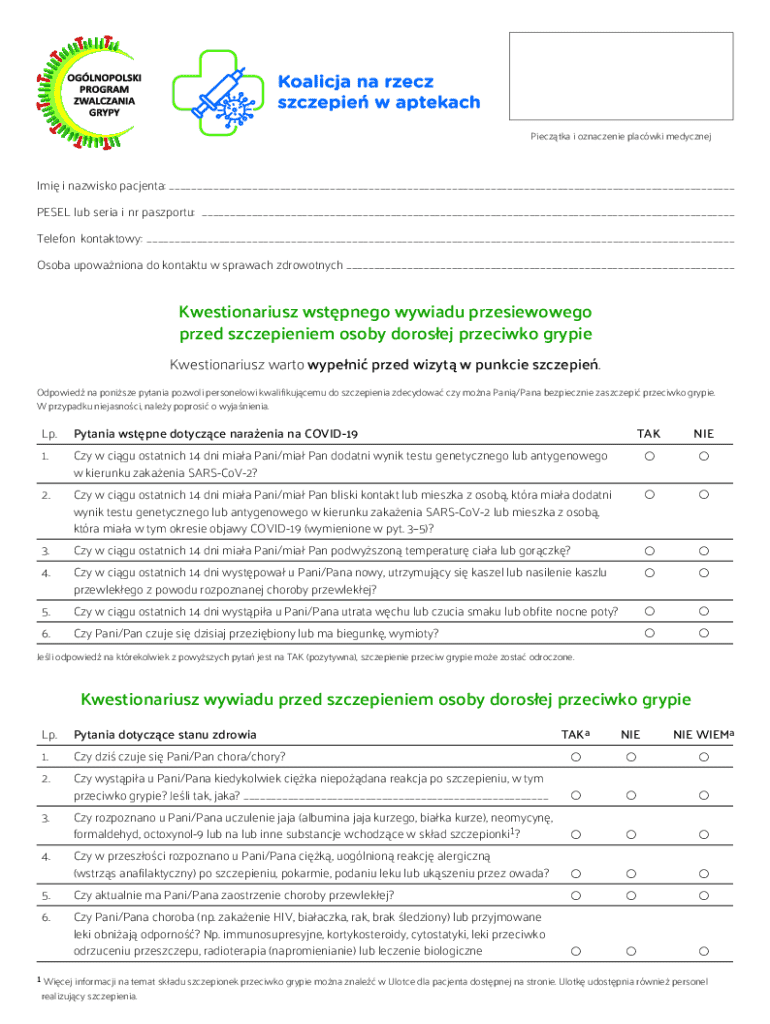
Get the free Adult Flu Vaccination Screening Questionnaire
We are not affiliated with any brand or entity on this form

Fill out
Complete the form online in a simple drag-and-drop editor.

eSign
Add your legally binding signature or send the form for signing.

Share
Share the form via a link, letting anyone fill it out from any device.

Export
Download, print, email, or move the form to your cloud storage.
Why pdfFiller is the best tool for your documents and forms


End-to-end document management
From editing and signing to collaboration and tracking, pdfFiller has everything you need to get your documents done quickly and efficiently.
Accessible from anywhere
pdfFiller is fully cloud-based. This means you can edit, sign, and share documents from anywhere using your computer, smartphone, or tablet.
Secure and compliant
pdfFiller lets you securely manage documents following global laws like ESIGN, CCPA, and GDPR. It's also HIPAA and SOC 2 compliant.
What is Flu Vaccine Form
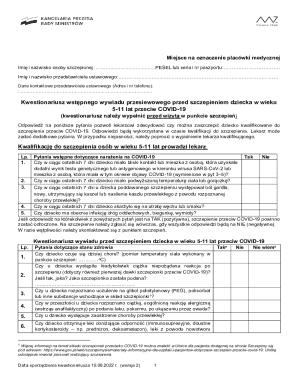
The Medical Questionnaire for Adult Flu Vaccination is a healthcare form used by individuals in Poland to assess eligibility for the flu vaccine.
pdfFiller scores top ratings on review platforms




Who needs Flu Vaccine Form?
Explore how professionals across industries use pdfFiller.

Flu Vaccine Form is needed by:
-
Patients seeking flu vaccination
-
Healthcare providers administering vaccines
-
Public health officials in Poland
-
Medical personnel conducting assessments
-
Insurance companies verifying vaccination eligibility
Comprehensive Guide to Flu Vaccine Form
What is the Adult Flu Vaccination Screening Questionnaire?
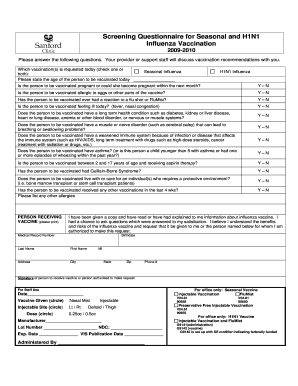
The Adult Flu Vaccination Screening Questionnaire is a critical medical form used in Poland to evaluate health status prior to receiving a flu vaccine. This form plays a vital role in the flu vaccination process by helping healthcare providers assess any potential risks associated with vaccination.
This questionnaire includes sections focusing on various health conditions, allergies, and exposure to COVID-19, ensuring that information is gathered comprehensively. By filling out this form accurately, patients contribute to a safer vaccination experience.
Why Should You Complete the Adult Flu Vaccination Screening Questionnaire?
Completing the Adult Flu Vaccination Screening Questionnaire is essential for ensuring safe flu vaccinations. The form allows medical professionals to conduct thorough health assessments, identifying any pre-existing conditions that may affect vaccination safety.
Failing to disclose relevant health information could lead to serious complications. Therefore, filling out this pre-vaccination screening form is not just a requirement; it is a crucial step in safeguarding your health during the flu season.
Eligibility and Roles for Completing the Adult Flu Vaccination Screening Questionnaire
The completion of the Adult Flu Vaccination Screening Questionnaire involves specific roles which are vital to the process. The primary participants are the patient and a qualifying healthcare professional who ensures the form's accuracy and completeness.
Both roles require signatures, indicating consent and responsibility regarding the information provided. It is important for patients to understand their role in this process, ensuring their health information is shared appropriately.
How to Fill Out the Adult Flu Vaccination Screening Questionnaire Online (Step-by-Step)
Filling out the Adult Flu Vaccination Screening Questionnaire online is a straightforward process. Follow these steps to complete the form effectively:
-
Access the questionnaire through a secure platform like pdfFiller.
-
Carefully read each section before providing answers, ensuring accuracy.
-
Complete all mandatory fields, including personal health information.
-
Review your responses and ensure no section is left incomplete.
-
Sign the questionnaire digitally or prepare for printing if a wet signature is required.
Review and Validation: Ensuring Your Adult Flu Vaccination Screening Questionnaire is Complete
Before submitting your Adult Flu Vaccination Screening Questionnaire, it's crucial to review and validate the information provided. Utilize a checklist to identify common errors such as missing answers or incorrect details.
Double-checking your responses not only improves the likelihood of a smooth vaccination process but also reinforces the importance of accurate information in ensuring your safety during the vaccination appointment.
How to Sign the Adult Flu Vaccination Screening Questionnaire
The signing process for the Adult Flu Vaccination Screening Questionnaire offers users different options. You can choose between digital signatures using pdfFiller’s eSigning feature, which provides convenience and security, or opt for a wet signature if required by your healthcare provider.
Understanding when to use each type of signature is essential for compliance with the vaccination procedure, making the process smoother for both you and the healthcare professional involved.
Submission Guidelines for the Adult Flu Vaccination Screening Questionnaire
Submitting the completed Adult Flu Vaccination Screening Questionnaire can be done through a few different methods. Users can choose to submit the form online via a secure portal or deliver it in person at a designated healthcare facility.
Be aware of any state-specific regulations or additional requirements that might affect your submission, ensuring that your vaccination process begins without delays.
Security and Compliance of the Adult Flu Vaccination Screening Questionnaire
Your privacy and data protection are paramount when filling out the Adult Flu Vaccination Screening Questionnaire. pdfFiller implements robust security measures like 256-bit encryption and maintains compliance with regulations such as HIPAA and GDPR.
Understanding these security features is important, as they ensure that your sensitive health information is managed securely throughout the vaccination process.
Your Next Steps After Completing the Adult Flu Vaccination Screening Questionnaire
After submitting your completed questionnaire, the next steps involve the vaccination appointment process. Once the healthcare provider reviews and approves your questionnaire, you can expect to receive information regarding your vaccination schedule.
Be prepared for any follow-up health assessments that may be necessary, ensuring you are fully informed about your health status prior to receiving the flu vaccine.
Experience the Ease of Completing Your Adult Flu Vaccination Screening Questionnaire with pdfFiller
Utilizing pdfFiller for your Adult Flu Vaccination Screening Questionnaire streamlines the process with user-friendly features and enhanced security. The platform makes it easy to create, edit, fill, and eSign your forms efficiently, safeguarding your information while simplifying the necessary steps.
Start your vaccination process today by accessing the form online through pdfFiller, and experience the advantages of modern document management.
How to fill out the Flu Vaccine Form
-
1.Access the Medical Questionnaire for Adult Flu Vaccination by navigating to pdfFiller and searching for the form's name.
-
2.Open the form in pdfFiller’s interface by clicking on the corresponding link.
-
3.Once the form is open, review the blank fields and checkboxes outlined in the document.
-
4.Prepare to enter necessary personal information such as your full name, contact details, and health history that may affect vaccine eligibility.
-
5.Answer all health-related questions carefully, including inquiries about allergies and COVID-19 exposure, to ensure accuracy.
-
6.Use the filling tools provided by pdfFiller to easily type in your responses and check relevant boxes where applicable.
-
7.After completing the form, double-check all entries for clarity and correctness to avoid potential issues during the vaccination process.
-
8.Upon final review, save the completed form to your pdfFiller account or download it directly to your device.
-
9.Once saved, you can print the form for physical submission or follow the submission instructions provided by your healthcare provider.

Who is eligible to fill out the Medical Questionnaire for Adult Flu Vaccination?
Any adult seeking flu vaccination in Poland should complete this questionnaire. It requires personal and health-related information to determine eligibility for the vaccine.
What information is required to complete the form?
You will need to provide personal information such as your full name, contact details, health status, medication allergies, and any recent COVID-19 exposure.
How do I submit the completed form?
After completing the Medical Questionnaire, you can either print it out and take it to your healthcare provider or submit it electronically via your healthcare facility's portal if available.
What should I do if I make a mistake on the form?
If you make a mistake, you can easily edit the entries on pdfFiller before saving or printing the form. Ensure all information is accurate before final submission.
Is there a deadline for submitting the questionnaire before vaccination?
While specific deadlines may vary, it is recommended to complete and submit the Medical Questionnaire at least a few days before your scheduled vaccination appointment to allow for processing.
Do I need to notarize this form?
No, the Medical Questionnaire for Adult Flu Vaccination does not require notarization. Signing the form is sufficient for consent and eligibility assessment.
How long will it take to process my form?
Processing times may vary by healthcare provider, but it typically takes a short time to review the questionnaire upon submission. Ensure timely submission for your vaccination.
Related Forms





Get the latest insights from our blog


If you believe that this page should be taken down, please follow our DMCA take down process
here
.
This form may include fields for payment information. Data entered in these fields is not covered by PCI DSS compliance.