
Last updated on
Oct 22, 2026

Get the free Screening Questionnaire for Seasonal Influenza Vaccination
We are not affiliated with any brand or entity on this form

Fill out
Complete the form online in a simple drag-and-drop editor.

eSign
Add your legally binding signature or send the form for signing.

Share
Share the form via a link, letting anyone fill it out from any device.

Export
Download, print, email, or move the form to your cloud storage.
Why pdfFiller is the best tool for your documents and forms


End-to-end document management
From editing and signing to collaboration and tracking, pdfFiller has everything you need to get your documents done quickly and efficiently.
Accessible from anywhere
pdfFiller is fully cloud-based. This means you can edit, sign, and share documents from anywhere using your computer, smartphone, or tablet.
Secure and compliant
pdfFiller lets you securely manage documents following global laws like ESIGN, CCPA, and GDPR. It's also HIPAA and SOC 2 compliant.
What is Influenza Vaccination Form
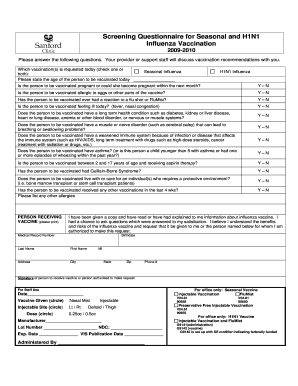
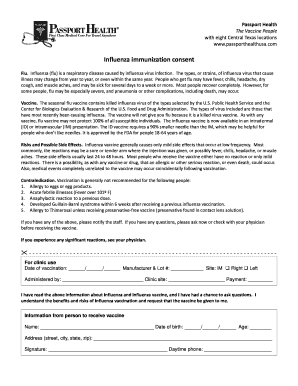
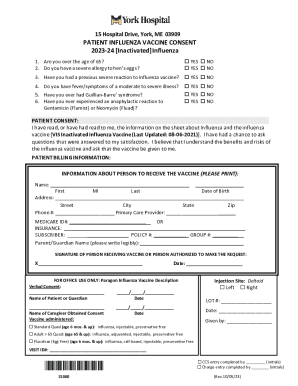
The Screening Questionnaire for Seasonal Influenza Vaccination is a healthcare form used by patients in California to assess eligibility for the seasonal influenza vaccine.
pdfFiller scores top ratings on review platforms




Who needs Influenza Vaccination Form?
Explore how professionals across industries use pdfFiller.

Influenza Vaccination Form is needed by:
-
Patients seeking seasonal flu vaccination
-
Parents or guardians of minors
-
Healthcare providers and nurses administering vaccines
-
Public health officials in California
-
Health insurance representatives
Comprehensive Guide to Influenza Vaccination Form
What is the Screening Questionnaire for Seasonal Influenza Vaccination?
The Screening Questionnaire for Seasonal Influenza Vaccination is a critical form utilized in California to assess eligibility for the seasonal flu vaccine. This questionnaire collects vital personal details and health-related inquiries, ensuring a comprehensive evaluation of potential vaccine recipients.
This important document requires signatures from either the patient or a designated guardian, reflecting the commitment to data integrity and responsibility during the vaccination process. Key areas of focus include allergies, past reactions, and overall health status.
Purpose and Benefits of the Screening Questionnaire for Seasonal Influenza Vaccination
Completing the Screening Questionnaire guarantees a health assessment, enhancing patient safety prior to vaccination. By conducting a thorough evaluation, healthcare providers can streamline the vaccination process across California.
Moreover, this form fosters a deeper understanding of an individual's medical history and any allergies that may affect vaccine eligibility. Patients are encouraged to provide accurate information to ensure their safety and compliance with state regulations.
Who Needs the Screening Questionnaire for Seasonal Influenza Vaccination?
This questionnaire is essential for all patients planning to receive the seasonal influenza vaccine. It is particularly crucial for the parents or guardians of minors, who are responsible for providing complete and accurate information.
Health professionals, including nurses, play a vital role in assisting individuals with filling out this form correctly. It is also necessary that authorized signatures are obtained to validate the information provided.
Eligibility Criteria for the Seasonal Influenza Vaccination Questionnaire
Individuals recommended to complete the Screening Questionnaire must meet certain health considerations. These include assessments of any known allergies or previous adverse reactions to vaccinations.
Current health evaluations are essential factors as well, allowing healthcare providers to determine any state-specific requirements that may apply within California's vaccination framework.
How to Fill Out the Screening Questionnaire for Seasonal Influenza Vaccination Online
Filling out the Screening Questionnaire online is a straightforward process. Begin by gathering all necessary personal and health information, including answers to questions about allergies or past vaccination reactions.
It is crucial to complete all sections accurately and thoroughly. Once you have filled in the required details, be sure to review the information for correctness before submission, as accuracy is vital for ensuring eligibility.
Common Errors and How to Avoid Them When Filling Out the Questionnaire
When completing the Screening Questionnaire, users often encounter common errors such as missing signatures or failing to answer critical health-related questions. To minimize mistakes, ensure that all areas of the form are addressed, and all necessary signatures are provided.
It is beneficial to double-check pre-filled information to guarantee its accuracy before finalizing the submission. Taking time to carefully review the completed form can prevent delays in the vaccination process.
How to Sign and Submit the Screening Questionnaire for Seasonal Influenza Vaccination
Submitting the Screening Questionnaire requires an understanding of the signature options available. There are distinct requirements for digital versus wet signatures, depending on the submission method chosen.
Users have the choice of submitting the form online or via printed copies. Adhering to the submission guidelines ensures that the vaccination process remains timely and efficient.
Security and Compliance for Handling the Screening Questionnaire
The handling of the Screening Questionnaire involves assurances of data security, which are vital for protecting sensitive health information. pdfFiller employs 256-bit encryption to safeguard this data.
Moreover, compliance with regulations such as HIPAA and GDPR showcases the commitment to maintaining privacy and security throughout the form-filling process. Ensuring that health forms are handled securely is of utmost importance.
How pdfFiller Supports Your Seasonal Influenza Vaccination Questionnaire Needs
pdfFiller provides a suite of features designed to assist users with the Screening Questionnaire for Seasonal Influenza Vaccination. Key benefits include editing capabilities, eSigning options, and secure sharing of completed forms.
User-friendly tools, such as auto-fill and annotation features, enhance the form completion experience, making pdfFiller a convenient solution for managing healthcare documents.
Take the Next Step for Your Seasonal Influenza Vaccination
By utilizing pdfFiller, users are encouraged to start the process of filling out their Screening Questionnaire. The platform offers ease of use and exceptional security, making the form handling experience efficient.
Timely completion of the questionnaire is essential to ensure vaccination eligibility, and pdfFiller stands ready to assist in that process.
How to fill out the Influenza Vaccination Form
-
1.To start, access pdfFiller and search for 'Screening Questionnaire for Seasonal Influenza Vaccination'. Open the form from the list of results.
-
2.Once the form is open, familiarize yourself with the layout including areas designated for personal information, health questions, and signatures.
-
3.Before filling out the form, gather necessary information such as your full name, birthdate, gender, and details about any allergies or past vaccine reactions.
-
4.Begin by entering your personal information in the provided fields. Use pdfFiller's text tools to fill in your last name, first name, and other required details.
-
5.Next, answer the health-related questions carefully, marking your responses using the checkboxes provided. Pay attention to questions about allergies and previous vaccine responses.
-
6.If you're completing the form on behalf of a minor, ensure that the parent or guardian provides the signature where indicated.
-
7.Once you have filled in all necessary fields, review your responses and ensure accuracy before proceeding to finalize the form.
-
8.After reviewing, use the save option to store your completed form. You can also download it for personal records or submit it directly through pdfFiller as required.

Who needs to fill out this vaccination screening questionnaire?
The Screening Questionnaire for Seasonal Influenza Vaccination must be completed by patients seeking the flu vaccine, as well as by parents or guardians for minors. Healthcare providers may also require this form for vaccination administration.
What information is required to complete the form?
To complete the form, you will need personal information such as your full name, birthdate, and gender, along with health-related information regarding allergies and previous vaccinations.
How do I submit the completed form?
After completing the Screening Questionnaire on pdfFiller, you can save the form for your records. If needed, submit electronically through the platform or follow your healthcare provider's instructions.
Are there any eligibility requirements for receiving the flu vaccine?
Generally, most individuals are eligible for the seasonal influenza vaccine. However, it's crucial to disclose any allergies or past reactions during the screening to determine suitability.
What should I do if I make a mistake while filling out the form?
If you make a mistake, you can easily edit the fields on pdfFiller by clicking on the text and entering the correct information. Review all responses before finalizing.
Is there a deadline for submitting the screening questionnaire?
While there may not be a strict deadline, it's advisable to complete the Screening Questionnaire shortly before your vaccination appointment to ensure timely processing.
What if I have additional questions about the form?
If you have further questions regarding the Screening Questionnaire for Seasonal Influenza Vaccination, consult with your healthcare provider or contact the relevant health authority for assistance.
Related Forms




Get the latest insights from our blog


If you believe that this page should be taken down, please follow our DMCA take down process
here
.
This form may include fields for payment information. Data entered in these fields is not covered by PCI DSS compliance.