
Last updated on
Nov 6, 2026

CA T4RIFSUM 2025-2026 free printable template
We are not affiliated with any brand or entity on this form

Fill out
Complete the form online in a simple drag-and-drop editor.

eSign
Add your legally binding signature or send the form for signing.

Share
Share the form via a link, letting anyone fill it out from any device.

Export
Download, print, email, or move the form to your cloud storage.
Why pdfFiller is the best tool for your documents and forms


End-to-end document management
From editing and signing to collaboration and tracking, pdfFiller has everything you need to get your documents done quickly and efficiently.
Accessible from anywhere
pdfFiller is fully cloud-based. This means you can edit, sign, and share documents from anywhere using your computer, smartphone, or tablet.
Secure and compliant
pdfFiller lets you securely manage documents following global laws like ESIGN, CCPA, and GDPR. It's also HIPAA and SOC 2 compliant.
What is CA T4RIFSUM
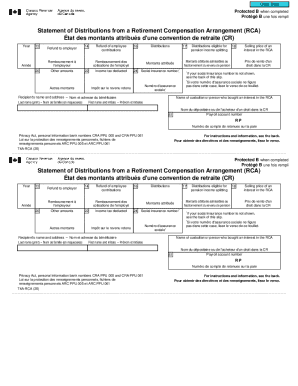
The t4rif information return is a document used by taxpayers to report specific information to the IRS regarding their taxes.
pdfFiller scores top ratings on review platforms




Who needs CA T4RIFSUM?
Explore how professionals across industries use pdfFiller.

CA T4RIFSUM is needed by:
-
Individual taxpayers who need to disclose certain tax details
-
Businesses required to report tax-related information
-
Tax professionals assisting clients with tax filing
-
Compliance officers reviewing tax documents
-
Auditors conducting tax audits
Comprehensive Guide to CA T4RIFSUM
Understanding the t4rif Information Return
The t4rif Information Return is a crucial document in tax reporting, providing a detailed record of specific financial transactions. Its primary role is to ensure compliance with tax laws and to facilitate accurate reporting of income. Filing this form is often necessary in various scenarios, such as when payments exceed a certain threshold or when engaging in specific types of transactions that the IRS requires to be reported.
Compliance with tax regulations hinges on the timely submission of the t4rif Information Return, making it essential for businesses and individuals alike. Understanding its significance can help avoid potential pitfalls related to tax obligations.
Benefits of Filing the t4rif Information Return
Accurately completing the t4rif Information Return presents numerous advantages. Firstly, it helps maintain good standing with tax authorities, which is vital for any entity operating within the tax system. By filing on time, individuals and businesses can avoid penalties and late fees that arise from non-compliance.
Additionally, timely submission ensures that financial records remain up-to-date, aiding in better financial management and planning. Having accurate records is paramount, especially when facing audits or inquiries from tax agencies.
Who Needs to File the t4rif Information Return?
Filing the t4rif Information Return is mandatory for a diverse group of individuals and entities. This includes businesses that make payments to contractors, financial institutions, and certain public sector organizations. Specifically, parties obligated to file include:
-
Employers paying employees income.
-
Businesses compensating independent contractors.
-
Organizations disbursing scholarships or grants.
Each sector may have additional rules related to the types of income that necessitate filing the t4rif return, making it crucial for organizations to understand their specific obligations.
Filing Deadlines and Submission Guidelines for the t4rif Information Return
To avoid complications, it is essential to be aware of the filing deadlines for the t4rif Information Return. This return must be submitted by the end of February for paper filings and by the end of April for electronic submissions. Missing these deadlines can result in penalties, reinforcing the importance of adhering to timelines.
Submission methods vary, allowing for both online and physical submissions. Understanding these methods is key to ensuring that all necessary documents are properly filed.
Navigating the t4rif Information Return: A Step-by-Step Guide
Completing the t4rif Information Return can be straightforward with the right guidance. Here are steps to fill out the form online:
-
Access the t4rif Information Return form through your preferred platform.
-
Input identifying information, including your business name and tax ID number.
-
Provide detailed information regarding the payments made.
-
Review each section for accuracy and completeness.
-
Submit the form electronically and save confirmation details.
Pay close attention to each field, as inaccuracies can lead to processing delays or complications. Familiarizing yourself with common errors to avoid will also aid in ensuring a smooth filing experience.
How to Sign and Submit the t4rif Information Return
When it comes to signing the t4rif Information Return, understanding the requirements is critical. Depending on the submission method, you may need either a digital signature or a traditional wet signature. Make sure to follow the specific requirements outlined for each type of submission.
For electronic filings, learn how to upload and submit the signed form effectively. After submission, confirm that you have received a successful submission receipt, which serves as proof of filing.
Post-Submission: What to Expect After Filing the t4rif Information Return
After filing the t4rif Information Return, tracking your submission status is crucial. You will typically receive confirmation receipts that can be used for your records. In the event of rejections or the need for amendments, knowing how to effectively address these issues is important.
Maintaining a copy of submitted documents will not only serve as evidence of compliance but also assist in future filings for reference.
Security and Privacy: Safeguarding Your t4rif Information Return
In the digital age, data protection during the filing process of the t4rif Information Return is paramount. pdfFiller implements robust security measures, including 256-bit encryption, to handle sensitive documents securely. Compliance with HIPAA and GDPR ensures that your data is managed responsibly.
Focusing on secure file sharing and storage practices can further protect your information from unauthorized access.
Maximize Your Efficiency with pdfFiller for the t4rif Information Return
Utilizing pdfFiller can significantly enhance your experience with the t4rif Information Return. The platform offers numerous tools that facilitate editing and filling out the form efficiently. Features such as eSigning, document sharing, and cloud storage streamline the filing process, making it less cumbersome.
Many users find that incorporating pdfFiller allows for a more organized way to manage their tax forms, ultimately making the overall experience smoother.
How to fill out the CA T4RIFSUM
-
1.Access the t4rif information return form on pdfFiller by searching for the form name in the pdfFiller search bar.
-
2.Once the form is open, familiarize yourself with the layout and required fields that need completion.
-
3.Gather information needed ahead of time, such as previous tax returns, receipts, and any relevant financial documentation.
-
4.Using pdfFiller's interface, click into each field and enter the necessary information accurately as prompted.
-
5.Use the formatting guidelines provided in the form instructions to ensure data is entered correctly.
-
6.After completing all fields, review the form thoroughly to check for any missing or incorrect information.
-
7.pdfFiller allows you to save your progress, so ensure you save the document frequently while working.
-
8.Once the form is complete and reviewed, use the tools provided by pdfFiller to download or submit the form electronically.
-
9.If needed, choose the option to print the form before submission or store it on your device for future reference.

Who is eligible to file the t4rif information return?
Any individual or business taxpayer who needs to disclose tax-related information to the IRS is eligible to file the t4rif information return. This can include both personal and corporate entities.
What is the deadline for submitting the t4rif information return?
The deadline for submitting the t4rif information return is typically aligned with the annual tax filing dates. It's important to check the IRS website for specific deadlines each tax year.
How can I submit the t4rif information return?
You can submit the t4rif information return electronically through pdfFiller or by mailing a printed copy to the appropriate IRS address. Ensure that you have signed the form if submitting by mail.
What documents do I need to complete the t4rif information return?
To complete the t4rif information return, you will need previous tax returns, financial statements, and any receipts or documents related to the information you are reporting on the form.
What are common mistakes to avoid when filing the t4rif information return?
Common mistakes include entering incorrect financial data, missing signatures, and failing to complete all required fields. Review your form thoroughly before submission to catch these errors.
How long does it take to process the t4rif information return?
Processing times for the t4rif information return can vary based on submission methods and current IRS workload. Generally, electronic submissions are processed faster than mailed forms.
Can I edit the t4rif information return after submission?
Once submitted, the t4rif information return cannot be edited. If you realize a mistake, you will needs to file an amended return with the IRS to correct any errors.
Related Forms




Get the latest insights from our blog


If you believe that this page should be taken down, please follow our DMCA take down process
here
.
This form may include fields for payment information. Data entered in these fields is not covered by PCI DSS compliance.