
Last updated on
Oct 19, 2026
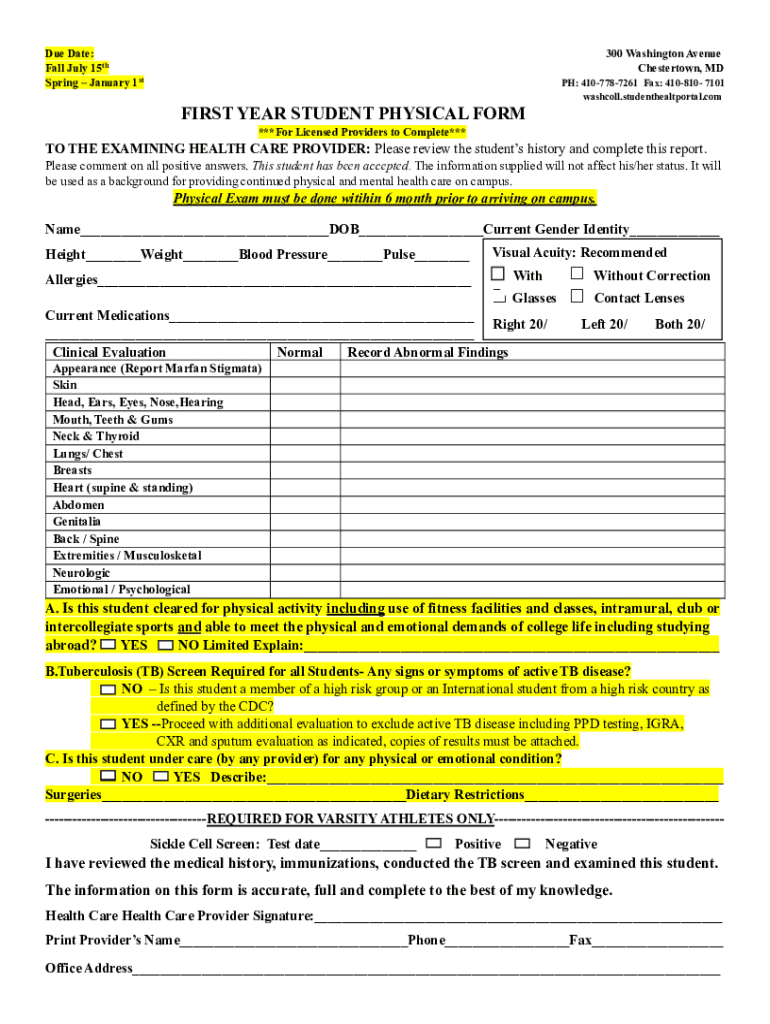
Get the free First Year Student Physical Form
We are not affiliated with any brand or entity on this form

Fill out
Complete the form online in a simple drag-and-drop editor.

eSign
Add your legally binding signature or send the form for signing.

Share
Share the form via a link, letting anyone fill it out from any device.

Export
Download, print, email, or move the form to your cloud storage.
Why pdfFiller is the best tool for your documents and forms


End-to-end document management
From editing and signing to collaboration and tracking, pdfFiller has everything you need to get your documents done quickly and efficiently.
Accessible from anywhere
pdfFiller is fully cloud-based. This means you can edit, sign, and share documents from anywhere using your computer, smartphone, or tablet.
Secure and compliant
pdfFiller lets you securely manage documents following global laws like ESIGN, CCPA, and GDPR. It's also HIPAA and SOC 2 compliant.
What is Student Physical Form
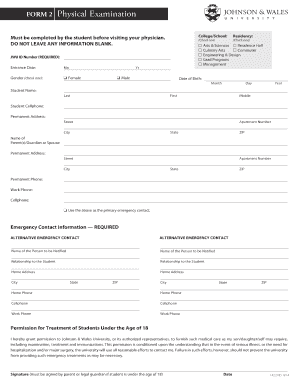
The first year student physical is a health assessment form used by educational institutions to ensure the physical well-being of incoming students.
pdfFiller scores top ratings on review platforms




Who needs Student Physical Form?
Explore how professionals across industries use pdfFiller.

Student Physical Form is needed by:
-
Incoming first-year students
-
Educational institutions requiring health assessments
-
Parents or guardians of new students
-
School health services providers
-
Athletics departments for eligibility
-
Counselors and student advisors
Comprehensive Guide to Student Physical Form
What is the First Year Student Physical?
The First Year Student Physical is a comprehensive health assessment required for new students entering educational institutions. This physical examination ensures that students meet health requirements crucial for their safety and well-being. Schools may require specific documentation from healthcare providers, which may include a review of medical history and immunization records, to ensure compliance with institutional standards.
Purpose and Benefits of Completing the First Year Student Physical
Completing the First Year Student Physical offers several health benefits for first-year students. It plays a vital role in identifying potential medical issues, ensuring that students are fit for participation in various academic and extracurricular activities. By filling out the physical examination form, institutions can maintain health compliance protocols and ensure a safe campus environment for all students. Additionally, students may face enrollment restrictions if they fail to submit the required health documentation on time.
Who Needs the First Year Student Physical?
First-year college and university students are typically required to submit the First Year Student Physical to enhance their transition into academic life. Specific exemptions may apply based on state regulations or institution policies. Some students may have different health documentation requirements based on prior conditions or existing health plans, which need to be clarified with their respective educational institutions.
How to Fill Out the First Year Student Physical Online
To fill out the First Year Student Physical online, follow these steps:
-
Access the form through pdfFiller.
-
Complete all required fields, providing accurate personal and health information.
-
Review each section of the form for completeness and correctness.
Carefully ensure that you provide precise details, as inaccuracies could delay your submission or result in additional requests for information.
Review and Validation Checklist for the First Year Student Physical
Before submitting the First Year Student Physical, consider the following checklist:
-
Verify personal details such as name and date of birth.
-
Ensure that your medical history is thoroughly documented.
-
Check that the signature of the healthcare provider is present.
Validating the correctness of the provided medical information is essential to uphold the integrity of your submission and avoid potential rejections.
How to Submit the First Year Student Physical
Students can submit the completed First Year Student Physical through various methods including:
-
Online submission via the institution’s portal or pdfFiller.
-
Mailing the physical form to the designated office.
-
Hand-delivering the form in person to the administrative office.
Be mindful of any submission deadlines to avoid complications with registration and ensure that all necessary fees are addressed if applicable.
What Happens After You Submit the First Year Student Physical?
Following the submission of your First Year Student Physical, you can expect a processing period during which the institution reviews the form. Students may receive notifications regarding their submission status, and it is advisable to track this through the provided channels. Be prepared for potential follow-up requests for additional documentation or clarifications based on the initial review process.
Security and Compliance in Handling the First Year Student Physical
pdfFiller employs robust security measures, including 256-bit encryption, to protect sensitive user information during the handling of the First Year Student Physical. Compliance with regulations like HIPAA and GDPR ensures that your health data is managed carefully, reinforcing the privacy of your personal information. Users can rest assured that their submissions are treated with the utmost confidentiality.
Utilizing pdfFiller for Your First Year Student Physical
Utilizing pdfFiller simplifies the process of editing and submitting your First Year Student Physical. The platform offers numerous capabilities like eSigning, easy sharing, and quick downloading of completed forms. Students are encouraged to leverage these tools to streamline their form filling process. To get started, visit pdfFiller's website and explore the various options available for managing your documents effectively.
How to fill out the Student Physical Form
-
1.Access pdfFiller and log into your account. Search for the 'first year student physical' form in the available templates.
-
2.Open the form by clicking on the title to load it into the editing interface.
-
3.Review the instructions provided at the top of the form. Gather all necessary documents, such as previous health records or vaccination records, before you start filling out the form.
-
4.Navigate through the form fields using your mouse or keyboard. Click on each field to enter the required information such as personal details, medical history, and emergency contacts.
-
5.Make sure to fill in all mandatory fields marked with an asterisk. You can switch between sections easily using 'tab' on your keyboard or by clicking with your mouse.
-
6.Once you have filled in all the fields correctly, review the completed form for any errors or missing information. Ensure that everything is accurate and up to date.
-
7.Save your progress by clicking the 'Save' button regularly. Once completed, you can download the form as a PDF or submit it directly through provided channels in pdfFiller.

Who is required to complete the first year student physical?
Incoming first-year students are typically required to complete this physical form to ensure they meet health standards before enrolling in educational programs.
What information do I need to provide on the form?
You will need to provide personal details, medical history, vaccination records, and emergency contact information. Ensure all information is accurate and current.
Are there submission deadlines for this form?
Yes, submission deadlines vary by institution. It is recommended to check with your school’s requirements or guidelines for specific due dates.
Can I submit the form online?
Absolutely! You can submit the first year student physical form online through pdfFiller, which offers direct submission options along with downloading capabilities.
What happens if I submit the form late?
Late submissions may result in delays in processing your enrollment or scheduling of courses. Always submit on time to avoid complications.
What common mistakes should I avoid when filling out the form?
Common mistakes include leaving required fields blank, providing incorrect information, or failing to sign the form. Double-check everything before submission.
How long does it take to process the form after submission?
Processing times can vary based on the institution, but typically it may take a few days to a week. Check with your school for specific timelines.
Related Forms





Get the latest insights from our blog



If you believe that this page should be taken down, please follow our DMCA take down process
here
.
This form may include fields for payment information. Data entered in these fields is not covered by PCI DSS compliance.