
Last updated on
Oct 19, 2026
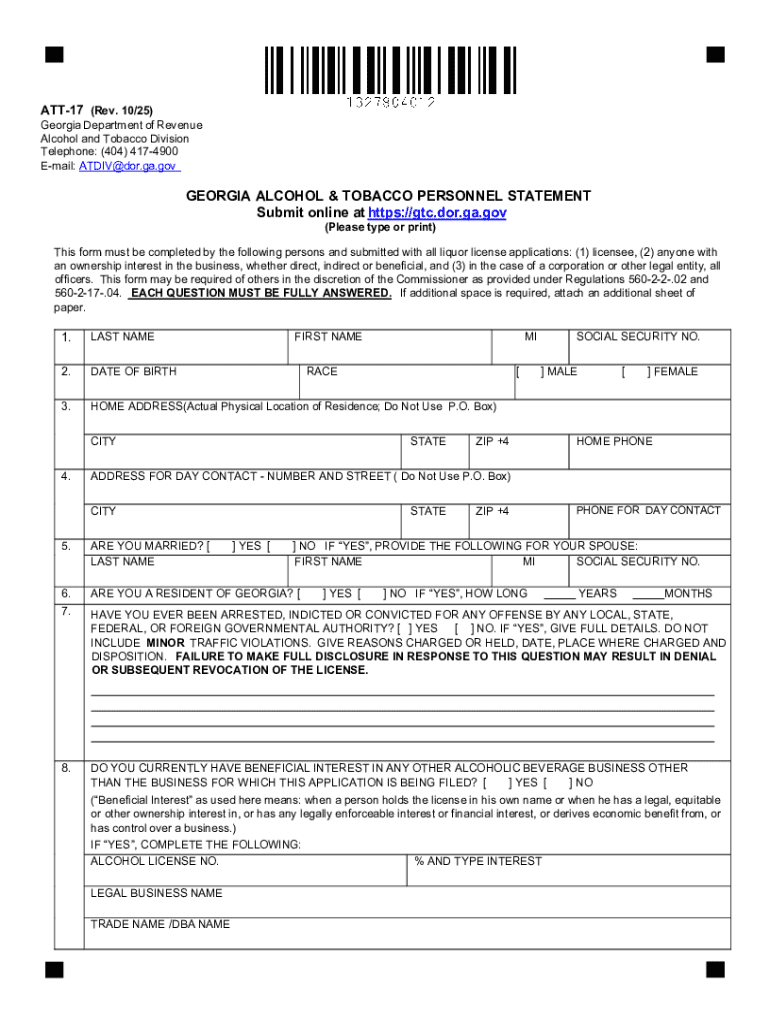
Get the free Georgia Alcohol and Tobacco Personnel Statement
We are not affiliated with any brand or entity on this form

Fill out
Complete the form online in a simple drag-and-drop editor.

eSign
Add your legally binding signature or send the form for signing.

Share
Share the form via a link, letting anyone fill it out from any device.

Export
Download, print, email, or move the form to your cloud storage.
Why pdfFiller is the best tool for your documents and forms


End-to-end document management
From editing and signing to collaboration and tracking, pdfFiller has everything you need to get your documents done quickly and efficiently.
Accessible from anywhere
pdfFiller is fully cloud-based. This means you can edit, sign, and share documents from anywhere using your computer, smartphone, or tablet.
Secure and compliant
pdfFiller lets you securely manage documents following global laws like ESIGN, CCPA, and GDPR. It's also HIPAA and SOC 2 compliant.
What is GA Alcohol Tobacco Form
The Georgia Alcohol and Tobacco form is a regulatory document used by businesses to comply with state laws governing the sale and distribution of alcohol and tobacco products.
pdfFiller scores top ratings on review platforms




Who needs GA Alcohol Tobacco Form?
Explore how professionals across industries use pdfFiller.

GA Alcohol Tobacco Form is needed by:
-
Business owners in the alcohol and tobacco industry
-
Retailers seeking to sell alcohol or tobacco
-
Distributors of alcoholic beverages or tobacco products
-
Individuals applying for related permits
-
Compliance officers in regulatory agencies
-
Legal advisors specializing in alcohol and tobacco laws
Comprehensive Guide to GA Alcohol Tobacco Form
What is the Georgia Alcohol and Tobacco Form?
The Georgia Alcohol and Tobacco Form is a crucial document used for regulating the sale of alcohol and tobacco within the state. This form serves the essential purpose of ensuring compliance with state laws, allowing the state of Georgia to monitor and control the distribution of these substances effectively.
Individuals and businesses engaged in the sale of alcohol and tobacco must be aware of the contexts in which this form is required. Making the necessary filings helps maintain an orderly market and reduces illegal sales practices.
Purpose and Benefits of the Georgia Alcohol and Tobacco Form
Utilizing the Georgia Alcohol and Tobacco Form offers significant benefits, particularly in maintaining compliance with state regulations. Those who adhere to the filing requirements can enjoy benefits such as avoiding legal penalties and potential fines.
Failing to file this form can lead to serious consequences, including fines and legal action against stakeholders in the alcohol and tobacco industry. Understanding the importance of this form helps businesses operate within the legal framework of Georgia.
Eligibility Criteria for the Georgia Alcohol and Tobacco Form
To determine who needs to fill out the Georgia Alcohol and Tobacco Form, individuals and businesses must consult specific eligibility criteria set by the state. This includes understanding the qualifications necessary for filing based on Georgia laws.
-
Businesses engaged in alcohol and tobacco sales.
-
Individuals seeking to apply for permits related to alcohol consumption.
-
Compliance with age restrictions and licensing requirements.
Knowing your eligibility is essential to avoid delays in the application process and to ensure successful submissions.
How to Fill Out the Georgia Alcohol and Tobacco Form Online
Filling out the Georgia Alcohol and Tobacco Form online can be straightforward when following a structured approach. Start by accessing the form and reviewing the required sections.
-
Fill out your personal and business information accurately.
-
Provide details pertinent to the types of alcohol and tobacco being sold.
-
Review each section for completeness before submission.
Using pdfFiller enhances the experience, offering intuitive tools that simplify the process of completing the form accurately and efficiently.
Common Errors and How to Avoid Them
When filling out the Georgia Alcohol and Tobacco Form, common pitfalls can lead to errors that may delay the submission process. Frequent mistakes include inaccurate personal information or failure to provide necessary documentation.
-
Double-check entries before submission to ensure accuracy.
-
Use the validation features provided by pdfFiller for error detection.
By following these tips, you can avoid common mistakes and streamline your submission process.
Submission Methods and Required Documents for the Georgia Alcohol and Tobacco Form
When you have completed the Georgia Alcohol and Tobacco Form, it is important to know how to submit it correctly. You have several options for submission, ensuring flexibility for users.
-
Online submission through pdfFiller's secure platform.
-
Mail the form with all required documents.
-
In-person submission at designated state offices.
Essential documents, such as identification and business licenses, must accompany the form to facilitate a smooth confirmation process upon submission.
What Happens After You Submit the Georgia Alcohol and Tobacco Form?
After submitting the Georgia Alcohol and Tobacco Form, your application will undergo a review process. Typically, applicants can expect a timeline for approval that varies based on the volume of submissions.
Tracking the status of your submission is crucial. If your form is denied or requires amendments, be prepared to take necessary actions to address any issues promptly. Keeping communication lines open with state officials can aid in resolving these matters efficiently.
Security and Privacy When Handling the Georgia Alcohol and Tobacco Form
When dealing with sensitive information in the Georgia Alcohol and Tobacco Form, security and privacy are paramount. pdfFiller employs robust security measures, including 256-bit encryption, to protect your data.
Data privacy and protection are crucial when handling documents that contain personal details. It is essential to understand how to securely store and manage completed forms to prevent unauthorized access.
Utilizing pdfFiller for Your Georgia Alcohol and Tobacco Form Needs
pdfFiller offers a range of features tailored to meet the needs of users looking to complete the Georgia Alcohol and Tobacco Form. With its intuitive interface, users can easily edit, fill, and sign documents without hassle.
-
Access forms from any device via a cloud-based solution.
-
Utilize editing tools to create necessary adjustments before submission.
-
Enjoy comprehensive support for the entire document lifecycle.
Leverage pdfFiller’s capabilities today to simplify your form processing experience.
How to fill out the GA Alcohol Tobacco Form
-
1.Begin by navigating to the pdfFiller website and logging into your account. If you don't have an account, you can create one easily.
-
2.Use the search bar to locate the Georgia Alcohol and Tobacco form. Click on the form link to open it in the pdfFiller editor.
-
3.Before filling out the form, gather all necessary information, including your business's details, licensing information, and any specific product information related to alcohol and tobacco.
-
4.Carefully read through the form fields. Click on each field to input your information accurately. Make use of the pdfFiller features such as text boxes, dropdown menus, and checkboxes to fill your details.
-
5.Double-check for accuracy and completeness after filling the form. Use the 'Review' function in pdfFiller to ensure that all sections are completed as required.
-
6.Once you're satisfied with the filled form, click on the 'Save' option to keep your progress. You can also download a copy of the form for your records if needed.
-
7.To finalize the submission, choose whether to send the form electronically or print it for mailing. If submitting electronically, follow the provided prompts to ensure successful submission.

Who is eligible to fill out the Georgia Alcohol and Tobacco form?
Eligible individuals include business owners, retailers, and distributors involved in the sale and distribution of alcohol and tobacco products in Georgia. Ensure you have the proper permits for your business type.
What are the submission methods for this form?
The Georgia Alcohol and Tobacco form can be submitted electronically through the pdfFiller platform or printed out and mailed to the appropriate regulatory authority. Select the option that best fits your needs.
Are there any deadlines for submitting this form?
Submission deadlines may vary based on specific business types and state regulations. It’s important to check with the Georgia Department of Revenue for any time-sensitive requirements related to your application.
What supporting documents are required?
When completing the form, make sure to have your business license, tax identification number, and any previous permits related to alcohol and tobacco. These documents may need to be submitted alongside your application.
What common mistakes should I avoid when filling out this form?
Common mistakes include omitting required information, incorrect data entry, and failing to review the form before submission. Always double-check your entries to avoid unnecessary delays.
How long does it take to process the submission?
Processing times can vary depending on the specific type of application and the workload of the reviewing agency. It's best to check with the Georgia Department of Revenue for estimated processing times.
Can I make changes to the form after submission?
Once submitted, changes may not be allowed without resubmitting the form. Contact the regulatory body directly if you need to update any information after submission.
Related Forms




Get the latest insights from our blog


If you believe that this page should be taken down, please follow our DMCA take down process
here
.
This form may include fields for payment information. Data entered in these fields is not covered by PCI DSS compliance.