
Last updated on
Oct 16, 2026
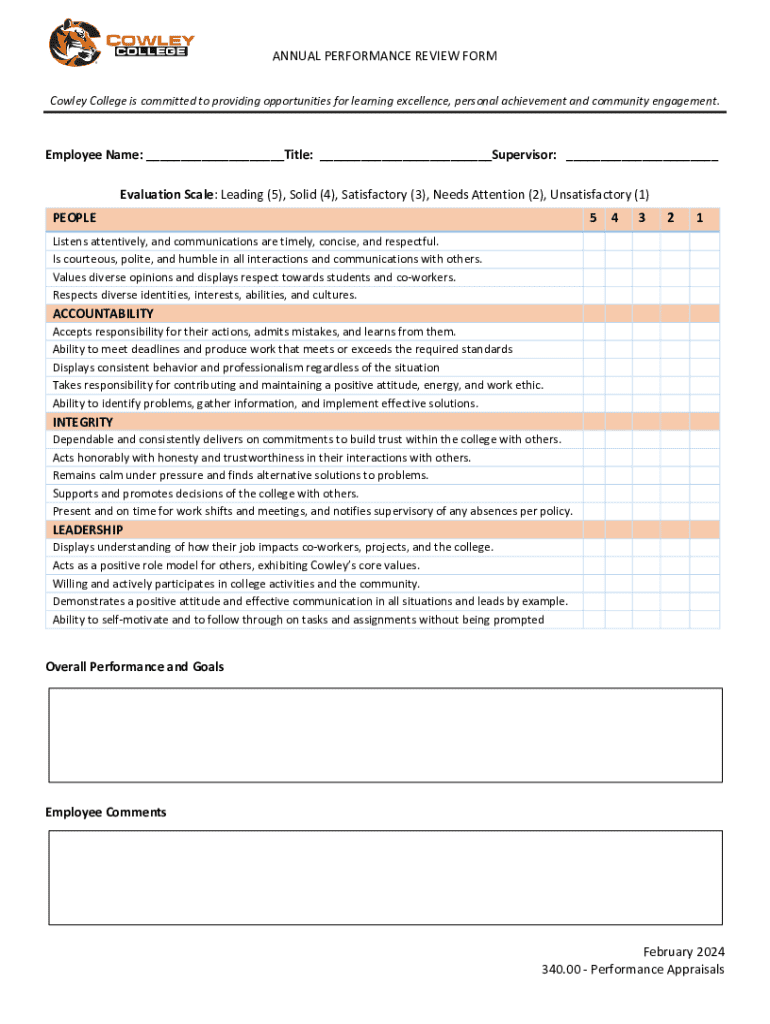
Get the free Annual Performance Review Form
We are not affiliated with any brand or entity on this form

Fill out
Complete the form online in a simple drag-and-drop editor.

eSign
Add your legally binding signature or send the form for signing.

Share
Share the form via a link, letting anyone fill it out from any device.

Export
Download, print, email, or move the form to your cloud storage.
Why pdfFiller is the best tool for your documents and forms


End-to-end document management
From editing and signing to collaboration and tracking, pdfFiller has everything you need to get your documents done quickly and efficiently.
Accessible from anywhere
pdfFiller is fully cloud-based. This means you can edit, sign, and share documents from anywhere using your computer, smartphone, or tablet.
Secure and compliant
pdfFiller lets you securely manage documents following global laws like ESIGN, CCPA, and GDPR. It's also HIPAA and SOC 2 compliant.
What is Performance Review
The annual performance review form is a document used by organizations to evaluate employee performance and facilitate constructive feedback during appraisal periods.
pdfFiller scores top ratings on review platforms




Who needs Performance Review?
Explore how professionals across industries use pdfFiller.

Performance Review is needed by:
-
HR managers conducting performance reviews
-
Supervisors assessing team member achievements
-
Employees preparing for their performance meetings
-
Training and development coordinators
-
Organizational leaders implementing performance improvement plans
Comprehensive Guide to Performance Review
What is the Annual Performance Review Form?
The annual performance review form is a structured document used to evaluate employee performance systematically. This form plays a crucial role in employee evaluations by providing a standardized way to assess achievements, set goals, and identify areas for improvement. It supports organizational growth and development by aligning employee performance with business objectives, fostering a culture of feedback and accountability.
Purpose and Benefits of the Annual Performance Review Form
The primary purposes of the annual performance review form include facilitating employee development, boosting motivation, and providing essential feedback. By using this form, both employers and employees can benefit significantly. Employees gain clarity on expectations and areas for growth, while employers can identify talent and better manage workforce performance. Additionally, the process encourages continual improvement and engagement in the workplace, contributing to a more motivated workforce.
Key Features of the Annual Performance Review Form
-
Sections typically included in the form, such as goals, achievements, and areas for improvement.
-
Editable fields allowing for personalized input from both employees and managers.
-
Capability for digital signatures and secure submissions to enhance authenticity.
Who Needs the Annual Performance Review Form?
The annual performance review form is essential for a variety of users, particularly HR professionals, managers, and team leaders. It is valuable across various industries, accommodating organizations of all sizes. Furthermore, this form can benefit employees at all levels, from entry-level staff to management, by providing a clear framework for performance expectations and evaluations.
How to Fill Out the Annual Performance Review Form Online
Filling out the annual performance review form online is straightforward, thanks to the interactive features provided by pdfFiller. Users can access the online fillable form and follow these steps:
-
Open the form on pdfFiller's platform.
-
Complete each section, addressing goals, achievements, and feedback details.
-
Review all information entered to ensure accuracy and completeness.
Common Errors When Completing the Annual Performance Review Form
When filling out the annual performance review form, several common errors can occur. Frequently encountered mistakes include omissions of key information or writing vague comments that lack substance. To avoid these pitfalls, ensuring clarity and specificity in evaluations is essential. Users should check their forms against a checklist to confirm completeness before submission.
How to Submit the Annual Performance Review Form
Once the annual performance review form is completed, there are several options available for submission. Users can choose to submit the form online, via email, or as a hard copy. It is also necessary to include any supporting documents required for the submission. Upon submitting the form, it is advisable to confirm receipt and track the progress of the submission to ensure proper processing.
Security and Compliance for the Annual Performance Review Form
Security is paramount when handling the sensitive information contained in performance evaluations. pdfFiller implements robust security measures, including encryption and compliance with regulations such as HIPAA and GDPR. Best practices for ensuring confidentiality include limiting access to sensitive employee data and keeping evaluations private to uphold trust in the review process.
How pdfFiller Supports You with the Annual Performance Review Form
pdfFiller offers a comprehensive solution for managing the annual performance review form. It provides features that facilitate efficient form completion, including editing, sharing, and eSigning capabilities. By enhancing the efficiency of processing performance reviews, pdfFiller streamlines the overall review process for organizations, encouraging users to explore its services for an improved experience.
Get Started with Your Annual Performance Review Form Today!
To get started with your annual performance review form on pdfFiller, simply access the platform and locate the appropriate form. Users are encouraged to explore pdfFiller’s features for enhanced document management and experience the convenience of filling out the form securely online. Embrace this opportunity to improve your performance review process.
How to fill out the Performance Review
-
1.To access the annual performance review form on pdfFiller, visit the pdfFiller website and log into your account. If you do not have an account, you will need to create one.
-
2.Once logged in, use the search bar to locate the form by typing 'annual performance review form' and select it from the results to open it.
-
3.Before you start filling out the form, gather all necessary information regarding employee performance history, achievements, goals, and feedback received from colleagues.
-
4.Navigate through the form using pdfFiller’s interface, which allows you to click into the fields where you need to input information. Each section will prompt you to fill out specific details.
-
5.Be sure to provide clear and constructive feedback on performance areas, accomplishments, areas for improvement, and any notes from previous reviews if applicable.
-
6.As you complete each section, consider using pdfFiller's tools to highlight key contributions or issues that may need addressing.
-
7.After completing all fields, review the entire form carefully for any inaccuracies or incomplete sections, making edits as needed.
-
8.Once the form is finalized, you can save the document directly to your pdfFiller account or download it to your local device in various formats including PDF.
-
9.Finally, if you need to submit the form, you can utilize pdfFiller’s email feature to send it directly to the relevant parties or print it out for physical submission.

Who is eligible to use the annual performance review form?
The annual performance review form is intended for use by organizations to evaluate their employees. Eligibility includes HR managers, supervisors, and any staff involved in performance assessment.
What is the deadline for submitting the annual performance review form?
Deadlines for submission typically depend on your organization’s performance review cycle. Ensure to check with your HR department for specific dates and avoid delays.
How do I submit the annual performance review form after completion?
You can submit the completed form via email directly through pdfFiller or by downloading it and delivering it in print to your HR department based on your company’s procedures.
Are there supporting documents required to accompany the performance review form?
Commonly required supporting documents may include previous performance reviews, self-assessments from employees, and performance metrics. Check with your HR for specific requirements.
What mistakes should I avoid when filling out the performance review form?
Avoid vague feedback, skipping important sections, and not providing sufficient supporting examples. Ensure you review each area for clarity and relevance before finalizing.
How long does it take to process the submitted annual performance review form?
Processing times can vary depending on your organization’s procedures but typically range from a few days to a few weeks. Follow up with HR if you have not received feedback in this time frame.
What should I do if I encounter issues while filling out the form on pdfFiller?
If you experience issues on pdfFiller, check their support section for guides or contact their customer support for assistance with technical problems.
Related Forms



Get the latest insights from our blog


If you believe that this page should be taken down, please follow our DMCA take down process
here
.
This form may include fields for payment information. Data entered in these fields is not covered by PCI DSS compliance.