
Last updated on
Oct 19, 2026
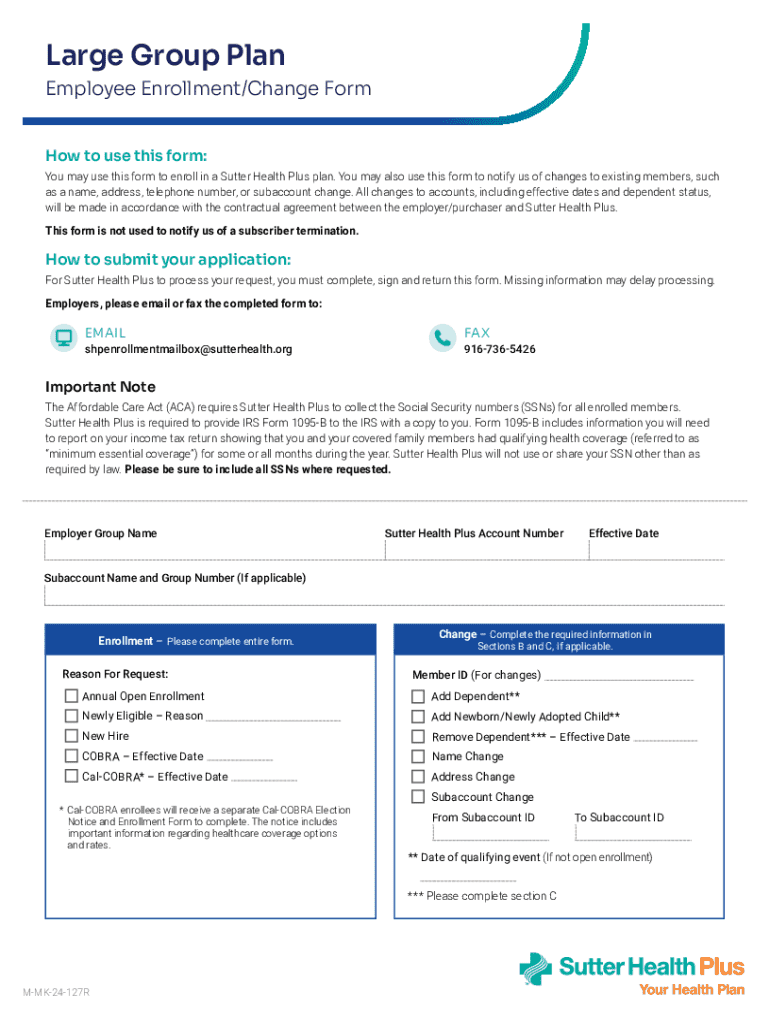
Get the free Sutter Health Plus Employee Enrollment/Change Form
We are not affiliated with any brand or entity on this form

Fill out
Complete the form online in a simple drag-and-drop editor.

eSign
Add your legally binding signature or send the form for signing.

Share
Share the form via a link, letting anyone fill it out from any device.

Export
Download, print, email, or move the form to your cloud storage.
Why pdfFiller is the best tool for your documents and forms


End-to-end document management
From editing and signing to collaboration and tracking, pdfFiller has everything you need to get your documents done quickly and efficiently.
Accessible from anywhere
pdfFiller is fully cloud-based. This means you can edit, sign, and share documents from anywhere using your computer, smartphone, or tablet.
Secure and compliant
pdfFiller lets you securely manage documents following global laws like ESIGN, CCPA, and GDPR. It's also HIPAA and SOC 2 compliant.
What is Sutter Health Enrollment Form
The Sutter Health Plus Employee Form is a document used by Sutter Health employees to manage and access employee health benefits efficiently.
pdfFiller scores top ratings on review platforms




Who needs Sutter Health Enrollment Form?
Explore how professionals across industries use pdfFiller.

Sutter Health Enrollment Form is needed by:
-
Sutter Health employees seeking health benefits
-
HR personnel managing employee records
-
Benefits administrators at Sutter Health
-
New employees enrolling in health plans
-
Managers overseeing employee health services
Comprehensive Guide to Sutter Health Enrollment Form
What is the Sutter Health Plus Employee Form?
The Sutter Health Plus Employee Form serves a vital role in the administration of employee health benefits at Sutter Health. This form is essential for employees seeking to enroll, update, or manage their health insurance plans. Typically, staff members undergoing changes in their employment status or those who are new hires will need to complete this form within specified timelines to ensure their benefits are appropriately managed.
-
The form is designed to administer health benefits for Sutter Health employees.
-
Employees across various categories may be required to complete this form.
-
It is essential to adhere to submission timelines to avoid disruptions in coverage.
Purpose and Benefits of the Sutter Health Plus Employee Form
The primary purpose of the Sutter Health Plus Employee Form is to facilitate seamless administration of health benefits for employees. Timely and accurate submission of this form provides numerous benefits, including the effective processing of requests related to health coverage.
-
This form supports the efficient administration of employee health benefits.
-
Submitting the form on time helps avoid delays in accessing benefits.
-
Providing accurate information is critical for service providers to deliver optimal healthcare services.
Who Needs the Sutter Health Plus Employee Form?
The Sutter Health Plus Employee Form is essential for various categories of employees. Understanding who needs to complete this form is crucial to ensure that all eligible individuals can maximize their health benefits.
-
All full-time and part-time employees should complete this form based on their insurance needs.
-
New hires and employees changing their health insurance plans are required to submit this form.
-
Employees on leave or returning from leave may also need to provide this documentation.
How to Fill Out the Sutter Health Plus Employee Form Online (Step-by-Step)
Filling out the Sutter Health Plus Employee Form online is a straightforward process. Here’s a simple guide to assist you:
-
Access the form via pdfFiller.
-
Complete required fields, ensuring accurate data entry.
-
Review each section, particularly those that are commonly misunderstood.
-
Save your work frequently to avoid losing any progress.
-
Submit the completed form directly through the platform.
Field-by-Field Instructions for the Sutter Health Plus Employee Form
Accurate completion of each field on the Sutter Health Plus Employee Form is essential. Here’s a detailed breakdown of what information is typically required for each section:
-
Personal information: Full name, address, and contact details.
-
Employment details: Job title and department information.
-
Health coverage selections: Choices regarding health benefits.
-
Beneficiary information: Names and details of beneficiaries when applicable.
Common Errors and How to Avoid Them when Filling the Sutter Health Plus Employee Form
When completing the Sutter Health Plus Employee Form, several common errors can lead to issues with processing. It’s important to be aware of these pitfalls to ensure a smooth submission.
-
Typographical errors in personal information can cause delays.
-
Failure to sign the form, which is crucial for validity.
-
Missing required fields, leading to incomplete submissions.
To avoid these mistakes, double-check your information and verify all entries against employer guidelines before submitting.
How to Sign the Sutter Health Plus Employee Form
Signing the Sutter Health Plus Employee Form is a critical step that establishes the validity of your submission. Understanding your options for signing can facilitate this process.
-
A digital signature can provide the same legal weight as a wet signature in many contexts.
-
Familiarize yourself with any legal requirements regarding form signing.
-
Utilizing pdfFiller makes the eSigning process secure and efficient, ensuring compliance with regulations.
Submission Methods and Where to Submit the Sutter Health Plus Employee Form
Once you’ve completed the Sutter Health Plus Employee Form, knowing how to submit it correctly is important for timely processing. Here are the different submission methods available:
-
Online submission through pdfFiller ensures instant processing.
-
Mailing the form requires it to be sent to the designated HR address.
-
In-person submission at the HR department can provide immediate confirmation.
Be mindful of submission deadlines to ensure your benefits are processed without delay.
What Happens After You Submit the Sutter Health Plus Employee Form?
After submitting the Sutter Health Plus Employee Form, it is crucial to understand the subsequent steps. Here’s what to expect:
-
Processing timelines can vary; typically, you can expect confirmation within a few business days.
-
You may need to follow up to check the status of your form submission.
-
Ensure that any additional documentation requests from your employer are met promptly.
Using pdfFiller for Your Sutter Health Plus Employee Form Needs
pdfFiller can greatly enhance your experience when dealing with the Sutter Health Plus Employee Form. Utilizing this platform offers significant advantages to users.
-
pdfFiller provides user-friendly tools for filling, signing, and submitting forms.
-
Robust security measures, including 256-bit encryption, protect your sensitive information.
-
Many users report increased efficiency and reduced errors by using pdfFiller for their form management.
How to fill out the Sutter Health Enrollment Form
-
1.To begin, access pdfFiller and log in or create an account if you don’t have one.
-
2.In the search bar, type 'Sutter Health Plus Employee Form' to locate the document.
-
3.Click on the form title from the search results to open it in the pdfFiller editor.
-
4.Before filling out the form, gather all necessary information including your employee ID, personal details, and health plan specifics.
-
5.Navigate through the form using the provided tools to add text, checkboxes, or signatures where required.
-
6.Ensure you fill in all mandatory fields that are typically marked with an asterisk (*) to avoid submission issues.
-
7.Review each section carefully for accuracy, ensuring that all information is up-to-date and correct.
-
8.Once completed, utilize the review function in pdfFiller to check for errors before finalizing the form.
-
9.After final review, save your document by clicking on the save button, and choose your preferred file format.
-
10.To download the completed form, select the download option and save it to your desired location on your device.
-
11.Finally, if required, submit the form either directly through pdfFiller or print and mail it to the necessary department.

Who is eligible to fill out the Sutter Health Plus Employee Form?
Any employee of Sutter Health who is enrolled or is seeking to enroll in Sutter Health's health benefits can complete the Sutter Health Plus Employee Form.
What is the deadline for submitting the form?
While specific deadlines may vary based on enrollment periods, it’s advisable to submit the form as soon as possible to ensure timely processing of health benefit eligibility.
How do I submit the completed form?
You can submit the completed Sutter Health Plus Employee Form via pdfFiller's submission options, or manually print it to submit it to HR via email or postal mail.
Are there any supporting documents needed with this form?
Typically, you may need to provide identification such as your employee ID or proof of previous coverage, but it’s best to check with HR for specific requirements.
What are common mistakes to avoid when filling out this form?
Ensure all mandatory fields are filled accurately, avoid leaving sections blank, and double-check personal details against your ID to prevent processing delays.
How long does it take to process this form?
Processing times may vary, but generally, you can expect a response or confirmation within 1-3 weeks after submission, depending on the volume of applications.
What should I do if I have questions while filling out the form?
If you have any questions, you can consult the HR department at Sutter Health directly or refer to the guidelines provided by pdfFiller for assistance.
Related Forms





Get the latest insights from our blog



If you believe that this page should be taken down, please follow our DMCA take down process
here
.
This form may include fields for payment information. Data entered in these fields is not covered by PCI DSS compliance.