
Last updated on
Oct 19, 2026

Get the free Sutter Health Plan Employee Enrollment Form
We are not affiliated with any brand or entity on this form

Fill out
Complete the form online in a simple drag-and-drop editor.

eSign
Add your legally binding signature or send the form for signing.

Share
Share the form via a link, letting anyone fill it out from any device.

Export
Download, print, email, or move the form to your cloud storage.
Why pdfFiller is the best tool for your documents and forms


End-to-end document management
From editing and signing to collaboration and tracking, pdfFiller has everything you need to get your documents done quickly and efficiently.
Accessible from anywhere
pdfFiller is fully cloud-based. This means you can edit, sign, and share documents from anywhere using your computer, smartphone, or tablet.
Secure and compliant
pdfFiller lets you securely manage documents following global laws like ESIGN, CCPA, and GDPR. It's also HIPAA and SOC 2 compliant.
What is Sutter Health Enrollment Form
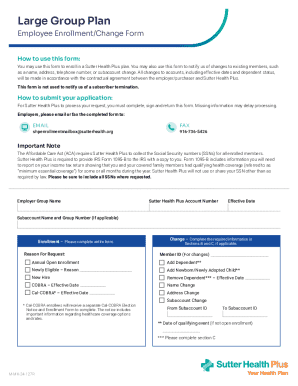
The Sutter Health Plan Employee Enrollment Form is a document used by employees to enroll in or change their health coverage with Sutter Health Plan.
pdfFiller scores top ratings on review platforms




Who needs Sutter Health Enrollment Form?
Explore how professionals across industries use pdfFiller.

Sutter Health Enrollment Form is needed by:
-
Employees seeking health insurance coverage
-
Human Resources personnel managing employee benefits
-
Sutter Health Plan administrators processing enrollments
-
New employees joining the health plan
-
Current employees wishing to make changes to their benefits
Comprehensive Guide to Sutter Health Enrollment Form
What is the Sutter Health Plan Employee Enrollment Form?
The Sutter Health Plan Employee Enrollment Form is a crucial document used by employees to enroll in or modify their health coverage options. This form serves as the primary method for individuals to access essential benefits provided by Sutter Health. Completing the form is important for employees seeking comprehensive health coverage and allows them to make necessary adjustments to their enrollment status.
Employees utilize this form when enrolling for the first time or when making changes to existing coverage, ensuring they can access the full range of health services offered by Sutter Health. The Sutter Health enrollment form streamlines the process, enhances user experience, and safeguards employee health benefits.
Why You Need the Sutter Health Plan Employee Enrollment Form
Completing the Sutter Health Plan Employee Enrollment Form is beneficial for both employees and employers. By enrolling in the health plan, employees gain access to vital healthcare services, which can significantly improve their overall health outcomes and financial stability. Submitting the health insurance enrollment form on time is imperative, as delays can lead to gaps in coverage.
For employers, ensuring that employees complete the enrollment process helps to maintain a healthier workforce and can lead to lower insurance premiums over time. Failure to submit the employee benefits enrollment form on schedule may result in loss of coverage or limited access to available healthcare services.
Key Features of the Sutter Health Plan Employee Enrollment Form
The Sutter Health Plan Employee Enrollment Form comes with several features designed to facilitate a smooth enrollment process. These include:
-
Fillable fields and checkboxes designed for user convenience.
-
Sections allowing users to select different benefit plans that best meet their needs.
-
Dedicated areas for providing details about eligible dependents.
-
Clear instructions for signing and submitting the completed form.
Overall, the Sutter Health benefits form is structured to simplify the enrollment experience for employees, making the process fast and efficient.
Who Should Use the Sutter Health Plan Employee Enrollment Form?
The Sutter Health Plan Employee Enrollment Form is intended for any employee who is eligible for Sutter Health benefits. This includes new hires who are enrolling for the first time, as well as current employees who may need to update their coverage or make changes due to life events such as marriage or the birth of a child.
It is crucial for employees to understand their rights concerning dependent coverage and the implications of failing to submit the employee health coverage form timely. New employees should be informed about the enrollment timeframe, and current employees must stay informed about their options for making changes.
How to Fill Out the Sutter Health Plan Employee Enrollment Form Online
Filling out the Sutter Health Plan Employee Enrollment Form online can be accomplished with ease by following these steps:
-
Access the form using the pdfFiller platform.
-
Begin by entering required personal information, such as name and address.
-
Provide sensitive information, including your Social Security number, in the designated fields.
-
Carefully review your entries to avoid common errors.
Utilizing pdfFiller not only enhances the user experience but also ensures that the form is completed accurately and efficiently, providing a clear path to securing health coverage.
Submission Process for the Sutter Health Plan Employee Enrollment Form
Once the form is completed, it can be submitted through several channels to ensure prompt processing:
-
Submission via email directly to your HR department.
-
Mailing the form to the specified address in your guidelines.
-
Hand-delivering the completed form in person to HR.
It is crucial to confirm submission deadlines to prevent any delays in coverage. Following submission, employees can expect a communication outlining the processing timeline and any additional actions required.
Security and Compliance with the Sutter Health Plan Employee Enrollment Form
Users can trust the handling of their personal information throughout the enrollment process. Sutter Health adheres to stringent data protection measures, including compliance with HIPAA standards. As the form is completed and submitted through pdfFiller, users are further ensured of their privacy and security.
With robust encryption and secure data practices, sensitive health information remains protected, making the form submission process worry-free for all users.
What Happens After You Submit the Sutter Health Plan Employee Enrollment Form
After submitting the form, employees can expect to receive confirmation of its receipt. This acknowledgment is crucial for tracking the processing of their enrollment or changes. If corrections or amendments are necessary after submission, there are clear channels for addressing these issues.
Understanding common rejection reasons helps employees avoid pitfalls that could delay their enrollment and ensures a smoother process moving forward.
Using pdfFiller to Complete Your Sutter Health Plan Employee Enrollment Form
pdfFiller simplifies the form completion experience by offering features such as:
-
E-signing capabilities that allow users to sign documents electronically.
-
Editing functionalities for inputting accurate information quickly.
-
User testimonials reflecting ease of use and efficiency in completing forms.
By leveraging pdfFiller, employees can confidently fill out and submit their forms while maintaining access to the resources they need for optimal health outcomes.
How to fill out the Sutter Health Enrollment Form
-
1.To access the Sutter Health Plan Employee Enrollment Form on pdfFiller, visit the pdfFiller website and use the search function to locate the form.
-
2.Once you've found the form, click on it to open the fillable PDF document.
-
3.Before completing the form, gather necessary personal information including your name, address, Social Security number, and details about any dependents.
-
4.Navigate through the form by clicking on the fields; fill in each section as required, using pdfFiller's interface to easily add text or checkboxes.
-
5.Review each field to ensure all required information is complete and accurate. Double-check for spelling errors and confirm that all dependents are listed correctly.
-
6.Once you complete the form, use the preview feature to review the entire document to ensure it appears as intended.
-
7.After finalizing the content, save the form by clicking on the 'Save' button, which allows you to download a copy to your device or save it in your pdfFiller account.
-
8.If you're ready to submit, look for the 'Submit' option that will guide you through sending it to your employer electronically.

Who is eligible to fill out the Sutter Health Plan Employee Enrollment Form?
The form is designed for employees of Sutter Health who wish to enroll in or make changes to their health coverage. Eligibility typically includes current employees and newly hired staff.
What documents do I need to complete the enrollment?
While filling out the Sutter Health Plan Employee Enrollment Form, you will need your personal identification details, including your Social Security number, address, and information regarding any dependents.
What is the deadline for submitting this form?
Submission deadlines for the Sutter Health Plan Employee Enrollment Form may vary based on your employer's policy. It is best to check with your HR department for specific timelines associated with enrollment periods.
How can I submit the completed form?
Completed forms can be submitted electronically through pdfFiller or printed and returned to your HR department. Ensure that you sign the form before submission.
What are common mistakes to avoid when filling out the form?
Common mistakes include leaving required fields blank, incorrect spelling of names or numbers, and failing to sign the form. Double-check all entries to ensure accuracy.
How long does it take for my enrollment to be processed?
Processing times for enrollments may vary but typically take a few weeks. Reach out to your HR department for specific timelines related to your enrollment.
Can I make changes after submitting the form?
Yes, you can make changes after submission, but you will likely need to fill out a new form and may require employer approval. Contact HR for guidance on the procedure.
Related Forms





Get the latest insights from our blog


If you believe that this page should be taken down, please follow our DMCA take down process
here
.
This form may include fields for payment information. Data entered in these fields is not covered by PCI DSS compliance.