
Last updated on
Oct 31, 2026

Get the free Rhode Island Background Check Fingerprinting Form
We are not affiliated with any brand or entity on this form

Fill out
Complete the form online in a simple drag-and-drop editor.

eSign
Add your legally binding signature or send the form for signing.

Share
Share the form via a link, letting anyone fill it out from any device.

Export
Download, print, email, or move the form to your cloud storage.
Why pdfFiller is the best tool for your documents and forms


End-to-end document management
From editing and signing to collaboration and tracking, pdfFiller has everything you need to get your documents done quickly and efficiently.
Accessible from anywhere
pdfFiller is fully cloud-based. This means you can edit, sign, and share documents from anywhere using your computer, smartphone, or tablet.
Secure and compliant
pdfFiller lets you securely manage documents following global laws like ESIGN, CCPA, and GDPR. It's also HIPAA and SOC 2 compliant.
What is RI Fingerprint Form
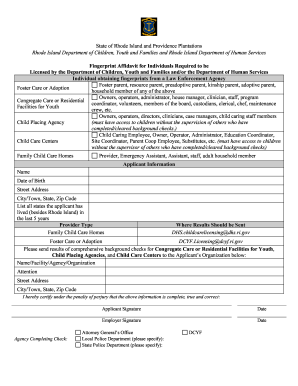
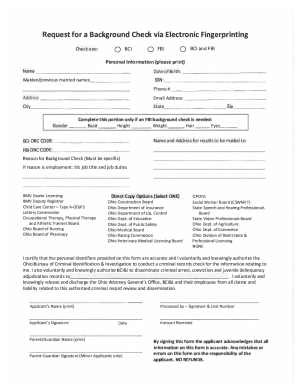
The Rhode Island Background Check Fingerprinting Form is a government document used by individuals seeking background checks for various professional and personal purposes.
pdfFiller scores top ratings on review platforms




Who needs RI Fingerprint Form?
Explore how professionals across industries use pdfFiller.

RI Fingerprint Form is needed by:
-
Child care providers
-
Adoption agencies
-
Mental health professionals
-
Massage therapists
-
Foster parents
-
School employers
-
Marijuana law applicants
Comprehensive Guide to RI Fingerprint Form
What is the Rhode Island Background Check Fingerprinting Form?
The Rhode Island Background Check Fingerprinting Form is essential for requesting background checks across various scenarios such as child care, adoption, or employment in sensitive positions. This form serves as an official request to access an individual's criminal history, ensuring the safety and security of vulnerable populations.
Specific contexts requiring this form include roles in education, healthcare, and other professions where safety is paramount. By understanding the Rhode Island Background Check Form, users can better navigate the requirements for their particular needs.
Purpose and Benefits of the Rhode Island Background Check Fingerprinting Form
This form is critical for individuals seeking to ensure compliance with safety regulations across different professions. Background checks are vital in protecting children, patients, and clients by verifying the trustworthiness of those who will work with them.
Utilizing platforms like pdfFiller enhances the application process, offering streamlined features for easier completion and submission. This efficiency can significantly reduce the time spent on paperwork, which is a considerable benefit for busy professionals.
Who Needs the Rhode Island Background Check Fingerprinting Form?
The Rhode Island Background Check Fingerprinting Form is typically needed by individuals in specific professions and situations that require thorough vetting. This includes foster parents, potential adoptive parents, mental health professionals, and employees in educational settings.
Additionally, various institutions and facilities may submit the form on behalf of individuals applying for roles where a background check is mandated. Understanding the target audience for this form ensures that those who need it can access it promptly.
Key Features of the Rhode Island Background Check Fingerprinting Form
The Rhode Island Background Check Fingerprinting Form boasts several key attributes that enhance its usability. It is a fillable form, allowing users to input information directly into any digital format.
Additional features include options for customization and varied submission methods through pdfFiller, making it adaptable to user needs. These attributes combine to facilitate a user-friendly experience while ensuring the form meets all necessary requirements.
How to Fill Out the Rhode Island Background Check Fingerprinting Form Online (Step-by-Step)
Filling out the Rhode Island Background Check Fingerprinting Form online can be accomplished through the following steps:
-
Access the form on pdfFiller.
-
Enter your personal information, including name and contact details.
-
Select the reason for fingerprinting from the provided options.
-
Review the filled details for accuracy.
-
Submit the form electronically or by following specified submission instructions.
This structured approach ensures that users provide all required information correctly, facilitating a smooth application process.
Review and Validation Checklist for the Rhode Island Background Check Fingerprinting Form
To ensure accurate completion of the Rhode Island Background Check Fingerprinting Form, users should review the following common errors and verification steps:
-
Ensure all necessary fields are filled in correctly.
-
Double-check personal details for accuracy, especially spelling.
-
Confirm that the selected reason for fingerprinting is appropriate.
-
Verify submission methods to align with agency requirements.
-
Consult a checklist for all required documents and signatures.
Submission Options for the Rhode Island Background Check Fingerprinting Form
Users have multiple options for submitting the completed Rhode Island Background Check Fingerprinting Form. Depending on the requesting agency, submissions can be completed electronically or via traditional mail.
For electronic submissions, follow the outlined instructions provided on pdfFiller for optimal processing. Each method ensures that the form reaches the appropriate authority efficiently.
Fees, Processing Time, and Confirmation of Submission
When preparing to submit the Rhode Island Background Check Fingerprinting Form, it is crucial to be aware of potential fees and processing timelines. Fees may vary based on the type of background check requested, so users should verify this information with the relevant agency.
After submission, users can expect varying processing times depending on the nature of the request. Tracking the status of submissions can often be done through the agency’s official channels.
Security and Compliance for the Rhode Island Background Check Fingerprinting Form
When using pdfFiller to complete and submit the Rhode Island Background Check Fingerprinting Form, users can trust that their sensitive information is protected. The platform employs robust security measures, including 256-bit encryption and compliance with HIPAA and GDPR standards, to safeguard data.
pdfFiller's commitment to data protection ensures that users can confidently submit sensitive information without compromising privacy.
Empower Your Application with pdfFiller
For those navigating the Rhode Island Background Check Fingerprinting Form, utilizing pdfFiller can significantly enhance the efficiency of the process. The platform simplifies form completion and submission, making it easy to edit and sign documents securely online.
User success stories demonstrate the effectiveness of pdfFiller in facilitating these processes, allowing users to focus on achieving their professional goals while managing their documentation efficiently.
How to fill out the RI Fingerprint Form
-
1.Access the Rhode Island Background Check Fingerprinting Form on pdfFiller by searching for it or using the direct link provided by your agency.
-
2.Open the form in pdfFiller's interface. Familiarize yourself with the layout and available tools, as you will use them to fill out the required fields.
-
3.Gather all necessary personal information, such as full name, address, date of birth, and reason for fingerprinting before starting to ensure a smooth completion.
-
4.Begin filling in the form. Click on each blank field to enter your information. Use pdfFiller’s tools to quickly navigate through the form and easily adjust any entries if needed.
-
5.Be sure to select your preferred means of notification for the results. This may include email or mail options as indicated on the form.
-
6.Review the completed form for any errors or missing information. Double-check that all fields are filled correctly as mistakes could delay processing.
-
7.Once satisfied with your form, save your work within pdfFiller. You can do this by clicking the save button or following the prompts to ensure your information is stored securely.
-
8.Finally, choose to download the form for your records, or select the option to submit it directly through pdfFiller, following any submission instructions provided.

Who is eligible to use the Rhode Island Background Check Fingerprinting Form?
Individuals requiring background checks for professional licensure or personal matters, such as child care, adoption, and other related fields are eligible. Be sure to check if any additional local regulations apply.
Is there a deadline for submitting this background check form?
While the form itself does not have a set deadline, it is important to submit it as soon as possible. Processing times can vary based on the specific purpose of the background check.
How can I submit the Rhode Island Background Check Fingerprinting Form?
You can submit the form either by downloading it and mailing it to the appropriate agency or directly through pdfFiller for electronic processing. Ensure all required information is included before submission.
What documents do I need to provide with this form?
Typically, you will need to include identification documents such as a government-issued ID. Review any specific instructions provided by your licensing agency to ensure compliance.
What are common mistakes to avoid when filling out this form?
Common mistakes include providing incomplete information, overlooking the reason for fingerprinting, and not selecting a notification preference. Double-check all entries before final submission to avoid delays.
How long does it take to process my background check after submission?
Processing times can vary, but generally, it may take a few weeks to receive results. It's advisable to check with the specific agency handling your application for more accurate timelines.
Is notarization required for the Rhode Island Background Check Fingerprinting Form?
No, this form does not require notarization. However, ensure you follow all provided instructions and requirements for submission to avoid complications.
Related Forms




Get the latest insights from our blog


If you believe that this page should be taken down, please follow our DMCA take down process
here
.
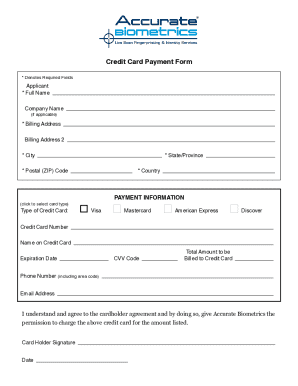
This form may include fields for payment information. Data entered in these fields is not covered by PCI DSS compliance.