
Last updated on
Oct 19, 2026

Get the free Parent Guardian Communication Log
We are not affiliated with any brand or entity on this form

Fill out
Complete the form online in a simple drag-and-drop editor.

eSign
Add your legally binding signature or send the form for signing.

Share
Share the form via a link, letting anyone fill it out from any device.

Export
Download, print, email, or move the form to your cloud storage.
Why pdfFiller is the best tool for your documents and forms


End-to-end document management
From editing and signing to collaboration and tracking, pdfFiller has everything you need to get your documents done quickly and efficiently.
Accessible from anywhere
pdfFiller is fully cloud-based. This means you can edit, sign, and share documents from anywhere using your computer, smartphone, or tablet.
Secure and compliant
pdfFiller lets you securely manage documents following global laws like ESIGN, CCPA, and GDPR. It's also HIPAA and SOC 2 compliant.
What is Communication Log
The Parent Guardian Communication Log is a communication form used by educational institutions to document interactions with parents or guardians regarding student-related matters.
pdfFiller scores top ratings on review platforms




Who needs Communication Log?
Explore how professionals across industries use pdfFiller.

Communication Log is needed by:
-
Teachers managing student communications
-
School administrators overseeing parent relations
-
Counselors addressing student concerns with parents
-
Parents tracking communications from schools
-
Educational professionals ensuring organized documentation
Comprehensive Guide to Communication Log
What is the Parent Guardian Communication Log?
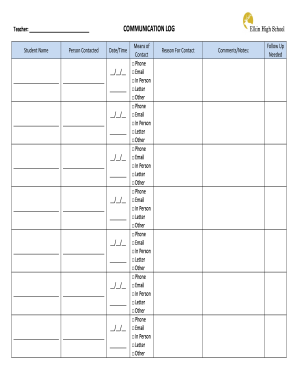
The Parent Guardian Communication Log serves as a valuable tool in educational settings, designed to document interactions between schools and parents or guardians. This log includes essential fields such as student information, parent or guardian details, dates of communication, and responses, which collectively enhance the efficacy of school-parent relationships. By tracking communication, schools can foster better engagement, ensuring that all parties are informed and accountable regarding student matters.
Purpose and Benefits of the Parent Guardian Communication Log
This log is crucial for educational institutions and parents, significantly improving communication regarding students. It offers numerous benefits, including maintaining a documented log for future reference, which enhances accountability. For instance, scenarios such as parent-teacher meetings or follow-up discussions about students' progress become easier and more structured with a reliable communication log in place.
Key Features of the Parent Guardian Communication Log
The Parent Guardian Communication Log includes several functionalities that enhance its effectiveness in educational contexts. Key features encompass:
-
Fillable fields for easy entry of information.
-
Options for checking off specific responses and concerns.
-
Efficient tracking of multiple communications over time.
-
Potential integration with existing school communication systems.
Who Needs the Parent Guardian Communication Log?
The primary users of the Parent Guardian Communication Log include teachers, school administrators, and counselors. It plays a key role in keeping parents and guardians informed about their child's education and progress. Situational usage for various educators or school staff highlights its necessity in promoting positive school-parent relationships.
How to Fill Out the Parent Guardian Communication Log Online (Step-by-Step)
To complete the Parent Guardian Communication Log using pdfFiller, follow these step-by-step instructions:
-
Access the online form on pdfFiller.
-
Fill in the necessary fields, providing accurate student and parent details.
-
Clearly state the date and nature of the communication.
-
Review entries for clarity and completeness before submission.
Common Errors and How to Avoid Them When Using the Communication Log
While using the Parent Guardian Communication Log, users should be aware of common pitfalls such as omitting essential information or entering unclear dates. To prevent miscommunication, it is advisable to review logs thoroughly for clarity before submission and validate entries to ensure accuracy.
How to Submit the Parent Guardian Communication Log
Submitting the completed Parent Guardian Communication Log can be done through various methods. Options include:
-
Online submission via pdfFiller.
-
Printing and physically submitting the document to the school.
Be mindful of important deadlines and school submission policies to ensure timely processing of the log.
Data Security and Compliance in Handling the Parent Guardian Communication Log
When handling sensitive information, data security and compliance are paramount. pdfFiller employs robust security protocols, including 256-bit encryption, to protect personal information. Compliance with regulations such as HIPAA and GDPR ensures that users' data is safeguarded throughout the communication process. Tips for ensuring privacy include using secure networks and being cautious with shared information.
Helpful Resources and Tools for Managing Communication
Users can benefit from additional resources that assist in managing communications effectively. Consider exploring:
-
Templates or forms that complement the Parent Guardian Communication Log.
-
Software tools that enhance communication management.
-
Contact information for support regarding any issues experienced while filling out the form.
Experience Effortless Document Management with pdfFiller
pdfFiller streamlines document management, enabling users to manage their Parent Guardian Communication Logs efficiently. The platform offers user-friendly tools for document handling, including eSigning and PDF editing. Emphasizing the importance of secure handling of educational forms, pdfFiller ensures that users have a reliable solution for all their document needs.
How to fill out the Communication Log
-
1.Access pdfFiller and search for the 'Parent Guardian Communication Log' form in the template library.
-
2.Open the form by clicking on it, which will load the interactive interface where you can fill out the fields.
-
3.Before filling in details, gather necessary information such as student names, parent or guardian contact details, and notes on interactions you have had.
-
4.Complete each field in the form by clicking on the appropriate section and typing in the relevant information, ensuring accuracy.
-
5.Use checkboxes where applicable to document responses or indicate resolutions effectively.
-
6.Once you have filled in all required fields, take a moment to review the content for any errors or missed information.
-
7.After verifying the form's accuracy, you can save your progress directly on pdfFiller, download a copy in your preferred format, or submit it electronically through the platform as needed.

Who is eligible to use the Parent Guardian Communication Log?
The Parent Guardian Communication Log is intended for use by educators, school administrators, and support staff in educational institutions who communicate directly with parents or guardians regarding student matters.
How should I submit the completed communication log?
After completing the Parent Guardian Communication Log on pdfFiller, you can submit it electronically through the platform, email it to appropriate parties, or print and deliver it in person as required by your school’s procedures.
What information do I need to prepare before filling in the form?
You should have essential details ready, such as the student's name, parent or guardian contact information, notes on each communication session, and any specific issues or resolutions discussed.
Are there any common mistakes to avoid when filling in the log?
Common mistakes include omitting essential contact information, not recording dates accurately, and failing to document all interactions thoroughly. Always double-check your entries for completeness.
Is there a deadline for completing this form?
While there may not be a universal deadline, it is best practice to fill out the Parent Guardian Communication Log promptly after each communication to ensure information is current and accurate.
How long will it take to process submitted forms?
Processing times can vary depending on your school's protocols. Generally, completed forms like the Parent Guardian Communication Log should be reviewed by teachers or administrators within a few days.
Where can I find additional assistance with this form?
If you need help with using the Parent Guardian Communication Log, consult your school’s administrative office or access the help section of pdfFiller for guidance on form-related questions.
Related Forms




Get the latest insights from our blog


If you believe that this page should be taken down, please follow our DMCA take down process
here
.
This form may include fields for payment information. Data entered in these fields is not covered by PCI DSS compliance.