
Last updated on
Oct 19, 2026

Get the free Parent Communication Log
We are not affiliated with any brand or entity on this form

Fill out
Complete the form online in a simple drag-and-drop editor.

eSign
Add your legally binding signature or send the form for signing.

Share
Share the form via a link, letting anyone fill it out from any device.

Export
Download, print, email, or move the form to your cloud storage.
Why pdfFiller is the best tool for your documents and forms


End-to-end document management
From editing and signing to collaboration and tracking, pdfFiller has everything you need to get your documents done quickly and efficiently.
Accessible from anywhere
pdfFiller is fully cloud-based. This means you can edit, sign, and share documents from anywhere using your computer, smartphone, or tablet.
Secure and compliant
pdfFiller lets you securely manage documents following global laws like ESIGN, CCPA, and GDPR. It's also HIPAA and SOC 2 compliant.
What is Communication Log
The Parent Communication Log is an education form used by schools to document interactions with parents or guardians regarding student progress and concerns.
pdfFiller scores top ratings on review platforms




Who needs Communication Log?
Explore how professionals across industries use pdfFiller.

Communication Log is needed by:
-
Teachers wishing to keep track of parent communications
-
School administrators managing parental engagement
-
Counselors documenting student support interactions
-
Parent volunteers involved in school activities
-
Educational institutions aiming to enhance parent-school collaboration
Comprehensive Guide to Communication Log
What is the Parent Communication Log?
The Parent Communication Log serves as a vital tool within educational settings for documenting interactions between schools and parents or guardians. It is defined as a form designed to facilitate transparent communication, emphasizing its significance for student success. Maintaining a clear and organized record of these communications is crucial for educators and parents alike, as it fosters accountability and strengthens relationships.
Purpose and Benefits of Using the Parent Communication Log
Utilizing the Parent Communication Log offers numerous advantages in educational environments. This log helps enhance communication between parents and teachers, ensuring that both parties are engaged in the educational process. Additionally, having a documented record enables efficient follow-ups, which supports accountability in student-related discussions.
-
Improves clarity and transparency in communications
-
Facilitates timely follow-ups
-
Helps in tracking student progress
-
Encourages parental involvement
Key Features of the Parent Communication Log
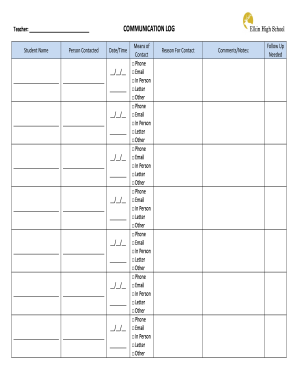
The Parent Communication Log includes essential fields such as date, time, method of communication, reason for contact, and outcome. This user-friendly fillable form template can be easily completed, allowing for seamless entry of information. Its design caters to various users, ensuring that everyone can utilize the log effectively.
Who Needs the Parent Communication Log?
The primary users of the Parent Communication Log include teachers, school administrators, and parents. Each of these roles plays an essential part in the effective utilization of the log. It can be relevant across various educational contexts, particularly in K-12 schools and special education settings, helping to ensure that communication is properly documented.
-
Teachers: Record parent interactions related to student performance
-
School Administrators: Maintain oversight of communications
-
Parents: Track interactions with the school
How to Fill Out the Parent Communication Log Online
Filling out the Parent Communication Log online using pdfFiller is a straightforward process. Users can access the log through the pdfFiller platform, where they will find clear navigation to fill out the form. After completing the form, users can easily save and submit their entries with just a few clicks.
-
Access the Parent Communication Log on pdfFiller
-
Complete all required fields
-
Save the completed log
-
Submit the log through the specified channels
Key Information to Gather Before Completing the Log
Prior to filling out the Parent Communication Log, certain information is necessary to ensure accuracy. Users should gather essential details, including student information and specifics regarding each communication interaction. Emphasizing the importance of thoroughness and precision can significantly enhance the effectiveness of the log.
-
Student's name and grade
-
Date and time of communication
-
Purpose of the interaction
Security and Compliance in Using the Parent Communication Log
Users of the Parent Communication Log can feel assured regarding security measures in place when utilizing pdfFiller. The platform employs 256-bit encryption, ensuring high-level security for all documents. Additionally, it complies with GDPR and HIPAA regulations, which protect sensitive information throughout the communication process.
-
256-bit encryption for secure data transmission
-
Compliance with GDPR and HIPAA standards
-
Safe handling of sensitive information
How to Digitally Sign the Parent Communication Log
Understanding the signing requirements for the Parent Communication Log is vital. pdfFiller simplifies this process by allowing users to apply digital signatures, which differ from traditional wet signatures. This capability enhances convenience and security while signing important documents online.
-
Open the Parent Communication Log in pdfFiller
-
Select the option to add a digital signature
-
Follow the prompts to complete the signing process
Submitting the Parent Communication Log
Once the Parent Communication Log is completed, users need to know the submission process. Typically, users can save or print the log as needed. It is essential to follow institutional guidelines on where to submit the completed log for appropriate review and record-keeping.
-
Save the completed log for future reference
-
Print a hard copy if required by your institution
-
Submit the log to the designated office or personnel
Take Advantage of pdfFiller for Your Parent Communication Log Needs
Utilizing pdfFiller for managing the Parent Communication Log streamlines the process significantly. The platform’s features allow for efficient completion and management of the log, ensuring that users can focus on communication rather than paperwork. Users frequently express satisfaction with the ease of use and effectiveness of pdfFiller’s capabilities.
How to fill out the Communication Log
-
1.Access pdfFiller and search for the Parent Communication Log form using the search bar.
-
2.Once you find the form, click on it to open the fillable PDF document.
-
3.Review the fields available on the form and ensure you have all necessary information ready, including student names and details about the communication.
-
4.Fill in the student and parent information in the designated fields, making sure to provide accurate details for effective communication tracking.
-
5.Document the date and time of each parent contact. Ensure to select the method of communication, such as phone, email, or in-person, using the provided options.
-
6.Clearly state the reason for the contact in the relevant section, detailing the purpose of your communication with the parent.
-
7.After filling in the essential fields, review the completed form for accuracy and completeness to avoid missing any critical information.
-
8.Utilize the preview feature on pdfFiller to ensure that everything appears correctly before finalizing the document.
-
9.Once satisfied with the form, proceed to save or download it directly to your device for your records.
-
10.You may also choose to submit the form electronically through pdfFiller or print it if a physical copy is required.

Who is eligible to use the Parent Communication Log?
The Parent Communication Log is designed for educational institutions such as schools and is primarily used by teachers, administrators, and counselors involved in student communication and engagement.
Are there any deadlines for submitting the Parent Communication Log?
There are generally no specific deadlines for utilizing the Parent Communication Log, but it is best to complete it promptly after each parent contact to maintain accurate records.
How can I submit the completed Parent Communication Log?
You can submit the completed Parent Communication Log electronically through pdfFiller's submission options or print it for manual submission to your school's administration.
What supporting documents are necessary when using the Parent Communication Log?
Typically, there are no additional supporting documents required when filling out the Parent Communication Log, but having detailed notes of the contact may aid in accurate completion.
What common mistakes should I avoid when completing the form?
Be sure to double-check that all fields are filled out completely and accurately. Common mistakes include leaving fields blank or providing incorrect contact information for parents.
What is the typical processing time for forms submitted through pdfFiller?
Processing times can vary based on your institution's procedures; however, forms submitted electronically through pdfFiller are usually reviewed promptly by school administrators.
Can the Parent Communication Log be modified once filled out?
Once saved, the Parent Communication Log can be reopened and edited on pdfFiller if further changes are needed before final submission.
Related Forms



Get the latest insights from our blog


If you believe that this page should be taken down, please follow our DMCA take down process
here
.
This form may include fields for payment information. Data entered in these fields is not covered by PCI DSS compliance.