
Last updated on
Oct 19, 2026

Get the free LifeNet Health Benefit Verification Request Form
We are not affiliated with any brand or entity on this form

Fill out
Complete the form online in a simple drag-and-drop editor.

eSign
Add your legally binding signature or send the form for signing.

Share
Share the form via a link, letting anyone fill it out from any device.

Export
Download, print, email, or move the form to your cloud storage.
Why pdfFiller is the best tool for your documents and forms


End-to-end document management
From editing and signing to collaboration and tracking, pdfFiller has everything you need to get your documents done quickly and efficiently.
Accessible from anywhere
pdfFiller is fully cloud-based. This means you can edit, sign, and share documents from anywhere using your computer, smartphone, or tablet.
Secure and compliant
pdfFiller lets you securely manage documents following global laws like ESIGN, CCPA, and GDPR. It's also HIPAA and SOC 2 compliant.
What is Benefit Verification Form
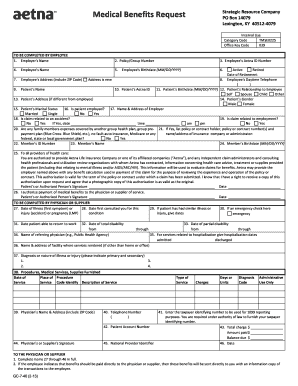
The LifeNet Health Benefit Verification Request Form is a medical billing document used by physicians to verify patient insurance benefits for wound care treatments.
pdfFiller scores top ratings on review platforms




Who needs Benefit Verification Form?
Explore how professionals across industries use pdfFiller.

Benefit Verification Form is needed by:
-
Physicians seeking patient insurance verification
-
Healthcare providers in wound care
-
Billing departments in medical facilities
-
Insurance companies processing claims
-
Patients needing authorization for treatment
Comprehensive Guide to Benefit Verification Form
Understanding the LifeNet Health Benefit Verification Request Form
The LifeNet Health Benefit Verification Request Form is central to ensuring appropriate patient care in wound management. This form primarily serves to verify patient insurance benefits, which is critical for both financial planning and accessing necessary treatments. Verifying insurance benefits helps healthcare providers confirm that patients can receive the wound care treatments they need without unexpected costs.
Purpose and Benefits of Using the LifeNet Health Benefit Verification Request Form
Utilizing the LifeNet Health Benefit Verification Request Form brings numerous advantages. For healthcare providers, it streamlines the insurance verification process, saving time and resources. Patients experience peace of mind knowing their insurance coverage is confirmed, allowing them to focus on their recovery. This form not only simplifies medical billing but also enhances the overall patient experience.
Key Features of the LifeNet Health Benefit Verification Request Form
This form is designed with essential features to enhance usability. It includes fillable fields for entering patient demographics, insurance details, and specific wound information. A physician's signature is required for validation, ensuring that the form is both authentic and secure. To protect sensitive data, the form incorporates various security measures that safeguard patient information.
Who Needs the LifeNet Health Benefit Verification Request Form?
The LifeNet Health Benefit Verification Request Form is primarily utilized by healthcare providers administering wound care treatments. It is essential for patients seeking confirmation of their insurance coverage before proceeding with necessary procedures. Understanding the eligibility criteria and using the form appropriately can facilitate timely and effective treatment.
How to Fill Out the LifeNet Health Benefit Verification Request Form Online
Filling out the LifeNet Health Benefit Verification Request Form online is an efficient process. Here’s how to complete it using pdfFiller:
-
Access the online platform and open the form.
-
Input patient demographic information in the designated fields.
-
Enter details concerning the wound and insurance information accurately.
This method ensures that all necessary information is collected quickly and efficiently, enhancing the patient experience.
Submitting the LifeNet Health Benefit Verification Request Form
After completing the LifeNet Health Benefit Verification Request Form, there are several submission methods available. You can submit the form via email or directly upload it to a designated portal. Be sure to follow the necessary steps after filling out the form, such as ensuring that all fields are completed and obtaining a physician's signature. Expect confirmation of form receipt and processing time updates afterward.
Common Errors and How to Avoid Them When Filing the LifeNet Health Benefit Verification Request Form
Users may encounter specific pitfalls when filling out the form. Common errors include providing incomplete information or neglecting to obtain a physician's signature. To avoid these issues, consider following this checklist before submission:
-
Review all entered information for accuracy.
-
Ensure the physician's signature is present.
-
Cross-check that the correct insurance details are included.
Privacy, Security, and Compliance with the LifeNet Health Benefit Verification Request Form
Protecting sensitive patient information is paramount when using the LifeNet Health Benefit Verification Request Form. The form utilizes 256-bit encryption to safeguard data, complying with HIPAA and GDPR guidelines. Ensuring confidentiality during the handling of patient information is vital for maintaining trust and security throughout the process.
Maximize Your Efficiency with pdfFiller for the LifeNet Health Benefit Verification Request Form
Enhancing your experience with the LifeNet Health Benefit Verification Request Form is straightforward with pdfFiller. The platform allows users to easily edit, sign, and share the form securely. With intuitive features designed for user convenience, pdfFiller provides a seamless experience for filling out and submitting crucial documents, enabling you to focus on what truly matters—effective healthcare delivery.
How to fill out the Benefit Verification Form
-
1.To access the LifeNet Health Benefit Verification Request Form on pdfFiller, navigate to the pdfFiller website and log in to your account. Use the search bar to find the form by entering its name.
-
2.Once the form is open, familiarize yourself with the interface. pdfFiller provides tools to easily fill in the form fields. Click on the areas that are marked for input.
-
3.Before completing the form, gather all necessary information including patient demographics, details of the wound, insurance information, and physician contact details. This will ensure you have everything you need.
-
4.Begin filling in the form, starting with the patient demographic information. Enter all relevant details accurately, making sure to double-check for any typos or errors.
-
5.Next, provide details regarding the wound care treatment and the specifics of the insurance policy. This section is critical for proper verification.
-
6.After filling all fields, review the completed form carefully. Check for any missing information and ensure that all data is accurate. pdfFiller allows you to save drafts, so make use of this feature if needed.
-
7.Finally, after reviewing, you can finalize the form. Use the save option to download it to your device or directly submit it through pdfFiller's submission options. You can also print a copy for your records.

Who is eligible to use the LifeNet Health Benefit Verification Request Form?
The form is primarily intended for physicians and healthcare providers who need to verify patient insurance benefits specifically for wound care treatments.
Are there deadlines associated with submitting this form?
While specific deadlines can vary, it is recommended to complete and submit the form as soon as possible to ensure timely processing of insurance claims related to wound care.
What methods can be used to submit the completed form?
You can submit the completed LifeNet Health Benefit Verification Request Form electronically through pdfFiller, or you may choose to print it out and send it via mail to the relevant insurance provider.
What supporting documents are required with this form?
Typically, you will need to include relevant patient insurance cards and any necessary medical documentation that supports the claim for wound care treatments.
What are common mistakes to avoid when filling out the form?
Ensure all fields are filled out completely and accurately. Common mistakes include typos in patient information and missing signatures, which can delay processing.
How long does it usually take for the verification request to be processed?
Processing times can vary by insurance provider. However, it typically takes between 5-10 business days to receive a response to your verification request.
What should I do if I have concerns about the form?
If you have any specific concerns about the LifeNet Health Benefit Verification Request Form, you should reach out to the provided contact information on the form or your healthcare provider for further assistance.
Related Forms





Get the latest insights from our blog


If you believe that this page should be taken down, please follow our DMCA take down process
here
.
This form may include fields for payment information. Data entered in these fields is not covered by PCI DSS compliance.