
Last updated on
Oct 19, 2026

Get the free Sports Physical Form
We are not affiliated with any brand or entity on this form

Fill out
Complete the form online in a simple drag-and-drop editor.

eSign
Add your legally binding signature or send the form for signing.

Share
Share the form via a link, letting anyone fill it out from any device.

Export
Download, print, email, or move the form to your cloud storage.
Why pdfFiller is the best tool for your documents and forms


End-to-end document management
From editing and signing to collaboration and tracking, pdfFiller has everything you need to get your documents done quickly and efficiently.
Accessible from anywhere
pdfFiller is fully cloud-based. This means you can edit, sign, and share documents from anywhere using your computer, smartphone, or tablet.
Secure and compliant
pdfFiller lets you securely manage documents following global laws like ESIGN, CCPA, and GDPR. It's also HIPAA and SOC 2 compliant.
What is Sports Physical
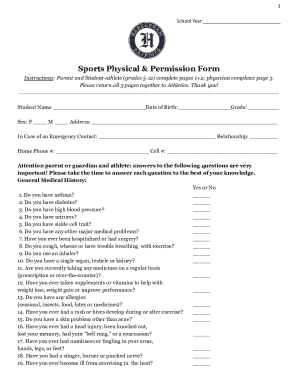
The Sports Physical Form is a medical consent document used by physicians to assess the health of student athletes and parents/guardians to provide emergency medical treatment consent.
pdfFiller scores top ratings on review platforms




Who needs Sports Physical?
Explore how professionals across industries use pdfFiller.

Sports Physical is needed by:
-
Student athletes requiring health assessments
-
Parents or guardians providing consent for medical treatment
-
Physicians evaluating athletic fitness
-
School administrators ensuring compliance with health regulations
-
Athletic coaches managing student participation
-
Health care providers involved in sports physicals
Comprehensive Guide to Sports Physical
What is the Sports Physical Form?
The Sports Physical Form is a crucial document used by Trinity Lutheran School to ensure student athletes are healthy and ready for participation in sports. This form is designed for use by both physicians and parents or guardians. It includes important information assessed by the physician regarding each student athlete's health status.
The form is essential not only for evaluating the physical condition of students but also for ensuring that they are cleared for participation in sports. To validate the form, signatures are required from both the physician and the parent or guardian, ensuring all necessary consents are documented.
Purpose and Benefits of the Sports Physical Form
The Sports Physical Form serves a vital purpose for student athletes and their families. It fundamentally assures the health and safety of children participating in school athletics. By providing a clear view of medical conditions or concerns, this form enables informed decisions regarding athletic participation.
-
Allows parents or guardians to give emergency medical consent.
-
Facilitates efficient communication between parents and healthcare providers regarding health issues.
-
Helps identify potential health risks associated with sports activities.
Who Needs the Sports Physical Form?
Basically, anyone involved in school sports activities needs the Sports Physical Form. This includes student athletes who must engage in sports for a certain duration each season.
Additionally, parents or guardians play a vital role as they must sign and consent to the medical treatment outlined in the form. Physicians conducting evaluations also require the form to assess the athlete's readiness for sports participation effectively.
How to Fill Out the Sports Physical Form Online (Step-by-Step)
Filling out the Sports Physical Form online using pdfFiller is straightforward and user-friendly. You can complete the digital form by following these steps:
-
Access pdfFiller and locate the Sports Physical Form.
-
Fill in your personal information, including name and contact details.
-
Complete the medical history section with relevant health information.
-
Provide consent by checking the appropriate boxes.
-
Review all entered information for accuracy before submission.
pdfFiller simplifies this process with its intuitive design, allowing users to move seamlessly through each section of the form.
Field-by-Field Instructions for the Sports Physical Form
The Sports Physical Form consists of several key fields that require specific information. Understanding these fields will aid in accurate completion:
-
Name: Enter the full name of the student athlete.
-
Age: Specify the age of the student athlete.
-
Height and Weight: Provide the current height and weight measurements.
-
Medical History: Include details about any previous medical conditions or injuries.
-
Checkboxes: Ensure that you check boxes related to physician recommendations and consents as required.
Attention to detail in providing emergency contact information is also essential during the filling process.
How to Sign the Sports Physical Form
Signing the Sports Physical Form is a critical step to confirm its validity. The process can be completed using either digital signatures or wet signatures. Here’s how to proceed:
-
Digital Signatures: Utilize pdfFiller's eSign functionality for quick and efficient signing.
-
Wet Signatures: If preferred, print the form to sign it manually.
-
Ensure both the physician and parent or guardian sign the form for validity.
Completing this signing process enhances the official nature of the document, promoting responsible cooperation among all parties involved.
Submission Methods and Where to Submit the Sports Physical Form
Submitting the Sports Physical Form is a crucial final step that ensures compliance before participating in sports. Users have several options for submitting the form:
-
Online Submission: Utilize pdfFiller for immediate submission.
-
Manual Submission: Print and deliver the form to school administration or designated officials.
Timely submission is essential to avoid delays in participation, so adhere to the deadlines specified by Trinity Lutheran School.
What Happens After You Submit the Sports Physical Form?
After submission, the following process occurs:
-
Confirmation of receipt: You will receive acknowledgment once your form has been processed.
-
Processing Timeline: Expect a certain timeframe for reviewing and approving the form.
-
Next Steps: Be prepared for potential follow-up actions based on the evaluation of the submitted information.
If necessary, there may also be a way to check the status of your submission for peace of mind.
Privacy and Security for the Sports Physical Form
Data protection is paramount when handling sensitive information in the Sports Physical Form. pdfFiller prioritizes security through its commitment to strict protocols:
-
256-bit encryption to safeguard data during transmission.
-
Compliance with HIPAA and GDPR regulations.
-
Effective risk management to protect sensitive health information of student athletes.
Such measures ensure that both health and privacy standards are met throughout the handling of the Sports Physical Form.
Leverage pdfFiller for Easy Form Management
Using pdfFiller enhances your experience in managing the Sports Physical Form. Key features include:
-
Ability to edit and securely share the form efficiently.
-
User-friendly interface allowing easy access from any device.
-
Simple eSigning capabilities that save time and effort.
Embrace the convenience pdfFiller offers to streamline the completion and submission of the Sports Physical Form, making the process easier for everyone involved.
How to fill out the Sports Physical
-
1.To access the Sports Physical Form on pdfFiller, go to the pdfFiller website and use the search bar to find the form by its name.
-
2.Once you open the form, navigate through the fillable fields easily using your mouse or keyboard. Click on each field to enter the required information.
-
3.Before starting, gather necessary information including the student's name, age, height, weight, and emergency contact details. This will help ensure all fields can be completed efficiently.
-
4.As you fill in the form, follow the explicit instructions provided for both the physician and parent/guardian. Make sure to document the physician's recommendations carefully.
-
5.After completing the required fields, review the entire form to ensure that all areas are correctly filled. Look for any blank fields or missing signatures.
-
6.To finalize the form, check that the physician and parent/guardian have signed. Use the signature function on pdfFiller to collect digital signatures.
-
7.Once finalized, save your work by clicking the save icon. You can also download the filled form directly to your device or submit it through pdfFiller to the intended recipient.

Who is eligible to fill out the Sports Physical Form?
The Sports Physical Form can be filled out by physicians evaluating student athletes and parents or guardians giving consent for medical treatment on behalf of their children.
Is there a deadline for submitting the form?
Typically, the Sports Physical Form should be submitted before the start of the athletic season or as required by the school’s athletic department. Always verify with the school for specific timelines.
How should I submit the completed form?
You can submit the completed Sports Physical Form through pdfFiller by using the submit option or by downloading it and sending it via email or physical mail to the relevant authority.
What supporting documents are required for the form?
Generally, no additional documents are required with the Sports Physical Form. However, it’s advisable to have the student’s medical history or previous physical assessments available during completion.
What are common mistakes to avoid when filling out the form?
Common mistakes include missing signatures, leaving fields incomplete, and failing to provide accurate emergency contact information. Double-check all entries before submission to avoid delays.
How long does it take to process the Sports Physical Form?
Processing time varies by institution but generally takes a few days to a week. It’s best to submit the form as early as possible to avoid any participation delays.
Can the Sports Physical Form be notarized?
No, notarization is not required for the Sports Physical Form. Ensure all information is accurately filled out and signed by the appropriate parties.
Related Forms



Get the latest insights from our blog


If you believe that this page should be taken down, please follow our DMCA take down process
here
.
This form may include fields for payment information. Data entered in these fields is not covered by PCI DSS compliance.