
Last updated on
Oct 19, 2026

Get the free Ontario Financial Hardship Unlocking Form
We are not affiliated with any brand or entity on this form

Fill out
Complete the form online in a simple drag-and-drop editor.

eSign
Add your legally binding signature or send the form for signing.

Share
Share the form via a link, letting anyone fill it out from any device.

Export
Download, print, email, or move the form to your cloud storage.
Why pdfFiller is the best tool for your documents and forms


End-to-end document management
From editing and signing to collaboration and tracking, pdfFiller has everything you need to get your documents done quickly and efficiently.
Accessible from anywhere
pdfFiller is fully cloud-based. This means you can edit, sign, and share documents from anywhere using your computer, smartphone, or tablet.
Secure and compliant
pdfFiller lets you securely manage documents following global laws like ESIGN, CCPA, and GDPR. It's also HIPAA and SOC 2 compliant.
What is Ontario FHU Form
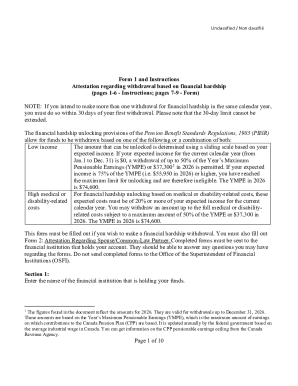
The Ontario Financial Hardship Unlocking Form (FORM FHU 3) is a personal finance document used by individuals in Ontario to apply for the release of funds from locked-in retirement accounts due to financial hardship.
pdfFiller scores top ratings on review platforms




Who needs Ontario FHU Form?
Explore how professionals across industries use pdfFiller.

Ontario FHU Form is needed by:
-
Individuals facing financial challenges in Ontario
-
Spouses of account owners needing access to funds
-
Residents needing assistance with first and last month rent
-
Holders of locked-in accounts like LIRA, LIF, or LRIF
-
Those seeking to unlock pension benefits due to hardship
-
Consumers looking for Ontario financial assistance programs
Comprehensive Guide to Ontario FHU Form
Understanding the Ontario Financial Hardship Unlocking Form
The Ontario Financial Hardship Unlocking Form is crucial for residents facing financial distress, allowing them to access locked-in retirement funds. This form serves as a financial lifeline for covering essential expenses, particularly rent during challenging times. Individuals who find themselves in dire situations can benefit significantly from this financial hardship unlocking process.
Key Features of the Ontario Financial Hardship Unlocking Form (FORM FHU 3)
FORM FHU 3 comprises several important components that applicants must understand. Key features include:
-
Multiple fillable fields and checkboxes to capture necessary information.
-
A requirement for signatures from both the account owner and their spouse, ensuring compliance.
-
Clear instructions to navigate the form easily.
Who Should Use the Ontario Financial Hardship Unlocking Form?
This form is designed for owners of locked-in retirement accounts in Ontario. Common scenarios necessitating the use of this form include unexpected job loss, medical emergencies, or other incidents that create a financial burden. By utilizing the Ontario Financial Hardship Unlocking Form, individuals can access essential funds, including Ontario pension benefits.
Eligibility Criteria for the Ontario Financial Hardship Unlocking Form
To be eligible for the Ontario Financial Hardship Unlocking Form, applicants must meet specific criteria, which include:
-
Demonstrating financial hardship that necessitates covering rent.
-
Knowing that the form can only be submitted once per calendar year.
Those who meet these requirements can take advantageous steps toward financial relief through this form.
Step-by-Step Guide: How to Fill Out the Ontario Financial Hardship Unlocking Form
Completing the Ontario Financial Hardship Unlocking Form is straightforward when following these steps:
-
Access the form online using pdfFiller.
-
Enter personal details, including your name and contact information.
-
Provide your locked-in account information.
-
Include details about your rental property, such as address and rental amounts.
-
Ensure all fields are completed and signatures obtained.
Properly following these steps will ensure a smooth submission process for the Ontario Financial Hardship Unlocking Form.
Common Mistakes to Avoid When Filling Out the Ontario Financial Hardship Unlocking Form
While completing the form, individuals frequently encounter errors that can hinder processing. Common mistakes include:
-
Forgetting to obtain the necessary signatures from both the account owner and spouse.
-
Leaving fields blank or providing incorrect information.
Validating the form before submission will enhance acceptance rates and simplify the process.
Submission and Next Steps After Completing the Ontario Financial Hardship Unlocking Form
Upon completing the Ontario Financial Hardship Unlocking Form, follow these steps for submission:
-
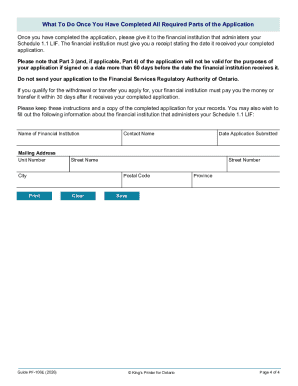
Submit the form through the designated channels provided by your financial institution.
-
Keep track of your submission progress, ensuring you have documentation of your application.
Post-submission, applicants can expect a processing timeline along with potential fees associated with the withdrawal.
Protecting Your Information: Security and Compliance with the Ontario Financial Hardship Unlocking Form
When filling out the Ontario Financial Hardship Unlocking Form, it's essential to prioritize security. pdfFiller implements advanced security measures, including 256-bit encryption, to protect sensitive information. Compliance with regulations such as GDPR and HIPAA ensures that personal data remains secure throughout the form-filling process.
Utilizing pdfFiller for Your Ontario Financial Hardship Unlocking Form Needs
pdfFiller enhances the experience of filling out the Ontario Financial Hardship Unlocking Form by providing tools for efficient document management. Users will find capabilities such as eSigning and converting formats to be invaluable. By utilizing pdfFiller, individuals can streamline their form-filling processes and ensure utmost accuracy.
Completing the Ontario Financial Hardship Unlocking Form with Confidence
Taking action on your financial needs can be empowering. With the straightforward interface of pdfFiller, completing the Ontario Financial Hardship Unlocking Form is easier than ever. Users can confidently submit their forms and benefit from available support to navigate the process effectively.
How to fill out the Ontario FHU Form
-
1.To begin, access the Ontario Financial Hardship Unlocking Form on pdfFiller. You can find it by searching the form name in the pdfFiller search bar or by visiting their website directly.
-
2.Once you have opened the form, familiarize yourself with the layout. pdfFiller provides fillable fields, checkboxes, and clear directions throughout the document.
-
3.Before completing the form, gather all necessary information. Ensure you have details about your locked-in account, personal identification, and specific information regarding the rental property.
-
4.Start filling in your personal details in the designated fields. Make sure to accurately enter your name, contact information, and other required identifiers as instructed.
-
5.Next, navigate to the section where you will input information about your locked-in retirement account. Include the type of account, institution name, and account number.
-
6.Fill in the details regarding the rental property requiring assistance. This includes the address and any pertinent details about the landlord or rental agreement.
-
7.Double-check all the completed sections for accuracy and completeness. Take a moment to ensure all necessary information has been provided thoroughly.
-
8.To finalize, provide the required signatures. Both the account owner and spouse must sign where indicated. Make sure each signature is legible.
-
9.After reviewing the entire form, utilize pdfFiller's save and download features to secure your document. You can either save it to your computer or download it in the desired format.
-
10.Finally, submit your completed form according to your financial institution's guidelines. Ensure that you keep a copy for your records.

Who is eligible to use the Ontario Financial Hardship Unlocking Form?
Individuals in Ontario who own locked-in retirement accounts like LIRA, LIF, or LRIF and are experiencing financial hardship may use this form to access their funds.
Can both the owner and spouse use the form together?
Yes, the form requires signatures from both the account owner and their spouse, if applicable, for processing the application for unlocking funds.
What is the deadline for submitting the unlocking request?
The form can be used once per calendar year. It's crucial to submit your application as soon as possible to avoid delays in accessing needed funds.
What documents should I prepare before filling the form?
Before filling out the form, gather personal identification, details of your locked-in account, and information about the rental property for which you need assistance.
How do I submit the Ontario Financial Hardship Unlocking Form?
After completing the form, submit it according to your financial institution's procedures. Some institutions may allow electronic submissions, while others may require paper copies.
What common mistakes should I avoid when filling out the form?
Ensure all sections are completed accurately and check for legibility of signatures. Failing to provide complete or clear information may result in processing delays.
How long does it take to process the unlocking request after submission?
Processing times may vary based on the financial institution, but generally, it can take anywhere from a few weeks to over a month. Check directly with your institution for specifics.


Get the latest insights from our blog


If you believe that this page should be taken down, please follow our DMCA take down process
here
.
This form may include fields for payment information. Data entered in these fields is not covered by PCI DSS compliance.