
Last updated on
Oct 19, 2026

Get the free Double Taxation Relief Form 41
We are not affiliated with any brand or entity on this form

Fill out
Complete the form online in a simple drag-and-drop editor.

eSign
Add your legally binding signature or send the form for signing.

Share
Share the form via a link, letting anyone fill it out from any device.

Export
Download, print, email, or move the form to your cloud storage.
Why pdfFiller is the best tool for your documents and forms


End-to-end document management
From editing and signing to collaboration and tracking, pdfFiller has everything you need to get your documents done quickly and efficiently.
Accessible from anywhere
pdfFiller is fully cloud-based. This means you can edit, sign, and share documents from anywhere using your computer, smartphone, or tablet.
Secure and compliant
pdfFiller lets you securely manage documents following global laws like ESIGN, CCPA, and GDPR. It's also HIPAA and SOC 2 compliant.
What is Form 41
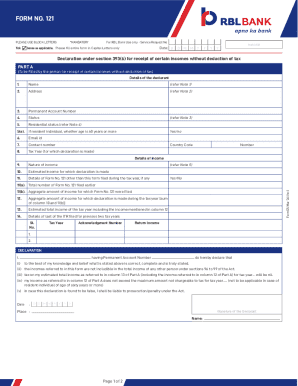
The Double Taxation Relief Form 41 is a tax document used by applicants in India to provide necessary information under section 159(8) of the Income Tax Act to claim relief from double taxation.
pdfFiller scores top ratings on review platforms




Who needs Form 41?
Explore how professionals across industries use pdfFiller.

Form 41 is needed by:
-
Individuals seeking double taxation relief
-
Taxpayers with foreign income
-
Non-resident Indians (NRIs) submitting tax returns
-
Tax consultants assisting clients with tax matters
-
Businesses operating in India relying on tax treaties
Comprehensive Guide to Form 41
What is the Double Taxation Relief Form 41?
The Double Taxation Relief Form 41 is pivotal within the framework of the Indian Income Tax Act, specifically concerning Section 159(8). This form is designed to streamline the process by which applicants can claim relief from double taxation based on their residential status and other relevant criteria. While it is crucial for assessing tax liabilities, it is notable that the form does not involve the IRS, focusing instead on local compliance with Indian tax regulations.
Purpose and Benefits of the Double Taxation Relief Form 41
Claiming relief from double taxation can significantly reduce the tax burden for residents. Filling out the double taxation relief form correctly and on time offers various benefits, such as ensuring compliance with tax obligations and facilitating smoother financial planning. Timely submission can prevent legal complications and enhance the accuracy of reported income.
Who Needs to Fill Out the Double Taxation Relief Form 41?
Eligible applicants for the Double Taxation Relief Form 41 include both individuals and entities who have income subject to taxation in more than one country. Specific circumstances necessitating this form often arise in scenarios involving international income. Failing to submit this form can lead to complications, including potential penalties and a higher tax liability.
Eligibility Criteria for the Double Taxation Relief Form 41
The eligibility for completing the income tax form 41 depends on several criteria, including residency status and types of income. To qualify, applicants must provide evidence of taxation in another jurisdiction that aligns with the requirements stated in the Indian Income Tax Act. Checking one's eligibility beforehand is essential to ensure compliance and avoid issues during processing.
How to Fill Out the Double Taxation Relief Form 41 Online
Filling out the double taxation relief form 41 online is a straightforward process. Follow these steps to ensure accuracy:
-
Access the form through pdfFiller.
-
Carefully complete all required fields, ensuring that personal and residential information is accurate.
-
Review the declaration and verification sections thoroughly.
-
Submit the form electronically, making sure to e-verify with a Digital Signature Certificate.
Common Errors When Completing the Double Taxation Relief Form 41
Applicants often make several common mistakes when completing the double taxation relief form 41. These errors can include incorrect personal information and missing signatures. To avoid these pitfalls, it’s advisable to double-check each field, verify the documents required, and consult guidance resources as necessary. Reviewing the completed form before submission can help maintain accuracy and compliance.
How to Submit the Double Taxation Relief Form 41
Submitting the completed double taxation relief form 41 can be done through several methods:
-
Online submission via pdfFiller or the Income Tax Department's portal.
-
Mailing a hard copy to the designated tax office.
Be aware of important deadlines to ensure timely processing and compliance with tax regulations.
What Happens After You Submit the Double Taxation Relief Form 41?
After submitting the double taxation relief form 41, you should receive a confirmation of receipt. Tracking options are often available to monitor the status of your application. If there are any issues or rejections, applicants should follow the prescribed process to address and rectify the concerns raised by the tax authorities.
Security and Compliance When Handling the Double Taxation Relief Form 41
Managing sensitive documents such as the double taxation relief form 41 requires stringent security measures. pdfFiller employs 256-bit encryption and adheres to data protection regulations including HIPAA and GDPR compliance. This ensures that your information remains confidential and safe throughout the process.
Maximize Your Efficiency with pdfFiller for Double Taxation Relief Form 41
Using pdfFiller can greatly simplify the process of completing and submitting the double taxation relief form 41. The platform offers various features that make document management seamless, including eSigning capabilities and form filling assistance. By leveraging pdfFiller’s tools, users can maximize their efficiency and improve their experience with tax document processing.
How to fill out the Form 41
-
1.Access the Double Taxation Relief Form 41 by visiting pdfFiller's website and searching for the form in the tax forms section.
-
2.Open the form by clicking on it, and allow pdfFiller’s interface to load the document in the editable format.
-
3.Before starting, gather necessary details such as your personal identification information, residential details, and specifics of the income that may be subject to double taxation.
-
4.Use the fillable fields and checkboxes to enter your information. Ensure accuracy in your details to avoid any delays in processing.
-
5.Follow the on-screen instructions for each section, and utilize the help features available on pdfFiller to clarify any uncertainties.
-
6.Carefully review all filled sections to ensure that all information is correct and complete before finalizing.
-
7.Once satisfied with the information, save the document. You can choose to download it in a preferred format or submit it directly through the available submission options on pdfFiller.

Who is eligible to submit the Double Taxation Relief Form 41?
Any individual or entity that qualifies under section 159(8) of the Income Tax Act, including taxpayers with foreign income or NRIs, can submit Form 41 to claim double taxation relief.
What are the deadlines for submitting the Form 41?
The submission deadline for Form 41 typically aligns with the income tax return filing deadline in India. Ensure you check the yearly tax calendar to meet all requirements on time.
How can I submit the Double Taxation Relief Form 41?
You can submit Form 41 electronically through the Income Tax Department's e-filing portal or by using pdfFiller, where you can fill out the form and submit it securely.
What supporting documents are required with Form 41?
Supporting documents generally include proof of income, tax residency certificates, and identification documents. Always verify the latest requirements before submission.
What common mistakes should I avoid when filling out Form 41?
Ensure that all entries are accurate, such as personal details and income amounts. Also, avoid leaving sections blank or providing inconsistent information that can lead to delays.
How long does it take to process the Form 41?
Processing times for Form 41 may vary, but applications are typically processed within a few weeks. You can check your status online on the Income Tax Department's portal.
Is there a fee for submitting Form 41?
Generally, there is no fee for submitting Form 41 itself. However, professional service fees may apply if you are using a tax consultant or online service for submission assistance.
Related Forms





Get the latest insights from our blog


If you believe that this page should be taken down, please follow our DMCA take down process
here
.
This form may include fields for payment information. Data entered in these fields is not covered by PCI DSS compliance.