
Last updated on
Oct 19, 2026

Get the free Non-Disclosure Agreement Template
We are not affiliated with any brand or entity on this form

Fill out
Complete the form online in a simple drag-and-drop editor.

eSign
Add your legally binding signature or send the form for signing.

Share
Share the form via a link, letting anyone fill it out from any device.

Export
Download, print, email, or move the form to your cloud storage.
Why pdfFiller is the best tool for your documents and forms


End-to-end document management
From editing and signing to collaboration and tracking, pdfFiller has everything you need to get your documents done quickly and efficiently.
Accessible from anywhere
pdfFiller is fully cloud-based. This means you can edit, sign, and share documents from anywhere using your computer, smartphone, or tablet.
Secure and compliant
pdfFiller lets you securely manage documents following global laws like ESIGN, CCPA, and GDPR. It's also HIPAA and SOC 2 compliant.
What is NDA Template
The Non-Disclosure Agreement Template is a legal document used by businesses and individuals to protect confidential information shared between parties.
pdfFiller scores top ratings on review platforms




Who needs NDA Template?
Explore how professionals across industries use pdfFiller.

NDA Template is needed by:
-
Businesses needing to secure trade secrets
-
Freelancers sharing proprietary information
-
Startups seeking investor confidentiality
-
Consultants providing sensitive client work
-
Parties entering into negotiations or partnerships
-
Contractors working with sensitive data
Comprehensive Guide to NDA Template
What is the Non-Disclosure Agreement Template?
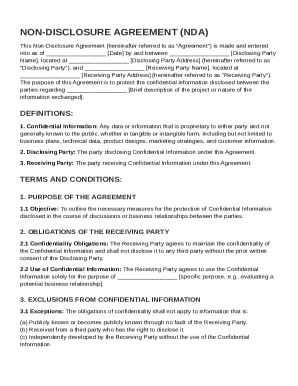
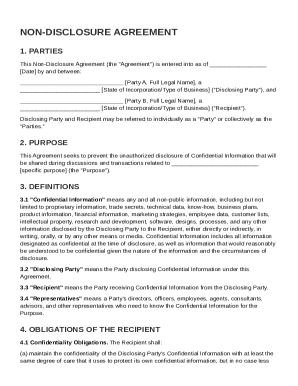
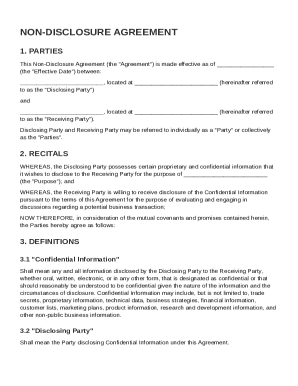
A Non-Disclosure Agreement (NDA) is a legal contract vital for protecting confidential and proprietary information shared between parties. This document outlines what constitutes confidential information, distinguishing between proprietary details and other types of information. It generally takes two forms: unilateral agreements, where one party shares confidential information, and mutual agreements, where both parties divulge sensitive information. Having a formal NDA in place strengthens business relationships by safeguarding sensitive details.
Purpose and Benefits of Using an NDA Template
Utilizing a template for drafting Non-Disclosure Agreements streamlines the creation process and ensures adherence to legal standards. It saves time by providing a structured format, reducing misunderstandings regarding confidentiality. The use of an NDA template protects the interests of both parties in professional settings by clearly defining obligations concerning sensitive information.
Key Features of the Non-Disclosure Agreement Template
The Non-Disclosure Agreement template incorporates essential features that enhance its usability and effectiveness. Key components include:
-
Blank fields for user input, including signatures, date, and print name.
-
Optional checkboxes to specify between unilateral and mutual agreements.
-
Definitions of confidentiality specifics that clarify what information is protected.
-
Governing law provisions to establish jurisdiction in case of disputes.
Who Needs the Non-Disclosure Agreement Template?
This NDA template is designed for a wide range of users, including businesses and individuals aiming to protect sensitive information. Professionals in sectors like tech, finance, and healthcare benefit significantly from using NDAs. Additionally, partners, contractors, or employees who require access to confidential information should utilize this document to ensure mutual understanding of confidentiality obligations.
How to Fill Out the Non-Disclosure Agreement Template Online
Filling out the Non-Disclosure Agreement template online involves several straightforward steps:
-
Access the NDA template on pdfFiller.
-
Edit the document by filling in the required fields, such as names and signatures.
-
Review each section carefully to prevent errors.
-
Validate the information before finalizing the document for signing.
Signing the Non-Disclosure Agreement Template
The signing process for NDAs can vary, with two primary methods available: digital signatures and wet signatures. Digital signatures offer a convenient option through platforms like pdfFiller, providing a secure and efficient signing process. Both types of signatures hold legal validity, ensuring that the document is enforceable regardless of the method used.
Common Errors and How to Avoid Them When Using the NDA Template
Users often encounter pitfalls while filling out the NDA template. Common mistakes include:
-
Missing signatures or initials where required.
-
Incorrect or omitted dates, which may invalidate the agreement.
-
Failure to specify the type of agreement (unilateral or mutual).
To ensure accuracy, users should double-check all entries and review the document for completeness before submission.
Security and Compliance when Using the NDAs
Ensuring document security and compliance is critical when using NDAs. pdfFiller employs robust security measures, including 256-bit encryption and compliance with regulations like GDPR. Protecting sensitive data is paramount when creating and sharing NDAs. Best practices include securely storing signed documents and implementing access controls to limit who can view or edit the agreements.
How to Download, Save, and Share the Completed NDA Template
Managing your completed Non-Disclosure Agreement is straightforward. Users can:
-
Download the NDA template as a PDF for easy storage.
-
Share the document securely with involved parties via email or other secure methods.
-
Save edits and access the document later from any device.
Make Your Documents Stand Out with pdfFiller
pdfFiller offers a user-friendly platform that simplifies the processes of filling, signing, and managing legal documents online. Highlighting ease of use and comprehensive document management tools, pdfFiller stands out as a reliable choice for all your Non-Disclosure Agreement needs. Utilizing such a robust platform ensures your legal documents are professionally handled and securely managed.
How to fill out the NDA Template
-
1.To start, navigate to pdfFiller's website and log in or create an account if you do not have one.
-
2.Use the search bar to find the 'Non-Disclosure Agreement Template' and select it from the search results to open the document.
-
3.Review the document layout and familiarize yourself with the fields that need completion.
-
4.Before starting, gather necessary information, including the names of the parties involved, the type of agreement (unilateral or mutual), and any specific confidential information to include.
-
5.Begin filling out the form by clicking on the designated fields to enter text directly.
-
6.Utilize pdfFiller's tools to check boxes for unilateral or mutual agreements as your situation requires.
-
7.Ensure that both parties' names and contact information are accurately entered, paying attention to the format specified in the template.
-
8.Once all information is filled out, review the completed document for accuracy and clarity.
-
9.Use the 'Preview' feature to see how the finalized document will look.
-
10.After reviewing, click on the save button to store your completed document.
-
11.You can download the NDA in your preferred format or share it directly from pdfFiller by entering the recipient's email address.
-
12.If required, both parties should sign the document digitally to complete the form.

Who is eligible to use the Non-Disclosure Agreement Template?
Any business or individual looking to protect confidential information can use the Non-Disclosure Agreement Template. It is suitable for various scenarios, including partnerships, consulting, and employment relations.
What is the time frame for completing the NDA?
Completing the Non-Disclosure Agreement Template can typically be done in a short time if all necessary information is readily available. Make sure to review it thoroughly before finalizing.
How should I submit the completed NDA?
After completing the NDA, you can either download and print it for signatures or use pdfFiller's e-signature feature to sign the document electronically. Ensure both parties sign before using the NDA.
Are there any supporting documents required?
Generally, no supporting documents are needed to complete a Non-Disclosure Agreement. However, you might want to provide context about the confidential information being protected, depending on your unique situation.
What common mistakes should I avoid when completing the NDA?
Ensure that all fields are accurately filled, especially the parties’ names and contact information. Avoid leaving any section blank, as it may invalidate the agreement.
How long is the NDA valid after signatures?
The validity of the NDA typically lasts for the duration specified within the document. It's important to clearly define this time frame in the agreement.
What should I do if I need to update or amend the NDA?
If you need to update the Non-Disclosure Agreement, create a new version that reflects the changes. Both parties will need to sign the amended document to ensure it's legally binding.
Related Forms



Get the latest insights from our blog


If you believe that this page should be taken down, please follow our DMCA take down process
here
.
This form may include fields for payment information. Data entered in these fields is not covered by PCI DSS compliance.