
Last updated on
Oct 7, 2026

Get the free Notification of Pregnancy Form
We are not affiliated with any brand or entity on this form

Fill out
Complete the form online in a simple drag-and-drop editor.

eSign
Add your legally binding signature or send the form for signing.

Share
Share the form via a link, letting anyone fill it out from any device.

Export
Download, print, email, or move the form to your cloud storage.
Why pdfFiller is the best tool for your documents and forms


End-to-end document management
From editing and signing to collaboration and tracking, pdfFiller has everything you need to get your documents done quickly and efficiently.
Accessible from anywhere
pdfFiller is fully cloud-based. This means you can edit, sign, and share documents from anywhere using your computer, smartphone, or tablet.
Secure and compliant
pdfFiller lets you securely manage documents following global laws like ESIGN, CCPA, and GDPR. It's also HIPAA and SOC 2 compliant.
What is Pregnancy Notification
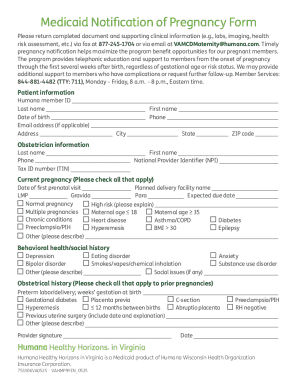
The Notification of Pregnancy Form is a healthcare document used by Humana Healthy Horizons to collect essential patient and obstetrician information for pregnant members in Oklahoma.
pdfFiller scores top ratings on review platforms




Who needs Pregnancy Notification?
Explore how professionals across industries use pdfFiller.

Pregnancy Notification is needed by:
-
Pregnant members enrolled in Humana Healthy Horizons
-
Obstetricians providing care to pregnant patients
-
Healthcare providers coordinating prenatal education
-
Administrative staff managing patient intake
-
Insurance representatives processing claims for maternal care
Comprehensive Guide to Pregnancy Notification
What is the Notification of Pregnancy Form?
The Notification of Pregnancy Form is an essential document for pregnant members of Humana Healthy Horizons in Oklahoma. This form plays a vital role in collecting necessary information to ensure proper healthcare and support throughout the pregnancy journey. It gathers data such as member ID, contact details, current pregnancy status, and obstetrical history.
This form not only facilitates individual healthcare plans but also supports telephonic education and outreach, helping members receive timely information and resources pertinent to their maternity care. Understanding the purpose and importance of this form is crucial for ensuring a smooth pregnancy experience.
Purpose and Benefits of the Notification of Pregnancy Form
Completing the Notification of Pregnancy Form is necessary for several reasons. First, it allows healthcare providers to offer timely support and education tailored to each pregnant member’s needs. By providing detailed information through this form, users can receive personalized care at the outset of their pregnancy.
Notifying an obstetrician regarding pregnancy status is key, as this can significantly impact the care planning process. Users who complete the form help ensure they benefit from comprehensive healthcare services throughout their pregnancies.
Key Features of the Notification of Pregnancy Form
The Notification of Pregnancy Form has unique features that set it apart from standard forms. It includes multiple fillable fields and checkboxes that streamline the data entry process for users. Completing the form online is made simple through its user-friendly interface, designed for efficient submission.
Moreover, rigorous security measures are in place to ensure the sensitive information provided is handled with the utmost care, complying with privacy standards and regulations.
Who Needs the Notification of Pregnancy Form?
This form is specifically designed for Humana members who are expecting parents. It is vital for those undergoing pregnancy to understand the eligibility criteria and ensure that their obstetricians are actively involved in their care. This form should be completed as soon as pregnancy is confirmed, allowing healthcare providers to monitor and support the member throughout their term.
Obstetricians also rely on this information to offer the best care possible, ensuring a coordinated approach to prenatal health.
How to Fill Out the Notification of Pregnancy Form Online
To efficiently complete the Notification of Pregnancy Form online, follow these steps:
-
Access the form through the designated website or portal.
-
Gather essential information, including member ID and obstetrical history.
-
Carefully input the required data into the fillable fields.
-
Double-check for accuracy to avoid common errors.
-
Submit the completed form as instructed.
By following these guidelines, users can ensure a smooth and efficient submission process.
Submission Methods for the Notification of Pregnancy Form
-
Emailing the form directly to the specified contact.
-
Faxing the form to the designated number.
-
Uploading the form online through the secure portal.
It is important to track submissions to confirm receipt and adhere to any deadlines for processing. Ensuring timely submission is vital for receiving appropriate care in a quick manner.
Security and Compliance for the Notification of Pregnancy Form
Security and compliance are paramount when handling the Notification of Pregnancy Form. pdfFiller complies with HIPAA and GDPR standards, ensuring that all sensitive data is protected. The form employs 256-bit encryption to safeguard the information shared by users.
These measures are crucial in maintaining the privacy of patient consent forms, allowing users to submit their information confidently and securely.
How pdfFiller Supports You in Completing the Notification of Pregnancy Form
pdfFiller enhances the form-filling process through its various features designed to make document management easier. Users benefit from capabilities like eSigning, editing, and sharing right from their browser without the need for downloads.
The platform's intuitive design simplifies the form completion experience, guiding users through specific fields without confusion. Resources and assistance are available to support users in case they encounter challenges while filling out the form.
What Happens After You Submit the Notification of Pregnancy Form
Once the Notification of Pregnancy Form has been submitted, users can expect several outcomes. Processing times vary, but users will receive confirmation notifications upon successful submission to keep them informed.
It is also important for members and their obstetricians to be prepared for potential follow-up actions. Understanding common scenarios that may occur post-submission, including possible delays and resolutions, will help users navigate their healthcare journey effectively.
Filling Out the Notification of Pregnancy Form Made Easy with pdfFiller
Utilizing pdfFiller's platform simplifies the entire process of filling out, signing, and submitting the Notification of Pregnancy Form. The tool is designed to enhance security, ease-of-use, and the efficient handling of sensitive documents.
Users are encouraged to leverage pdfFiller today for a streamlined approach to their form management needs.
How to fill out the Pregnancy Notification
-
1.Access the Notification of Pregnancy Form through pdfFiller by searching for the document title in the platform's search bar.
-
2.Once the form is open, review the entire document to familiarize yourself with the fields and checkboxes provided.
-
3.Before starting to fill out the form, ensure you have your member ID, contact information, pregnancy status, and obstetrical history readily available.
-
4.Begin filling in your personal details in the designated fields, making sure to provide accurate and complete information.
-
5.Next, move on to the obstetrician's information section, where you will enter the necessary details about your healthcare provider.
-
6.Utilize pdfFiller's tools to navigate fields easily and ensure that all required fields are filled out correctly.
-
7.Carefully review your inputs to verify all information is accurate and no sections are left incomplete.
-
8.Once you have filled out the form, check for any additional instructions or required checkboxes.
-
9.Finally, save your completed form on pdfFiller. You can download it as a PDF or submit it directly through the platform depending on the provided submission guidelines.

Who is eligible to fill out the Notification of Pregnancy Form?
The Notification of Pregnancy Form is designed for pregnant members of Humana Healthy Horizons in Oklahoma and their obstetricians. Ensure you meet these criteria before attempting to complete the form.
What is the deadline for submitting this form?
It is important to submit the Notification of Pregnancy Form as early as possible during your pregnancy to ensure you receive timely telephonic education and support. Check with your healthcare provider for specific guidelines.
How can I submit the Notification of Pregnancy Form?
You can submit the Notification of Pregnancy Form via pdfFiller by downloading the completed document and uploading it to your healthcare provider's system, or you may provide it directly to your obstetrician.
What supporting documents are needed with this form?
Typically, no additional documents are required when submitting the Notification of Pregnancy Form. However, it is advisable to check if your obstetrician requests any specific supporting documentation.
What common mistakes should I avoid when completing the form?
Common mistakes include leaving required fields blank, providing incorrect information, and forgetting to sign the form. Always double-check your entries before submission.
How long does it take to process the Notification of Pregnancy Form?
The processing time can vary, but typically your obstetrician or healthcare provider will review the submitted form and provide feedback or follow-up within a week.
What should I do if I have questions while filling out the form?
If you have questions while completing the Notification of Pregnancy Form, consider reaching out to your obstetrician's office for guidance or using pdfFiller's help resources for assistance on the platform.
Related Forms



Get the latest insights from our blog


If you believe that this page should be taken down, please follow our DMCA take down process
here
.
This form may include fields for payment information. Data entered in these fields is not covered by PCI DSS compliance.