
Last updated on
Oct 8, 2026

Get the free Member Notification of Pregnancy Form
We are not affiliated with any brand or entity on this form

Fill out
Complete the form online in a simple drag-and-drop editor.

eSign
Add your legally binding signature or send the form for signing.

Share
Share the form via a link, letting anyone fill it out from any device.

Export
Download, print, email, or move the form to your cloud storage.
Why pdfFiller is the best tool for your documents and forms


End-to-end document management
From editing and signing to collaboration and tracking, pdfFiller has everything you need to get your documents done quickly and efficiently.
Accessible from anywhere
pdfFiller is fully cloud-based. This means you can edit, sign, and share documents from anywhere using your computer, smartphone, or tablet.
Secure and compliant
pdfFiller lets you securely manage documents following global laws like ESIGN, CCPA, and GDPR. It's also HIPAA and SOC 2 compliant.
What is Pregnancy Notification
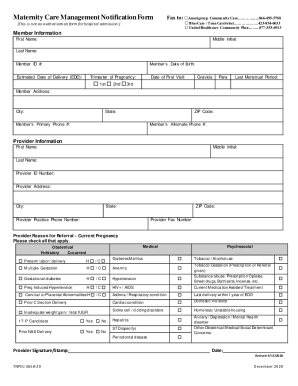
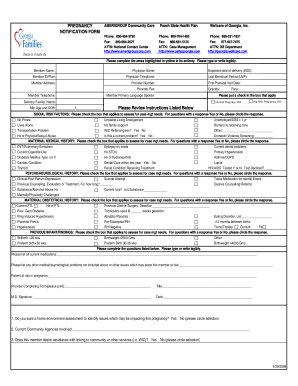
The Member Notification of Pregnancy Form is a confidential healthcare document used by members of Arizona Complete Health-Complete Care Plan to notify their healthcare provider about their pregnancy.
pdfFiller scores top ratings on review platforms




Who needs Pregnancy Notification?
Explore how professionals across industries use pdfFiller.

Pregnancy Notification is needed by:
-
Members of Arizona Complete Health-Complete Care Plan
-
Expectant mothers in Arizona seeking prenatal care
-
Healthcare providers needing pregnancy notifications
-
Patients requiring support services during pregnancy
-
Administrative staff managing patient intake documents
-
Social workers assisting pregnant clients
Comprehensive Guide to Pregnancy Notification
What is the Member Notification of Pregnancy Form?
The Member Notification of Pregnancy Form is a critical healthcare document utilized by members of the Arizona Complete Health-Complete Care Plan. Its primary purpose is to inform healthcare providers about a member's pregnancy, ensuring they receive appropriate prenatal care and support services. Submitting this form is essential for maintaining confidentiality and protecting personal data, allowing expectant members to communicate their pregnancy status securely.
Purpose and Benefits of the Member Notification of Pregnancy Form
This form serves several vital functions. It guarantees that expectant mothers access timely and appropriate prenatal care as well as related services. By facilitating open communication between members and their healthcare providers, this form promotes a collaborative approach to managing health conditions that may impact pregnancy. Overall, the benefits extend to improved maternal and infant health outcomes.
Who Needs the Member Notification of Pregnancy Form?
Members of the Arizona Complete Health-Complete Care Plan are encouraged to complete the Member Notification of Pregnancy Form. Expectant mothers facing various circumstances, including new pregnancies or health changes, should submit this form to alert their healthcare providers. This proactive approach helps ensure that healthcare providers can deliver tailored care throughout the pregnancy journey.
How to Fill Out the Member Notification of Pregnancy Form Online (Step-by-Step)
Filling out the Member Notification of Pregnancy Form online is straightforward. Follow these steps:
-
Access the form via pdfFiller's platform.
-
Enter your Medicaid ID #, personal information, and health history in the fillable fields.
-
Review all the provided information for accuracy.
-
Complete the form and download the PDF version once finished.
Field-by-Field Instructions for the Member Notification of Pregnancy Form
Each section of the Member Notification of Pregnancy Form is designed to collect essential information. Here’s what to consider for each fillable field:
-
Medicaid ID #: This identifies your healthcare coverage.
-
Your First Name and Last Name: Enter your legal name accurately.
-
Your Birth Date: Important for confirming your identity.
-
Health Condition Checkboxes: Carefully indicate any existing health conditions that may impact your pregnancy.
Validation and double-checking your information are crucial before submitting the form.
Common Errors and How to Avoid Them
When completing the Member Notification of Pregnancy Form, users should be aware of common mistakes to avoid:
-
Incomplete fields, which can delay processing.
-
Submitting the form without cross-checking against the eligibility criteria.
-
Using incorrect Medicaid ID #, which can lead to complications in care.
Reviewing the form for completeness and accuracy can help mitigate these errors.
What Happens After You Submit the Member Notification of Pregnancy Form?
Once the Member Notification of Pregnancy Form is submitted, members will receive a confirmation receipt. Typically, processing times may vary, but members can track the status of their submission through their healthcare provider's portal. Depending on the submission's content, the next steps may include scheduling prenatal care appointments or additional health evaluations.
Security and Compliance for the Member Notification of Pregnancy Form
Data protection is paramount when handling sensitive information such as pregnancy notifications. pdfFiller employs 256-bit encryption to safeguard all personal data. Furthermore, compliance with HIPAA and GDPR ensures that all information remains confidential during the submission and handling process, allowing members to trust the security of their data.
Utilizing pdfFiller for Your Member Notification of Pregnancy Form Needs
pdfFiller offers comprehensive solutions for completing the Member Notification of Pregnancy Form. Users can take advantage of its wide array of features, which include filling, editing, eSigning, and saving forms efficiently. With its user-friendly design, pdfFiller simplifies the completion process, encouraging members to manage their forms securely and effectively.
How to fill out the Pregnancy Notification
-
1.Begin by accessing pdfFiller and entering the platform using your account. If you do not have an account, create one to get started.
-
2.Locate the Member Notification of Pregnancy Form by using the search feature in pdfFiller. Once you find the form, click on it to open.
-
3.Before filling out the form, gather all necessary personal information, including your Medicaid ID, name, date of birth, and any medical history relevant to your pregnancy.
-
4.Once the form is open, navigate through the fillable fields. Click on 'Medicaid ID #' and enter your ID. Next, move to 'Your First Name,' 'Your Last Name,' and 'Your Birth Date,' filling in each section carefully.
-
5.If there are checkboxes regarding health conditions, review the list and select any that apply to your situation by clicking the corresponding box.
-
6.As you fill in the fields, make sure to follow any on-screen instructions from pdfFiller for clarity, including checking for required fields that must be completed.
-
7.After filling out the form, thoroughly review all provided information to confirm its accuracy and completeness. Look for any fields that may have been overlooked.
-
8.To finalize the form, click the 'Save' button to store your progress. If you want to download or submit the form, use the provided options in pdfFiller to complete these actions seamlessly.

Who is eligible to use the Member Notification of Pregnancy Form?
Expectant mothers enrolled in the Arizona Complete Health-Complete Care Plan are eligible to use this form to notify their healthcare provider about their pregnancy.
What information do I need to complete the form?
You will need personal information such as your Medicaid ID, name, date of birth, and details about your health history to accurately complete the form.
How do I submit the Member Notification of Pregnancy Form?
After completing the form on pdfFiller, you can submit it digitally or download it for mailing. Ensure you follow any specific submission guidelines provided by your healthcare provider.
What should I do if I make a mistake on the form?
If you make a mistake while filling out the Member Notification of Pregnancy Form, pdfFiller allows you to easily edit any fields before finalizing the document.
Is there a deadline for submitting this form?
It is recommended to submit the Member Notification of Pregnancy Form as soon as possible after confirming your pregnancy, ensuring that you receive necessary prenatal care promptly.
Are there any fees associated with this form?
Typically, there are no fees associated with completing the Member Notification of Pregnancy Form itself, but check with your healthcare provider for specific guidelines.
How will I know if my form has been processed?
Once submitted, you should follow up with your healthcare provider to confirm receipt and processing of your Member Notification of Pregnancy Form to ensure continued support.
Related Forms




Get the latest insights from our blog


If you believe that this page should be taken down, please follow our DMCA take down process
here
.
This form may include fields for payment information. Data entered in these fields is not covered by PCI DSS compliance.