
Last updated on
Oct 7, 2026

Get the free HESP-226 Citizenship Declaration Form
We are not affiliated with any brand or entity on this form

Fill out
Complete the form online in a simple drag-and-drop editor.

eSign
Add your legally binding signature or send the form for signing.

Share
Share the form via a link, letting anyone fill it out from any device.

Export
Download, print, email, or move the form to your cloud storage.
Why pdfFiller is the best tool for your documents and forms


End-to-end document management
From editing and signing to collaboration and tracking, pdfFiller has everything you need to get your documents done quickly and efficiently.
Accessible from anywhere
pdfFiller is fully cloud-based. This means you can edit, sign, and share documents from anywhere using your computer, smartphone, or tablet.
Secure and compliant
pdfFiller lets you securely manage documents following global laws like ESIGN, CCPA, and GDPR. It's also HIPAA and SOC 2 compliant.
What is HESP-226 Form
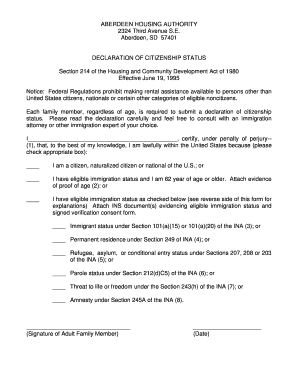
The HESP-226 Citizenship Declaration Form is a government document used by individuals to declare their citizenship status for the purpose of obtaining financial assistance.
pdfFiller scores top ratings on review platforms




Who needs HESP-226 Form?
Explore how professionals across industries use pdfFiller.

HESP-226 Form is needed by:
-
Individuals applying for financial assistance
-
Parents submitting on behalf of children
-
Legal guardians completing citizenship declarations
-
Students needing financial aid verification
-
Residents applying for immigration benefits
Comprehensive Guide to HESP-226 Form
What is the HESP-226 Citizenship Declaration Form?
The HESP-226 form serves as a key document for individuals declaring their citizenship status in the United States. This citizenship declaration form is critical in facilitating access to various forms of financial assistance. Applicants need to provide personal information, such as their full legal name, date of birth, and citizenship status, while filing this form.
-
The HESP-226 form is essential for declaring citizenship status.
-
Completing this form is necessary for individuals seeking financial aid.
-
Personal information required includes full legal name and date of birth.
Purpose and Benefits of the HESP-226 Citizenship Declaration Form
The primary purpose of the HESP-226 form is to support individuals in their pursuit of financial assistance by accurately declaring their citizenship. Completing this form correctly can yield significant benefits, including a smoother application process for assistance. Historically, the form has played a vital role in the broader U.S. citizenship documentation processes.
-
The form clarifies eligibility for financial assistance programs.
-
Individuals submitting the form accurately can enjoy expedited processing.
-
This form has historical value within U.S. citizenship documentation.
Who Needs to Complete the HESP-226 Citizenship Declaration Form?
The HESP-226 form is primarily aimed at individuals seeking financial aid and must be filled out by eligible applicants. These applicants are typically required to meet specific age and residency criteria. Special considerations are in place for minors, necessitating a guardian's signature for the form to be valid.
-
Eligible applicants may include both adults and children.
-
Individuals must meet certain age and residency requirements.
-
Guardians must sign the form when submitted on behalf of a child.
How to Fill Out the HESP-226 Citizenship Declaration Form Online (Step-by-Step)
Filling out the HESP-226 form online is a straightforward process when using pdfFiller. Here’s a step-by-step guide to help you complete the form effectively.
-
Access the HESP-226 form on the pdfFiller platform.
-
Input your full legal name and date of birth in the required fields.
-
Declare your citizenship status by selecting the appropriate option.
-
Gather and attach any necessary supporting documentation.
-
Review the completed form for accuracy before submission.
Common Errors and How to Avoid Them When Filing the HESP-226 Form
Many applicants encounter common pitfalls when completing the HESP-226 form, leading to potential delays in processing. Identifying these errors can help ensure a smoother application process. By taking proactive steps, individuals can significantly reduce the risk of mistakes that could compromise their submission.
-
Incorrect personal details, such as mismatched names or dates.
-
Failing to provide all necessary supporting documentation.
-
Not reviewing the form thoroughly before submission.
How to Sign and Submit the HESP-226 Citizenship Declaration Form
Properly signing and submitting the HESP-226 form is essential for its acceptance. Be aware of the differences between digital signatures and traditional wet signatures, and choose the submission method that best suits your needs. Ensuring timely submission is critical to avoid potential delays.
-
Understand the requirements for digital versus wet signatures.
-
Know the various submission options: online or via postal mail.
-
Adhere to key deadlines for submission to ensure timely processing.
What Happens After You Submit the HESP-226 Citizenship Declaration Form?
Once you have submitted the HESP-226 form, understanding the follow-up process is vital. You will typically receive a confirmation receipt, and knowing how to track the status of your application can ease any concerns you may have. Be prepared to take action if your application is rejected or needs amendments.
-
You will receive a confirmation receipt after submission.
-
Typically, processing times may vary based on the volume of applications.
-
Know your options if a rejection occurs or amendments are necessary.
Security and Compliance for the HESP-226 Citizenship Declaration Form
When filling out the HESP-226 form, prioritizing security and compliance is crucial. pdfFiller employs robust security measures to protect your sensitive information during the form-filling process. Understanding compliance with privacy regulations is also essential for safeguarding your personal data.
-
pdfFiller utilizes 256-bit encryption for data protection.
-
Adhere to guidelines for handling personal information securely.
-
Ensure compliance with privacy regulations such as HIPAA and GDPR.
Engage with pdfFiller for Your HESP-226 Citizenship Declaration Form Needs
Utilizing pdfFiller can streamline your experience in filling out the HESP-226 form. The platform offers numerous advantages, including easy editing and signing features, as well as a user-friendly interface. Choosing a reliable service like pdfFiller ensures the secure handling of your sensitive documents.
-
pdfFiller's cloud-based platform offers seamless editing and signing.
-
Features simplify the filling out and submission of the form.
-
Rely on a secure service for managing important documents.
How to fill out the HESP-226 Form
-
1.To begin, visit the pdfFiller website and log in to your account. If you don’t have an account yet, create one to access the HESP-226 form.
-
2.Use the search bar to find the HESP-226 Citizenship Declaration Form. Click on the document to open it in the pdfFiller interface.
-
3.Start filling out the required fields. Prepare by gathering the necessary information such as your full legal name, date of birth, and social security number before you start typing.
-
4.Use the pdfFiller tools to click into each field and enter the information as prompted. Ensure accuracy while typing; any errors may delay processing.
-
5.If you are completing the form on behalf of a child, make sure to include the responsible adult's information where required.
-
6.Once you have filled out all fields, review your form carefully. Look for any missed fields or typos and correct them before proceeding.
-
7.After verifying all details, navigate to the signature field. Click to digitally sign the form, ensuring you comply with all signature requirements.
-
8.Finally, save your completed form. You can choose to download it as a PDF, or submit it directly through pdfFiller’s submission options. Make sure to keep a copy for your records.

Who is eligible to complete the HESP-226 Citizenship Declaration Form?
The form is intended for individuals who need to declare their citizenship status when applying for financial assistance. This includes both adult applicants and parents or guardians completing the form on behalf of minor children.
What supporting documents are required with the HESP-226 form?
You may need to provide documentation that verifies your citizenship status, such as a birth certificate or passport. It’s important to gather these documents before starting the form to ensure a smooth process.
How can I submit the completed HESP-226 form?
You can submit the HESP-226 form electronically via pdfFiller or print it to send by mail. Ensure all required fields are filled and the form is signed before submission to avoid any delays.
Are there any mistakes I should avoid when filling out the HESP-226 form?
Common mistakes include leaving fields blank, misspelling important details, or forgetting to include required signatures. Double-check all information for accuracy before finalizing the form.
Is there a deadline for submitting the citizenship declaration form?
While specific deadlines may vary based on the assistance program you are applying for, it's advisable to submit the HESP-226 form as soon as you begin the application process to avoid any delays in obtaining assistance.
How long does it take to process the HESP-226 form?
Processing times can vary depending on the agency handling your application. It's best to check with the specific organization for their estimated processing times once the form is submitted.
Related Forms


Get the latest insights from our blog


If you believe that this page should be taken down, please follow our DMCA take down process
here
.
This form may include fields for payment information. Data entered in these fields is not covered by PCI DSS compliance.