
Last updated on
Oct 7, 2026

Get the free Confirmation of Citizenship/Immigration Document Statement
We are not affiliated with any brand or entity on this form

Fill out
Complete the form online in a simple drag-and-drop editor.

eSign
Add your legally binding signature or send the form for signing.

Share
Share the form via a link, letting anyone fill it out from any device.

Export
Download, print, email, or move the form to your cloud storage.
Why pdfFiller is the best tool for your documents and forms


End-to-end document management
From editing and signing to collaboration and tracking, pdfFiller has everything you need to get your documents done quickly and efficiently.
Accessible from anywhere
pdfFiller is fully cloud-based. This means you can edit, sign, and share documents from anywhere using your computer, smartphone, or tablet.
Secure and compliant
pdfFiller lets you securely manage documents following global laws like ESIGN, CCPA, and GDPR. It's also HIPAA and SOC 2 compliant.
What is Citizenship Document Statement
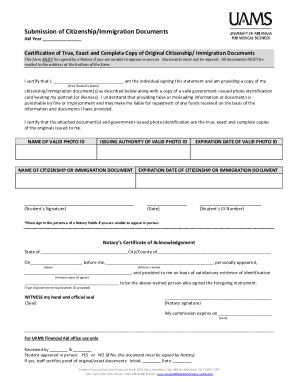
The Confirmation of Citizenship/Immigration Document Statement is a legal document used by students in the U.S. to submit citizenship or immigration paperwork to the Department of Homeland Security (DHS) when unable to present them in person.
pdfFiller scores top ratings on review platforms




Who needs Citizenship Document Statement?
Explore how professionals across industries use pdfFiller.

Citizenship Document Statement is needed by:
-
Students applying for citizenship verification.
-
International students needing to provide immigration documents.
-
Educational institutions requesting documentation from students.
-
Department of Homeland Security officials processing citizenship documents.
-
Legal advisors assisting students with immigration paperwork.
Comprehensive Guide to Citizenship Document Statement
What is the Confirmation of Citizenship/Immigration Document Statement?
The Confirmation of Citizenship/Immigration Document Statement is a form utilized by students in the U.S. to submit their citizenship or immigration documents to the Department of Homeland Security (DHS). This form is critical for students unable to present their identification in person, ensuring they remain compliant with DHS requirements. Its primary role is to confirm an individual’s citizenship or immigration status.
This form helps students navigate the complexities of immigration documentation by providing a clear channel for verification. It ensures that information about citizenship is accurate, aiding the DHS in processing applications efficiently.
Purpose and Benefits of the Confirmation of Citizenship/Immigration Document Statement
Verifying citizenship or immigration status is essential for students, as it impacts their eligibility for various benefits in the educational system. The Confirmation of Citizenship/Immigration Document Statement serves several vital purposes, including:
-
Assuring compliance with DHS regulations.
-
Preventing delays in processing student applications.
-
Facilitating smoother transitions into academic programs for eligible students.
By utilizing this form, students can enhance their chances of a successful application process, ultimately leading to greater stability in their educational pursuits.
Who Needs the Confirmation of Citizenship/Immigration Document Statement?
The target audience for the Confirmation of Citizenship/Immigration Document Statement primarily includes students who must provide proof of their citizenship or immigration status. Specific eligibility criteria and situations warrant this documentation, such as:
-
Individuals enrolled in educational institutions requiring verification.
-
Students unable to present identification in person due to various circumstances.
Understanding who is required to submit this form helps streamline the application process for students and the institutions they are applying to.
How to Fill Out the Confirmation of Citizenship/Immigration Document Statement Online (Step-by-Step)
Completing the Confirmation of Citizenship/Immigration Document Statement online is a straightforward process. Follow these steps for accurate submission:
-
Access the form on pdfFiller.
-
Fill in key fields, including your type of identification.
-
Provide the expiration dates of your ID and citizenship documents.
-
Review all entries for accuracy before submission.
-
Submit the completed form electronically.
This method simplifies the filling process and ensures all necessary details are accurately represented to the DHS.
Common Errors and How to Avoid Them
While completing the Confirmation of Citizenship/Immigration Document Statement, many users encounter common pitfalls. Some frequent mistakes include:
-
Omitting required information, such as expiration dates.
-
Filling in incorrect identification types.
-
Failing to sign the document correctly.
To ensure the form is filled out properly, double-check entries and confirm that all required fields are complete before submitting.
How to Sign the Confirmation of Citizenship/Immigration Document Statement
Signing the Confirmation of Citizenship/Immigration Document Statement is a crucial step in the process. You have options for signing:
-
Digital signature using pdfFiller’s eSignature feature.
-
Wet signature if required by specific institutions.
When using the eSignature feature, ensure you follow all security protocols to protect your information during the signing process.
Submission Methods for the Confirmation of Citizenship/Immigration Document Statement
Once completed, there are several ways to submit the Confirmation of Citizenship/Immigration Document Statement:
-
Online submission through pdfFiller.
-
Mailing the completed form to the appropriate DHS office.
Be aware of any additional requirements or steps necessary following your chosen submission method to ensure your documents are processed without delays.
Tracking Your Submission and What Happens After Submission
After submitting the Confirmation of Citizenship/Immigration Document Statement, it’s important to track your submission. Here’s how you can confirm its status:
-
Monitor communications from the DHS regarding confirmation of receipt.
-
Be aware of expected processing times to gauge when you might receive updates.
Being proactive in tracking your submission can alleviate uncertainty as you await further actions from the DHS.
Importance of Security and Data Protection When Submitting Your Form
When handling sensitive information through the Confirmation of Citizenship/Immigration Document Statement, it’s essential to prioritize security. pdfFiller offers robust security features:
-
256-bit encryption to protect your data.
-
Compliance with SOC 2 Type II standards and legislation like HIPAA and GDPR.
This ensures your documents remain confidential and safe during and after the submission process.
Enhance Your Form-Filling Experience with pdfFiller
Utilizing pdfFiller can significantly enhance your experience when filling out the Confirmation of Citizenship/Immigration Document Statement. Benefits include:
-
Ability to create and edit documents with ease.
-
Features for eSigning documents securely.
-
Access to a variety of templates and cloud storage for your convenience.
Engaging with pdfFiller ensures that you have the tools needed to manage your documents efficiently and securely.
How to fill out the Citizenship Document Statement
-
1.Access pdfFiller's website and log in to your account or create a new one if necessary.
-
2.Once logged in, use the search bar to find the 'Confirmation of Citizenship/Immigration Document Statement' form.
-
3.Click on the form to open it and ensure you have the necessary identification information ready.
-
4.Begin filling out the required fields, including your name, type of ID, and citizenship document details.
-
5.Make sure to input the expiration dates of each document accurately in the corresponding fields.
-
6.Carefully review all entered information for correctness and completeness, as accuracy is crucial in this document.
-
7.Use the pdfFiller tools to sign the form electronically, certifying the accuracy of your provided information.
-
8.Once finished, save your work, and you may choose to download the document or submit it through the platform as per your needs.
-
9.Follow any additional instructions provided by your educational institution or DHS regarding submission methods.

Who is eligible to use the Confirmation of Citizenship/Immigration Document Statement?
Any student in the U.S. who needs to provide citizenship or immigration documents to DHS can use this form. It's especially important for those who cannot present their documents in person.
What documents do I need to fill out this form?
You will need identification information, including the type of ID you hold and details of your citizenship or immigration documents. Be sure to have expiration dates ready.
How do I submit the completed form?
After filling out the Confirmation of Citizenship/Immigration Document Statement on pdfFiller, you can download the completed form or follow the institution's specific submission guidelines.
Are there any common mistakes to avoid when completing this form?
Common mistakes include incorrect document details, missing signatures, or failing to check expiration dates. Always double-check your entries before submission.
How long does it take to process the form after submission?
Processing times can vary. Typically, the processing duration depends on the Department of Homeland Security's workload and your specific situation. Stay informed through their official channels.
What if I need to notarize the document?
The Confirmation of Citizenship/Immigration Document Statement does not require notarization. However, ensure that you follow submission guidelines provided by your institution or DHS.
Can I edit my submission after sending it to DHS?
Once submitted to the Department of Homeland Security, you generally cannot edit your submission. Contact them directly for guidance on what to do if you need to make changes.
Related Forms




Get the latest insights from our blog


If you believe that this page should be taken down, please follow our DMCA take down process
here
.
This form may include fields for payment information. Data entered in these fields is not covered by PCI DSS compliance.