
Last updated on
Oct 19, 2026

Get the free Citizenship/DHS Confirmation Form
We are not affiliated with any brand or entity on this form

Fill out
Complete the form online in a simple drag-and-drop editor.

eSign
Add your legally binding signature or send the form for signing.

Share
Share the form via a link, letting anyone fill it out from any device.

Export
Download, print, email, or move the form to your cloud storage.
Why pdfFiller is the best tool for your documents and forms


End-to-end document management
From editing and signing to collaboration and tracking, pdfFiller has everything you need to get your documents done quickly and efficiently.
Accessible from anywhere
pdfFiller is fully cloud-based. This means you can edit, sign, and share documents from anywhere using your computer, smartphone, or tablet.
Secure and compliant
pdfFiller lets you securely manage documents following global laws like ESIGN, CCPA, and GDPR. It's also HIPAA and SOC 2 compliant.
What is Citizenship Confirmation
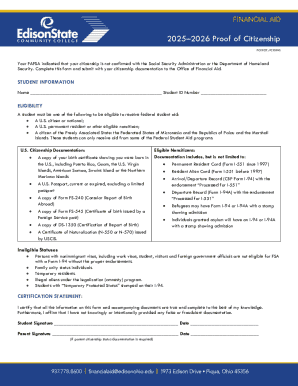
The Citizenship/DHS Confirmation Form is a financial aid document used by South Suburban College to verify student citizenship status for federal financial aid applications.
pdfFiller scores top ratings on review platforms




Who needs Citizenship Confirmation?
Explore how professionals across industries use pdfFiller.

Citizenship Confirmation is needed by:
-
Students applying for federal financial aid
-
South Suburban College admissions staff
-
Financial aid counselors assisting with documentation
-
International students seeking citizenship verification
-
Individuals needing proof of citizenship or eligible non-citizen status
-
Enrolling students at South Suburban College
Comprehensive Guide to Citizenship Confirmation
What is the Citizenship/DHS Confirmation Form?
The Citizenship/DHS Confirmation Form serves as a verification tool for students at South Suburban College to confirm their citizenship status when applying for financial aid. Completing this form is essential as it aligns with both federal and institutional requirements regarding U.S. citizenship documentation. It plays a crucial role in the federal financial aid application process, ensuring students provide the necessary proof to qualify for assistance.
Purpose and Benefits of the Citizenship/DHS Confirmation Form
The Citizenship/DHS Confirmation Form helps eligible students access financial aid by verifying their citizenship status. This verification process not only reassures institutions of students’ eligibility but also significantly impacts students' education financing. Completing the form enables students to receive the financial support they need for their academic endeavors at South Suburban College.
Who Needs the Citizenship/DHS Confirmation Form?
This form is required for U.S. citizens and eligible non-citizens applying for federal financial aid. Students enrolled in various educational programs at South Suburban College must be aware of the implications of submitting their form on time to avoid delays in aid processing. Ensuring that the form is completed and submitted promptly is crucial for those intending to receive federal assistance.
Eligibility Criteria for Using the Citizenship/DHS Confirmation Form
Eligibility to submit the Citizenship/DHS Confirmation Form includes U.S. citizens and correctly identified eligible non-citizens. Age and residency requirements also play a role in determining who can apply for financial aid. Students should gather relevant documentation, such as a U.S. Birth Certificate or a U.S. Passport, to support their application.
How to Fill Out the Citizenship/DHS Confirmation Form Online (Step-by-Step)
To complete the Citizenship/DHS Confirmation Form online, follow these steps:
-
Gather necessary personal information, including your name, SSC ID, last four digits of your SSN, and address.
-
Access the online form and proceed to fill out each section carefully.
-
Complete all required fields, ensuring your signature is included at the end.
-
Review the document for accuracy before submission.
-
Submit the form online, or choose an alternative submission method if necessary.
Common Errors and How to Avoid Them with the Citizenship/DHS Confirmation Form
While filling out the Citizenship/DHS Confirmation Form, students often encounter common errors. These can include incomplete fields or incorrect data entries, which can delay processing. To avoid these pitfalls, consider these best practices:
-
Thoroughly review the form for any omitted information.
-
Ensure all personal details are accurate, including names and identification numbers.
-
Utilize a validation checklist to confirm that the form is complete before submission.
Submission Methods for the Citizenship/DHS Confirmation Form
Students have several options for submitting the Citizenship/DHS Confirmation Form, including:
-
Online submission via the designated platform.
-
Mailing the completed form directly to South Suburban College.
-
Submitting the form in person at the appropriate office.
Be aware of any associated fees or deadlines to ensure timely processing of your form.
What Happens After You Submit the Citizenship/DHS Confirmation Form
After submitting the Citizenship/DHS Confirmation Form, students should expect a processing period during which their application will be verified. It may be necessary to provide additional documentation upon follow-up requests from the institution. Tracking your financial aid progress is essential, as this will help you stay informed about your status after submission.
Security and Compliance When Using the Citizenship/DHS Confirmation Form
The security of personal information is paramount when using the Citizenship/DHS Confirmation Form. The submission process adheres to strict document security measures, including encryption and compliance with relevant regulations. Utilizing reputable platforms, such as pdfFiller, provides reassurance about privacy and data protection, ensuring your information remains safe during the form completion process.
Making the Most of pdfFiller to Complete Your Citizenship/DHS Confirmation Form
Using pdfFiller to complete your Citizenship/DHS Confirmation Form offers several advantages:
-
Edit and fill documents with ease from any browser.
-
Access cloud-based document management features for convenience.
-
Engage with the platform’s tools for efficient eSigning and verification.
These benefits enhance the overall experience of gathering and submitting necessary information for your financial aid application.
How to fill out the Citizenship Confirmation
-
1.To begin, access pdfFiller and search for the Citizenship/DHS Confirmation Form using the search bar. Select the document to open it in the editor.
-
2.Once the form is loaded, familiarize yourself with the layout. A series of fillable fields will be prominently displayed for your information.
-
3.Before filling out the form, gather the necessary information required for completion. You will need your name, college ID, the last four digits of your Social Security number, your permanent address, date of birth, and contact details such as phone number and email address.
-
4.Start by clicking in the first field labeled 'Student Name' to enter your full name as documented on official identification.
-
5.Continue to fill in each subsequent field following the prompts on the form. Ensure you provide accurate information to avoid processing delays.
-
6.Once you have completed all required fields, review your entries carefully. Check for typing errors or missing information to ensure accuracy.
-
7.After finalizing your input, navigate to the signature line. Use your mouse or touchscreen to sign electronically where indicated.
-
8.To save your work, click on the 'Save' button located in the toolbar. You can also download a copy in various formats or submit the form directly through pdfFiller’s 'Submit' option.
-
9.If you need to print the form, choose the 'Print' option to obtain a hard copy for your records or for submission in-person.

What documents are needed to complete the Citizenship/DHS Confirmation Form?
To complete the form, you need to provide documentation such as a U.S. Birth Certificate, U.S. Passport, or other acceptable proof of citizenship or eligible non-citizen status, along with your personal identification details.
Who needs to fill out the Citizenship/DHS Confirmation Form?
This form is required for students at South Suburban College applying for federal financial aid to verify their citizenship status. It is specifically for those who meet the eligibility criteria for financial assistance.
How do I submit the completed form?
You can submit the completed Citizenship/DHS Confirmation Form electronically via pdfFiller. Ensure that you follow the instructions to finalize and then use the 'Submit' function to send it directly to South Suburban College or save a copy for your records.
What are some common mistakes to avoid when filling out this form?
Common mistakes include providing inaccurate personal information, forgetting to sign the form, and omitting required documentation. Double-check your entries to ensure everything is correct before submission.
Is there a deadline for submitting the Citizenship/DHS Confirmation Form?
While specific deadlines may vary, it's crucial to submit the form as soon as you start your financial aid application process to avoid delays in receiving assistance and meet college requirements.
How long does processing take after submitting the form?
Processing times can vary, but typically you should expect to receive confirmation within a few days. For specific timelines, check with South Suburban College’s financial aid office directly.
Related Forms







Get the latest insights from our blog


If you believe that this page should be taken down, please follow our DMCA take down process
here
.
This form may include fields for payment information. Data entered in these fields is not covered by PCI DSS compliance.