
Last updated on
Oct 7, 2026

Get the free Leadership Development Form
We are not affiliated with any brand or entity on this form

Fill out
Complete the form online in a simple drag-and-drop editor.

eSign
Add your legally binding signature or send the form for signing.

Share
Share the form via a link, letting anyone fill it out from any device.

Export
Download, print, email, or move the form to your cloud storage.
Why pdfFiller is the best tool for your documents and forms


End-to-end document management
From editing and signing to collaboration and tracking, pdfFiller has everything you need to get your documents done quickly and efficiently.
Accessible from anywhere
pdfFiller is fully cloud-based. This means you can edit, sign, and share documents from anywhere using your computer, smartphone, or tablet.
Secure and compliant
pdfFiller lets you securely manage documents following global laws like ESIGN, CCPA, and GDPR. It's also HIPAA and SOC 2 compliant.
What is Leadership Form
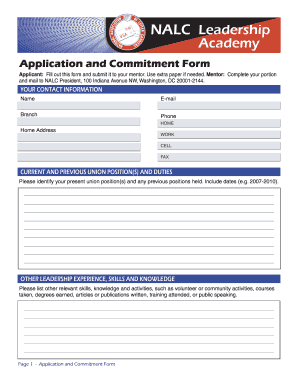
The Leadership Development Form is an evaluation document used by organizations to assess and track the leadership progress of individuals in a religious or community setting.
pdfFiller scores top ratings on review platforms




Who needs Leadership Form?
Explore how professionals across industries use pdfFiller.

Leadership Form is needed by:
-
Church leaders seeking to evaluate their staff.
-
Community organizations aiming to assess volunteer leadership.
-
Religious institutions reviewing pastoral and administrative capabilities.
-
Leadership committees performing evaluations.
-
Members responsible for discipleship and training.
-
Consultants focusing on leadership development.
Comprehensive Guide to Leadership Form
What is the Leadership Development Form?
The Leadership Development Form is a vital document used to assess and evaluate leaders in religious and community environments. Its primary function revolves around establishing a framework that enhances leadership qualities within various settings, particularly among church leaders and community organizers.
This form serves to define specific benchmarks for effective leadership, enabling evaluators to take a comprehensive view of an individual’s capabilities. Designed for individuals such as church leaders and community organizers, it provides structured feedback for improvement and growth.
Purpose and Benefits of the Leadership Development Form
The Leadership Development Form is essential for evaluating diverse aspects of leadership. One of its key benefits is the ability to assess areas such as personal prayer life, teaching abilities, and overall church management skills. Regular use of this form allows leadership teams to track progress over time, identifying areas of growth for leaders.
Moreover, the form fosters accountability among leaders, creating an environment conducive to improvement within church management and community engagement. By systematically addressing strengths and weaknesses, leaders can be better equipped for their roles.
Key Features of the Leadership Development Form
The Leadership Development Form includes several unique features designed to enhance usability and effectiveness. It utilizes fillable fields and checkboxes, making the evaluation process straightforward for assessors.
-
Sections tailored for various levels of leadership ensure relevant feedback.
-
Comprehensive criteria and questions guide evaluators in providing detailed assessments.
These features collectively streamline the evaluation process while allowing for a thorough understanding of leadership performance.
Who Needs the Leadership Development Form?
This form is aimed at a wide range of users within church and community settings. Church leaders and spiritual mentors will find it particularly beneficial for refining their leadership strategies and assessing their own growth.
-
Evaluators within community organizations can leverage the form for comprehensive assessments.
-
Individuals in charge of leadership development programs will utilize this tool to enhance training and support for emerging leaders.
How to Fill Out the Leadership Development Form Online
To complete the Leadership Development Form through pdfFiller, follow these simple steps:
-
Access the form online using the pdfFiller platform.
-
Fill out the key fields, ensuring to address specific evaluation criteria.
-
Review each entry for accuracy before final submission.
This structured approach not only simplifies the process but also promotes a higher level of completeness in form submission.
Common Errors and How to Avoid Them
When filling out the Leadership Development Form, it’s crucial to avoid common mistakes that may undermine the evaluation’s integrity. Frequent errors include leaving fields blank or misinterpreting evaluation criteria.
-
Double-check all entries to confirm they are filled out correctly.
-
Utilize a validation checklist prior to submitting the form to ensure compliance with all requirements.
How to Electronically Sign the Leadership Development Form
Adding a digital signature to the Leadership Development Form is essential for confirming its authenticity. Digital signatures are legally recognized and offer a secure alternative to traditional wet signatures.
To add an electronic signature using pdfFiller, follow these steps:
-
Navigate to the signature section of the form.
-
Choose the option to insert an electronic signature.
-
Follow the prompts to complete the signing process.
This method not only facilitates swift execution but also maintains the document's security throughout the process.
Where and How to Submit the Leadership Development Form
Once completed, there are several options for submitting the Leadership Development Form. You may choose to deliver it electronically via email or utilize online submission tools offered by your organization.
-
Emailing the form directly to designated recipients is a common approach.
-
Online submission through platforms like pdfFiller provides a seamless delivery method.
Additionally, tracking submission status and confirming receipt can ensure that your evaluation is processed promptly.
Security and Privacy of Your Leadership Development Form
Concerns regarding data security and privacy compliance are paramount when handling sensitive documents such as the Leadership Development Form. pdfFiller incorporates industry-standard security measures, including 256-bit encryption, to protect user data.
-
Compliance with SOC 2 Type II, HIPAA, and GDPR standards reinforces data integrity.
-
Confidentiality is critical during leadership evaluations, assuring users that their information is handled responsibly.
Get Started with the Leadership Development Form on pdfFiller
Engaging with pdfFiller to complete the Leadership Development Form offers myriad benefits. The platform provides user-friendly features that enhance form management and completion.
With simple access to fillable forms, leadership evaluation becomes an efficient process, making it easier for you to engage with and develop your leadership talent effectively.
How to fill out the Leadership Form
-
1.To access the Leadership Development Form on pdfFiller, visit the pdfFiller website and use the search feature to locate the form using its name.
-
2.Once you find the form, click on it to open it in pdfFiller's online editor.
-
3.Before you start filling out the form, gather relevant information such as previous evaluation results, leader performance records, and any feedback from peers or team members.
-
4.Navigate through the document to identify the different sections that pertain to prayer life, evangelism, teaching abilities, and church management.
-
5.Fill in the required fields and check boxes as per the provided criteria, ensuring that your responses reflect accurate evaluations.
-
6.Utilize the instructions included within the form to help guide your responses and ensure completeness.
-
7.Once all fields are completed, review the form for any errors or omissions to ensure that all sections are filled out appropriately.
-
8.After reviewing, finalize the form by clicking the save button to keep your changes.
-
9.You can download the completed form directly to your device in various formats or submit it through email if prompted.
-
10.If needed, you may also choose to print the form directly or share it with other committee members for additional feedback.

Who is eligible to use the Leadership Development Form?
The Leadership Development Form is designed for organizations evaluating the leadership skills of individuals, typically within church or community settings. Anyone involved in leadership oversight or assessment can use this form.
Are there deadlines for submitting the completed form?
While specific deadlines may vary by organization, it is generally recommended to complete and submit the Leadership Development Form promptly after the evaluation period. Check with your organization for any specific timeframes.
What methods can I use to submit the completed form?
You can submit the completed Leadership Development Form by downloading it and emailing it directly to the designated evaluator or committee. Alternatively, some organizations may have an online submission portal.
What supporting documents are needed when filling out this form?
While not explicitly stated, it is beneficial to include supporting documents such as previous evaluations, performance feedback, and specific objectives for the leader being assessed.
What are common mistakes to avoid while filling out the Leadership Development Form?
Common mistakes include failing to gather necessary background information, overlooking specific criteria in evaluation sections, and not reviewing responses for coherence and accuracy before submission.
How long does it take to process the completed Leadership Development Form?
Processing times can vary. However, evaluations typically take a few days to complete, depending on the number of evaluators involved and the urgency expressed by the organization.
Can I modify my responses after submitting the form?
Once submitted, changes to the Leadership Development Form may require you to contact the evaluator directly for any necessary corrections or modifications.
Related Forms




Get the latest insights from our blog


If you believe that this page should be taken down, please follow our DMCA take down process
here
.
This form may include fields for payment information. Data entered in these fields is not covered by PCI DSS compliance.