
Last updated on
Sep 30, 2026

Get the free Employee Training Log
We are not affiliated with any brand or entity on this form

Fill out
Complete the form online in a simple drag-and-drop editor.

eSign
Add your legally binding signature or send the form for signing.

Share
Share the form via a link, letting anyone fill it out from any device.

Export
Download, print, email, or move the form to your cloud storage.
Why pdfFiller is the best tool for your documents and forms


End-to-end document management
From editing and signing to collaboration and tracking, pdfFiller has everything you need to get your documents done quickly and efficiently.
Accessible from anywhere
pdfFiller is fully cloud-based. This means you can edit, sign, and share documents from anywhere using your computer, smartphone, or tablet.
Secure and compliant
pdfFiller lets you securely manage documents following global laws like ESIGN, CCPA, and GDPR. It's also HIPAA and SOC 2 compliant.
What is Grease Control Log
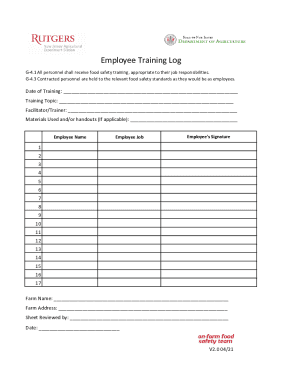
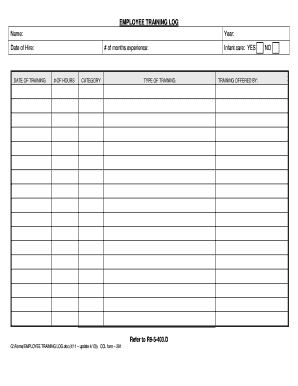
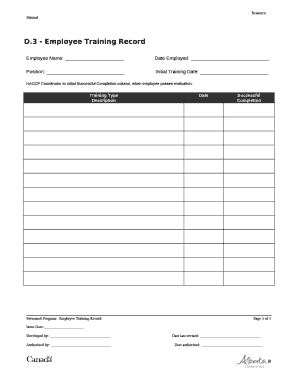
The Employee Training Log is a fillable document used by food service establishments to record employee training sessions and attendance.
pdfFiller scores top ratings on review platforms




Who needs Grease Control Log?
Explore how professionals across industries use pdfFiller.

Grease Control Log is needed by:
-
Food service establishments
-
Employees undergoing training
-
Managers overseeing training sessions
-
Human resources personnel
-
Compliance officers
-
Training coordinators
Comprehensive Guide to Grease Control Log
What is the Employee Training Log?
The Employee Training Log serves as a critical tool for tracking the training of employees in food service establishments. It ensures that all staff members are adequately trained and compliant with necessary operational standards. This log is essential for maintaining comprehensive records of employee training sessions, which play a pivotal role in regulatory compliance and overall workforce development.
Purpose and Benefits of the Employee Training Log
This log aids food service establishments in monitoring employee training activities effectively. By maintaining a comprehensive record of training sessions, it helps ensure adherence to Grease Control Program standards. Both employees and managers benefit from accurate logs, as they promote accountability, enhance training outcomes, and provide a reference for future training needs.
Key benefits include:
-
Tracking employee progress over time.
-
Demonstrating compliance during audits.
-
Improving communication regarding training initiatives.
Key Features of the Employee Training Log
The Employee Training Log is designed with user convenience in mind, featuring essential fields that include employee names, their signatures, and manager initials. This fillable form allows for easy documentation of each training session attended. Security is also a priority; measures are in place to ensure that training documents are handled appropriately and confidentially.
Notable features are:
-
Employee attendance log.
-
Training session records.
-
Digital security protocols to protect sensitive information.
Who Needs the Employee Training Log?
The Employee Training Log is crucial for both employees and managers within food service industries. Employees must sign the log to acknowledge that they have completed their training, which is vital for regulatory compliance. Utilizing this log not only ensures that all staff are trained appropriately, but it also helps establishments mitigate risks related to non-compliance.
How to Fill Out the Employee Training Log Online (Step-by-Step)
Filling out the Employee Training Log online is a straightforward process. Here’s a step-by-step guide to ensure you complete it accurately:
-
Access the Employee Training Log form online.
-
Enter the employee's name and training details in the designated fields.
-
Have the employee sign the document electronically.
-
Collect the manager's initials to confirm the training attendance.
-
Save the completed form securely for future reference.
Common Errors and How to Avoid Them
When filling out the Employee Training Log, certain errors frequently occur that can lead to compliance issues. Common mistakes include:
-
Omitting employee signatures.
-
Filling in incorrect training dates.
-
Failing to secure a manager’s initials.
To avoid these pitfalls, always review the completed log for accuracy before submission, ensuring that all fields are properly filled out and signatures collected.
How to Sign and Submit the Employee Training Log
Understanding the signature requirements for the Employee Training Log is vital. Digital signatures are often permitted, simplifying the submission process. Alternatively, traditional wet signatures may be required depending on the organization's policies. Once signed, the completed log can be submitted to supervisors or appropriate regulatory bodies, ensuring compliance is maintained.
Retention of this log is equally important; completed forms should be stored securely and accessible for future referencing or audits.
How pdfFiller Can Streamline the Employee Training Log Process
pdfFiller provides significant advantages for handling the Employee Training Log efficiently. Users can easily fill out, sign, and securely store the log within the platform. Features such as encryption and compliance with regulations ensure that sensitive information is protected throughout the process.
Additional functionalities offered by pdfFiller include:
-
Converting different versions of the log.
-
Sharing completed forms securely.
Sample of a Completed Employee Training Log
To assist users, an illustrative example of a filled-out Employee Training Log can provide clarity on how to complete their own logs accurately. This example includes pertinent details such as employee names, signatures, training dates, and manager initials, demonstrating how information should be properly recorded and organized.
Preparing for Your Own Employee Training Log
Before initiating completion of the Employee Training Log, users should gather all necessary information. Creating a checklist of required items will facilitate a smooth and efficient process. By leveraging pdfFiller’s platform, users can create, edit, and submit their logs effortlessly, ensuring all documentation is accurate and compliant.
How to fill out the Grease Control Log
-
1.Access the Employee Training Log on pdfFiller by searching for the form name in the search bar.
-
2.Open the form to view the blank fields designated for employee names, signatures, and manager initials.
-
3.Gather necessary information before starting, including employee names, training dates, and details about the training session.
-
4.Begin filling out the form by entering the employee names in the designated fields.
-
5.Next, have each employee sign in the appropriate area once they acknowledge receipt of the 'Best Management Practice' brochure and completed the Grease Control Program video.
-
6.Managers should initial next to each employee's signature to confirm attendance.
-
7.Review the completed form to ensure all fields are filled accurately, and there are no missing signatures or initials.
-
8.Once finalized, save the document by clicking on the save option in pdfFiller for your records.
-
9.Download the completed form in your preferred format, or submit it directly through pdfFiller if required.

Who is required to sign the Employee Training Log?
Employees are required to sign the Employee Training Log to acknowledge their training. Managers are not required to sign but must initial to confirm attendance.
Is the Employee Training Log an IRS form?
No, the Employee Training Log is not an IRS form. It is specifically used for internal training records within food service establishments.
What happens if an employee forgets to sign the log?
If an employee forgets to sign the log, they should do so as soon as possible. Missing signatures may affect training documentation and compliance.
How should I submit the completed Employee Training Log?
Once completed, the Employee Training Log can be saved and submitted electronically through pdfFiller, or printed for physical submission as required by your establishment.
How can I ensure the accuracy of the Employee Training Log?
To ensure accuracy, double-check that all fields are filled, signatures are obtained, and that you have the correct employee names and training sessions recorded.
Are there any additional documents required with the form?
Typically, there are no additional documents needed with the Employee Training Log. However, you may want to keep copies of supporting training materials for reference.
Can I edit the Employee Training Log after saving it?
Yes, you can reopen and edit the Employee Training Log on pdfFiller as long as you have not submitted it. Make sure to save your changes after editing.
Related Forms



Get the latest insights from our blog


If you believe that this page should be taken down, please follow our DMCA take down process
here
.
This form may include fields for payment information. Data entered in these fields is not covered by PCI DSS compliance.