
Last updated on
Oct 7, 2026

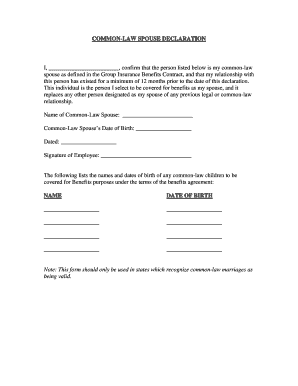
Get the free Spouse of Married/Common-Law Applicants Form
We are not affiliated with any brand or entity on this form

Fill out
Complete the form online in a simple drag-and-drop editor.

eSign
Add your legally binding signature or send the form for signing.

Share
Share the form via a link, letting anyone fill it out from any device.

Export
Download, print, email, or move the form to your cloud storage.
Why pdfFiller is the best tool for your documents and forms


End-to-end document management
From editing and signing to collaboration and tracking, pdfFiller has everything you need to get your documents done quickly and efficiently.
Accessible from anywhere
pdfFiller is fully cloud-based. This means you can edit, sign, and share documents from anywhere using your computer, smartphone, or tablet.
Secure and compliant
pdfFiller lets you securely manage documents following global laws like ESIGN, CCPA, and GDPR. It's also HIPAA and SOC 2 compliant.
What is Spouse Applicant Form
The Spouse of Married/Common-Law Applicants Form is a financial aid application document used by spouses in Saskatchewan to provide necessary income information for student aid eligibility.
pdfFiller scores top ratings on review platforms




Who needs Spouse Applicant Form?
Explore how professionals across industries use pdfFiller.

Spouse Applicant Form is needed by:
-
Married/common-law spouses of students applying for financial aid
-
Students seeking Saskatchewan student financial assistance
-
Financial aid advisors and institutions requiring spousal information
-
Canadian residents looking to apply for education funding
-
Individuals gathering financial documentation for study programs
Comprehensive Guide to Spouse Applicant Form
What is the Spouse of Married/Common-Law Applicants Form?
The Spouse of Married/Common-Law Applicants Form is essential for students applying for financial aid in Saskatchewan, Canada. This document captures crucial spousal information necessary for assessing eligibility and aid amounts. Accurate details on the spouse help streamline the financial aid process, ensuring students receive adequate support for their educational pursuits.
This form is specifically designed to collect the legal name, Social Insurance Number (SIN), and other vital personal details of the spouse. Providing accurate spousal information is fundamental for determining the financial assistance a student may qualify for in Saskatchewan, linking directly to the student aid process.
Purpose and Benefits of the Spouse of Married/Common-Law Applicants Form
Filling out the Spouse of Married/Common-Law Applicants Form accurately and timely offers several benefits. Firstly, it ensures that the student financial aid systems can properly assess the financial contributions of the spouse, leading to correct support levels. This clarity can significantly impact overall aid received.
By declaring spousal income accurately, applicants can avoid complications in their financial aid journey. This form ultimately supports clarity regarding financial obligations, enhancing the financial aid experience for married and common-law applicants.
Who Needs the Spouse of Married/Common-Law Applicants Form?
The Spouse of Married/Common-Law Applicants Form is necessary for those who meet the eligibility criteria for student financial aid in Canada. Specifically, individuals who are married or are in a common-law partnership need to submit this form to provide essential spousal information.
Applicants should complete this form when they are applying for student financial assistance to confirm the relevant details about their spouse’s financial situation, which plays a critical role in determining the total aid package available.
Important Information You'll Need to Gather
Before starting to fill out the Spouse of Married/Common-Law Applicants Form, gather the following information:
-
Legal name of the spouse
-
Social Insurance Number (SIN)
-
Date of birth
-
Mailing address
-
Spousal income details
-
Employment status information
Having these documents and details ready will facilitate a smoother completion of the form. Thorough preparation helps to ensure no vital information is overlooked during the submission process.
How to Fill Out the Spouse of Married/Common-Law Applicants Form Online (Step-by-Step)
Completing the Spouse of Married/Common-Law Applicants Form online can be straightforward if you follow these steps:
-
Access the online form platform and select the appropriate document.
-
Enter the legal name, SIN, and date of birth in the required fields.
-
Provide the mailing address and spousal income information as prompted.
-
Check the appropriate boxes for gender and income declaration.
-
Review all entered information for accuracy.
-
Sign and date the form, ensuring your signature appears in ink if needed.
Each step is crucial to ensure all requirements are met for a successful submission, particularly the validation through a personal signature.
Common Errors and How to Avoid Them
When filling out the Spouse of Married/Common-Law Applicants Form, users should be mindful of common mistakes that may delay processing or lead to rejection. These include:
-
Omitting significant information like the SIN or date of birth
-
Incorrect spelling of names or fields
-
Failure to provide required signatures
To prevent these errors, thoroughly review the filled form before submission. Taking the time to double-check can save applicants from hassles later in the financial aid process.
Submission Methods and Delivery of the Spouse of Married/Common-Law Applicants Form
Applicants can submit the completed Spouse of Married/Common-Law Applicants Form in various ways. Options typically include:
-
Electronic submission via the specified online platform
-
Physical submission through the mail or designated offices
Be mindful of any key deadlines associated with submission to ensure that your application is timely processed. This is crucial for securing financial aid effectively.
What Happens After You Submit the Form?
After submitting the Spouse of Married/Common-Law Applicants Form, applicants can expect to receive confirmation of their submission. Staying informed about tracking the submission status is essential to ensure timely processing.
Processing times may vary; therefore, it's important to know what to expect. Understanding this process can alleviate concerns about application status and help you plan accordingly.
Security and Compliance for Handling the Spouse of Married/Common-Law Applicants Form
The security of personal data when submitting the Spouse of Married/Common-Law Applicants Form is a priority. Proper handling of sensitive documents is mandatory, and applicants should be reassured of the safety measures in place.
Features like 256-bit encryption ensure that your data remains secure throughout the submission process. Compliance with regulations such as HIPAA and GDPR also contributes to a respectful and secure experience when sharing personal information.
Experience the Ease of Completing Your Form with pdfFiller
Utilizing pdfFiller simplifies the process of filling out the Spouse of Married/Common-Law Applicants Form. Features offered by pdfFiller include an intuitive interface for editing and managing documents, making form completion straightforward.
The platform’s security measures provide peace of mind, enabling users to handle sensitive information safely while completing their forms online. This combination of user-friendliness and security sets pdfFiller apart in the document management landscape.
How to fill out the Spouse Applicant Form
-
1.Start by accessing pdfFiller and searching for 'Spouse of Married/Common-Law Applicants Form'. Click on the form to open it in the editor.
-
2.Familiarize yourself with the layout of the form, locating all fillable fields, including the applicant's legal last name, Social Insurance Number (SIN), date of birth, and mailing address.
-
3.Before completing the form, gather all necessary information, such as your spouse's SIN, date of birth, and any income details that may be required.
-
4.Using the pdfFiller interface, click on the fillable fields sequentially and type in the required information. Ensure accuracy for all entries, as they will impact financial aid eligibility.
-
5.As you complete the document, check the checkboxes for gender and any relevant income questions concerning your spouse, ensuring you adhere to the instructions given on the form.
-
6.If any signature areas require ink signatures, make a note to print the final form for hand-signing once completed on pdfFiller.
-
7.Once all information is entered, carefully review the entire form for completeness and accuracy. Make corrections where necessary before finalizing your submission.
-
8.To save your completed form, click on the 'Save' option in pdfFiller. You can also download a PDF version to your device or submit it directly through the platform, if applicable.

Who is eligible to fill out the Spouse of Married/Common-Law Applicants Form?
This form is intended for spouses of students who are applying for financial aid in Saskatchewan. You must provide accurate personal and financial information to support the application.
What supporting documents are needed when submitting this form?
Along with the form, it may be necessary to include proof of income such as tax returns or pay stubs. Make sure to check the specific requirements needed for the financial aid application.
How can I submit the completed Spouse of Married/Common-Law Applicants Form?
After completing the form, you can submit it electronically through pdfFiller if applicable, or print it and mail it to the relevant financial aid office as instructed in submission guidelines.
What common mistakes should I avoid when completing this form?
Ensure all personal information is filled out accurately and completely. Double-check for missed signatures or dates, as incomplete submissions may delay processing.
Are there any deadlines for submitting this form for financial aid?
Yes, timelines vary based on financial aid policies. Please check the Saskatchewan financial aid website for specific deadlines related to your study period and submission dates.
How long does it take to process the Spouse of Married/Common-Law Applicants Form?
Processing times may vary based on the financial aid office's workload and the completeness of your application. Generally, allow several weeks for processing after submission.
Is a notarization required for this form?
No, notarization is not required for the Spouse of Married/Common-Law Applicants Form. However, ensure you sign it as instructed to certify your information.
Related Forms




Get the latest insights from our blog


If you believe that this page should be taken down, please follow our DMCA take down process
here
.
This form may include fields for payment information. Data entered in these fields is not covered by PCI DSS compliance.