
Last updated on
Oct 19, 2026

Get the free Child Safety Meeting Template
We are not affiliated with any brand or entity on this form

Fill out
Complete the form online in a simple drag-and-drop editor.

eSign
Add your legally binding signature or send the form for signing.

Share
Share the form via a link, letting anyone fill it out from any device.

Export
Download, print, email, or move the form to your cloud storage.
Why pdfFiller is the best tool for your documents and forms


End-to-end document management
From editing and signing to collaboration and tracking, pdfFiller has everything you need to get your documents done quickly and efficiently.
Accessible from anywhere
pdfFiller is fully cloud-based. This means you can edit, sign, and share documents from anywhere using your computer, smartphone, or tablet.
Secure and compliant
pdfFiller lets you securely manage documents following global laws like ESIGN, CCPA, and GDPR. It's also HIPAA and SOC 2 compliant.
What is CSM Template
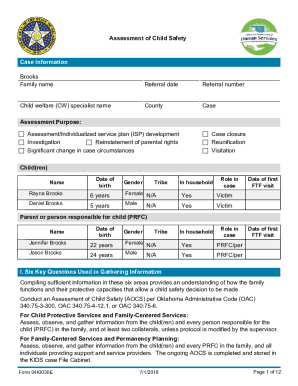
The Child Safety Meeting Template is a personal form used by Oklahoma Human Services to facilitate structured discussions about child safety.
pdfFiller scores top ratings on review platforms




Who needs CSM Template?
Explore how professionals across industries use pdfFiller.

CSM Template is needed by:
-
Child welfare specialists
-
Supervisors in human services
-
Meeting facilitators
-
Educational professionals focused on safety
-
Parents involved in child safety planning
-
Non-profit organizations addressing child safety
Comprehensive Guide to CSM Template
What is the Child Safety Meeting Template?
The Child Safety Meeting Template is a crucial tool designed to facilitate discussions about child safety within Oklahoma. This template serves as a structured framework that enhances the effectiveness of dialogues among professionals involved in child welfare, as mandated by Oklahoma Human Services.
The document is organized with specific sections, including spaces for contact information, meeting details, and additional notes. This structure ensures that every meeting is thorough and focused on the essential aspects of child safety planning in Oklahoma.
Purpose and Benefits of the Child Safety Meeting Template
Utilizing the Child Safety Meeting Template is vital for orchestrating organized and impactful discussions related to child safety. The template ensures that conversations are structured, which is essential in identifying risks and developing safety plans.
Professionals such as specialists, supervisors, and facilitators benefit significantly from using this template. It provides a consistent format that makes it easier to track discussions and decisions made during meetings. Additionally, the template can be adapted for various scenarios, ensuring that it remains relevant for all stakeholders involved in child safety.
Key Features of the Child Safety Meeting Template
The Child Safety Meeting Template includes several features that enhance its utility. First, it offers fillable fields, allowing users to quickly input necessary information digitally, which is especially beneficial for virtual meetings.
Each section is designed with specific functions, ensuring that vital information is clearly presented. Moreover, the template incorporates security features that protect sensitive information discussed during meetings, making it a trusted tool for professionals handling child welfare cases.
Who Needs the Child Safety Meeting Template?
The template is designed for a diverse group of professionals involved in child welfare. Key users include child welfare specialists, case managers, and other stakeholders focused on fostering child safety.
This tool is particularly useful in numerous scenarios, such as when assessing a child's living conditions or formulating action plans to address safety concerns. By utilizing the template, these professionals can ensure that all necessary information is documented comprehensively.
How to Fill Out the Child Safety Meeting Template Online (Step-by-Step)
Filling out the Child Safety Meeting Template online is straightforward. Follow these steps:
-
Access the template through the designated online platform.
-
Complete all fillable fields by entering the required information relevant to the meeting.
-
Review entries for accuracy to prevent misinformation.
-
Utilize the features offered by pdfFiller for editing or adjusting entries as needed.
The advantages of using pdfFiller for this process include cloud-based access and features that allow easy edits, enhancing overall efficiency when completing the template.
Review Checklist for the Child Safety Meeting Template
Before submitting the Child Safety Meeting Template, ensure that you check off the following items:
-
All fields are filled out accurately.
-
The template has been reviewed for any potential errors.
-
Comments or additional notes are included where necessary.
Paying attention to these details can prevent common mistakes that might delay processing the template.
How to Sign the Child Safety Meeting Template
Proper signing of the Child Safety Meeting Template is essential. Users can choose between digital and wet signatures, with the digital method being particularly secure when using pdfFiller.
To submit the completed template, simply follow the outlined submission procedures provided in the platform. Ensuring that your signature is securely attached safeguards the sensitive information within the document.
Where to Submit the Child Safety Meeting Template
After completing the Child Safety Meeting Template, it’s important to know where to submit it. Official submission locations include various online portals associated with Oklahoma Human Services.
Be aware that processing times for submissions may vary, so it's advisable to submit the template promptly to avoid delays in addressing child safety matters.
Security and Compliance for the Child Safety Meeting Template
When handling the Child Safety Meeting Template, data protection is paramount. pdfFiller adheres to stringent security standards, including 256-bit encryption and compliance with HIPAA regulations.
Data privacy is crucial, especially for forms dealing with child safety. Implementing best practices for storing and handling completed templates further ensures that sensitive information remains secure.
Why Choose pdfFiller for Your Child Safety Meeting Template Needs?
pdfFiller stands out as an exceptional platform for managing your Child Safety Meeting Template. It simplifies form completion through its user-friendly editing, saving, and signing options.
By utilizing pdfFiller, users can enhance their experience, ensuring that every aspect of filling out the Child Safety Meeting Template is efficient and secure.
How to fill out the CSM Template
-
1.To start, access pdfFiller and search for the 'Child Safety Meeting Template' in the document library.
-
2.Once located, click on the form to open it in the pdfFiller editor.
-
3.Before filling out the form, gather essential information such as participant contact details and meeting specifics.
-
4.Begin completing the fillable fields as prompted, entering necessary contact information for all participants.
-
5.Utilize pdfFiller's tools to check off any sections you have completed, ensuring a systematic approach.
-
6.Take advantage of any instructional text provided within the form for guidance while filling it out.
-
7.After entering all relevant information, review each field for accuracy and completeness.
-
8.Once you are satisfied with the input, you can save your progress at any time using the save option.
-
9.Next, choose the option to download, print, or submit the form directly via pdfFiller, depending on your needs.
-
10.If submitting electronically, follow the prompts for email or fax submission as provided by pdfFiller.

Who is eligible to use the Child Safety Meeting Template?
The Child Safety Meeting Template is designed for use by professionals involved in child welfare, including specialists, supervisors, and facilitators from Oklahoma Human Services.
Is there a deadline to complete the form?
While there are no specific deadlines indicated, it is advisable to complete and submit the Child Safety Meeting Template in a timely manner to allow for proper planning and safety discussions.
How do I submit the completed Child Safety Meeting Template?
You can submit the completed form through pdfFiller via email or fax as specified in the submission section of the template. Alternatively, printed copies can be submitted in person.
What supporting documents do I need to prepare?
While the Child Safety Meeting Template may not require additional documents, gathering information such as participant details and safety planning notes can help ensure completeness during the meeting.
What common mistakes should I avoid when filling out the form?
Be cautious to double-check all entered information for accuracy and completeness. Avoid leaving fields blank and ensure that all participants' details are correctly filled out.
What is the processing time for this form?
Processing times will vary based on specific procedures within Oklahoma Human Services, but typically, timely completion of the form allows for more efficient planning and follow-ups.
Can I edit the form after saving it on pdfFiller?
Yes, one of the advantages of using pdfFiller is the ability to edit your saved form as needed before final submission, ensuring all changes can be made effectively.
Related Forms



Get the latest insights from our blog


If you believe that this page should be taken down, please follow our DMCA take down process
here
.
This form may include fields for payment information. Data entered in these fields is not covered by PCI DSS compliance.