
Last updated on
Oct 1, 2026

Get the free Visitor Registration Form
We are not affiliated with any brand or entity on this form

Fill out
Complete the form online in a simple drag-and-drop editor.

eSign
Add your legally binding signature or send the form for signing.

Share
Share the form via a link, letting anyone fill it out from any device.

Export
Download, print, email, or move the form to your cloud storage.
Why pdfFiller is the best tool for your documents and forms


End-to-end document management
From editing and signing to collaboration and tracking, pdfFiller has everything you need to get your documents done quickly and efficiently.
Accessible from anywhere
pdfFiller is fully cloud-based. This means you can edit, sign, and share documents from anywhere using your computer, smartphone, or tablet.
Secure and compliant
pdfFiller lets you securely manage documents following global laws like ESIGN, CCPA, and GDPR. It's also HIPAA and SOC 2 compliant.
What is Visitor Registration
The Visitor Registration Form is a healthcare document used by medical practices to gather essential information from visitors or patients for registration and treatment purposes.
pdfFiller scores top ratings on review platforms




Who needs Visitor Registration?
Explore how professionals across industries use pdfFiller.

Visitor Registration is needed by:
-
Healthcare providers looking to register new patients.
-
Visitors attending healthcare facilities.
-
Parents or guardians registering minors for medical services.
-
Administrative staff managing patient intake forms.
-
Medical practitioners needing accurate patient information.
Comprehensive Guide to Visitor Registration
Overview of the Visitor Registration Form
The Visitor Registration Form plays a vital role in healthcare settings, enabling practices to gather essential information from individuals visiting for medical services. This form is designed for use by both applicants and their parents or guardians, ensuring that all necessary data is collected efficiently. Key terms related to this document include visitor registration form and healthcare registration form.
Purpose and Benefits of the Visitor Registration Form
The primary purpose of the Visitor Registration Form is to collect crucial visitor information that assists medical practices in managing patient records and streamlining operations. This form offers several benefits, including an organized and efficient check-in process, which ultimately enhances the patient experience. Healthcare providers can rely on the reliable data from this patient registration form and new patient form to ensure accurate service delivery.
Key Features of the Visitor Registration Form
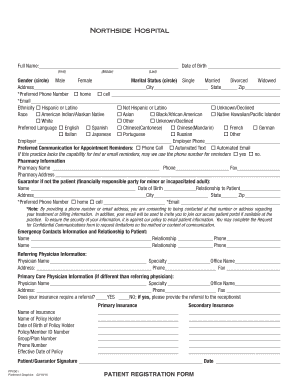
The Visitor Registration Form includes various fillable fields that capture pertinent visitor details, such as:
-
Forename
-
Surname
-
Date of birth
-
Home address
-
Local contact number
Additionally, it contains a declaration section where applicants consent to treatment, underscoring its significance in the registration process. This document is often referred to as a visitor details form or patient intake form.
Who Needs the Visitor Registration Form?
This form is intended for patients visiting a healthcare facility for the first time, as well as their guardians. It is essential for those signing the form to meet the age requirement; applicants aged 12 years or older must sign the document themselves, while those under 12 require a parent or guardian's signature. Reference terms include healthcare visitor form and medical registration form pdf.
How to Fill Out the Visitor Registration Form Online (Step-by-Step)
Filling out the Visitor Registration Form online is straightforward. Follow these steps:
-
Access the form via the healthcare provider's website.
-
Enter the required fields, such as title, preferred pronouns, forename, and surname.
-
Provide your date of birth and contact information.
-
Review all entries for accuracy before submission.
Important fields also include appointment details and Next of Kin information, ensuring comprehensive visitor data collection.
Common Errors and How to Avoid Them
While completing the Visitor Registration Form, users commonly make the following errors:
-
Omitting required fields
-
Providing incorrect contact information
-
Neglecting to sign the form when necessary
To ensure accuracy and completeness, double-check all entries before submission, particularly the essential details and signatures required on the medical registration form.
Digital Signing the Visitor Registration Form
Digital signatures are a convenient alternative to traditional wet signatures, and they hold the same legal validity when executed correctly. To eSign the Visitor Registration Form using pdfFiller, users can follow the simple instructions provided on the platform, making the process quick and efficient. This feature enhances the overall user experience, integrating technology seamlessly into healthcare documentation.
Submission Methods for the Visitor Registration Form
Once completed, the Visitor Registration Form can be submitted in a couple of ways. Users have the option to:
-
Upload the document online via the healthcare provider's portal.
-
Submit it in person at the designated office.
Additionally, ensure to send any required identification documents along with the form as needed for verification purposes.
Security and Compliance when Using the Visitor Registration Form
Data protection is paramount when dealing with sensitive information such as healthcare records. Compliance with regulations like HIPAA and GDPR is crucial. Users can have peace of mind knowing that pdfFiller implements robust security measures, including 256-bit encryption and SOC 2 Type II compliance, to protect personal and medical data.
Experience Easy Form Management with pdfFiller
pdfFiller offers a comprehensive suite of features for managing your Visitor Registration Form efficiently. Users can edit, share, and eSign documents seamlessly, enhancing the entire registration process. We encourage users to take advantage of pdfFiller's capabilities to streamline their healthcare registration experience.
How to fill out the Visitor Registration
-
1.Access the Visitor Registration Form by navigating to pdfFiller and selecting the form from the healthcare forms section.
-
2.Once the form is open, you can click on each fillable field to enter information. Ensure that you have all necessary details ready before starting.
-
3.Gather personal information such as title, preferred pronouns, full name, date of birth, gender identity, and contact details before you begin filling out the form.
-
4.Fill in the 'Home Address' and 'Local Address' fields accurately, making sure to provide valid contact numbers.
-
5.For the 'Next of Kin' sections, have the full names of at least two contacts ready to enter.
-
6.Review the 'Date & Time of Appointment' and 'Appointment With' fields, ensuring that all appointment-specific details are included.
-
7.Make sure to complete the declaration section that confirms your agreement regarding treatment payments and privacy disclosures.
-
8.If you are 12 years or older, sign in the designated area. Parents or guardians need to sign if registering a patient under the age of 12.
-
9.After filling in all fields, review your entries for accuracy. Use pdfFiller's preview option to check your responses.
-
10.Once satisfied, save your completed form, or download it as a PDF. You can also submit it directly through pdfFiller if required.

Who needs to complete the Visitor Registration Form?
Any visitor or new patient who seeks medical services at a healthcare facility must complete the Visitor Registration Form, including minors who require a parent or guardian to sign on their behalf.
What information do I need to provide?
You will need to supply personal details such as your name, date of birth, contact information, home and local addresses, next of kin information, and appointment details when completing the form.
Is there a deadline for submitting this form?
It is recommended to submit the Visitor Registration Form prior to your scheduled appointment to ensure a smooth intake process. Check with your healthcare provider for any specific timelines.
What supporting documents must I submit along with the form?
A copy of photographic identification is required to be submitted along with the Visitor Registration Form to verify your identity and ensure accurate record-keeping.
What are common mistakes to avoid when completing this form?
Common mistakes include missing signatures, providing incorrect personal details, or forgetting to include required documents like photographic ID. Double-check all fields before submission.
How can I submit the Visitor Registration Form?
You can submit the completed form via pdfFiller by following instructions to download it or directly submitting it to the healthcare provider’s designated platform as instructed.
How long does it take to process the Visitor Registration Form?
Processing times can vary by healthcare provider, but generally expect confirmation of your registration on the day of your appointment or shortly thereafter.
Related Forms




Get the latest insights from our blog



If you believe that this page should be taken down, please follow our DMCA take down process
here
.
This form may include fields for payment information. Data entered in these fields is not covered by PCI DSS compliance.