
Last updated on
Oct 1, 2026

Get the free Preschool Evaluation Planning Form
We are not affiliated with any brand or entity on this form

Fill out
Complete the form online in a simple drag-and-drop editor.

eSign
Add your legally binding signature or send the form for signing.

Share
Share the form via a link, letting anyone fill it out from any device.

Export
Download, print, email, or move the form to your cloud storage.
Why pdfFiller is the best tool for your documents and forms


End-to-end document management
From editing and signing to collaboration and tracking, pdfFiller has everything you need to get your documents done quickly and efficiently.
Accessible from anywhere
pdfFiller is fully cloud-based. This means you can edit, sign, and share documents from anywhere using your computer, smartphone, or tablet.
Secure and compliant
pdfFiller lets you securely manage documents following global laws like ESIGN, CCPA, and GDPR. It's also HIPAA and SOC 2 compliant.
What is Preschool Evaluation Form
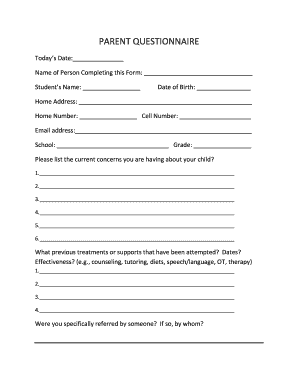
The Preschool Evaluation Planning Form is an education document used by school district representatives and parents to assess a preschool child's suspected disability and plan evaluations.
pdfFiller scores top ratings on review platforms




Who needs Preschool Evaluation Form?
Explore how professionals across industries use pdfFiller.

Preschool Evaluation Form is needed by:
-
School District Representatives managing evaluations
-
Parents or Guardians of preschool children
-
Child psychologists assessing disabilities
-
Educators involved in special education
-
Administrative staff handling educational forms
-
Early intervention specialists supporting children
Comprehensive Guide to Preschool Evaluation Form
What is the Preschool Evaluation Planning Form?
The Preschool Evaluation Planning Form is an essential tool in the educational landscape, specifically designed to document evaluations for preschool children suspected of disabilities. This special education form serves the purpose of facilitating accurate assessments and planning interventions tailored to each child's unique needs.
By utilizing the preschool evaluation form, educators and stakeholders can ensure that all relevant information regarding a child's development is systematically recorded, helping to create an effective pathway towards early intervention.
Purpose and Benefits of the Preschool Evaluation Planning Form
This education planning form plays a crucial role in early intervention and educational planning, helping to identify the necessary supports for children with potential disabilities. Parents and guardians gain clarity on their child's developmental needs and the resources available to assist them.
Additionally, school district representatives benefit from a structured process that aids in identifying appropriate interventions and support strategies. The form promotes collaboration between families and educators, ensuring that every child receives the attention and resources they deserve.
Key Features of the Preschool Evaluation Planning Form
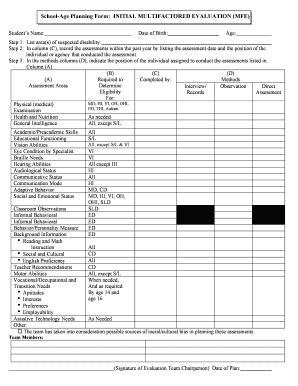
The Preschool Evaluation Planning Form includes several important components that contribute to comprehensive assessments:
-
Child information, including name, ID number, and date of birth.
-
Categories of suspected disabilities that may affect the child's learning.
-
Assessment methods that will be utilized during the evaluation process.
-
Signature lines for both parents/guardians and school district representatives to validate the form.
These features ensure that all pertinent details are effectively captured and that the evaluation process is transparent and collaborative.
Who Needs the Preschool Evaluation Planning Form?
The primary users of the Preschool Evaluation Planning Form include school district representatives and parents or guardians of preschool children. The form is essential in various scenarios, such as when a child is being considered for special education services or when there are concerns regarding their development.
By engaging both parties in the process, the form fosters accountability and cooperation in meeting the educational needs of the child.
How to Fill Out the Preschool Evaluation Planning Form Online (Step-by-Step)
Completing the Preschool Evaluation Planning Form is straightforward with pdfFiller. Follow these steps to ensure accuracy:
-
Access the form on the pdfFiller website.
-
Fill in the child’s personal information, including name and date of birth.
-
Select the relevant disability categories based on observations and assessments.
-
Choose the assessment methods that will be applied during the evaluation.
-
Ensure both the parent/guardian and school district representative sign the form electronically.
-
Review all entered information for completeness before finalizing.
Using pdfFiller's editing and eSigning features makes the submission process user-friendly and efficient.
Common Errors and How to Avoid Them
When completing the Preschool Evaluation Planning Form, users often encounter typical mistakes that can lead to delays or inaccuracies, such as:
-
Omitting essential child information, like name or ID number.
-
Forgetting to obtain required signatures from both parties.
To ensure accuracy, it is recommended to double-check all fields before submission and utilize pdfFiller's review features to catch any potential errors early in the process.
Submission Methods and Where to Submit the Preschool Evaluation Planning Form
The Preschool Evaluation Planning Form can be submitted through various methods, including online submission via pdfFiller or traditional mail. When submitting by mail, ensure that you send it to the designated address provided by your local school district.
It's essential to check for any specific submission requirements or addresses applicable to your state, as these may vary.
What Happens After You Submit the Preschool Evaluation Planning Form?
Once the Preschool Evaluation Planning Form is submitted, the review process begins. Families can expect the following:
-
A designated reviewer will assess the submitted information for completeness.
-
Timelines for the evaluation process will be communicated to the family.
This process ensures that families remain informed and can plan accordingly for the next steps in their child's educational journey.
Security and Compliance for the Preschool Evaluation Planning Form
Given the sensitive nature of the information contained within the Preschool Evaluation Planning Form, security is of utmost importance. pdfFiller adheres to strict compliance regulations, including HIPAA and GDPR, ensuring that all documents are handled securely and confidentially.
By utilizing 256-bit encryption and achieving SOC 2 Type II compliance, pdfFiller provides a trusted environment for users to manage their sensitive documents without compromise.
Take the Next Step with pdfFiller
For a streamlined form-filling experience, pdfFiller offers an array of features that enhance the completion of the Preschool Evaluation Planning Form. Users can take advantage of tools that enable text editing, eSigning, and document sharing, all within a secure environment.
Start your journey towards efficient form management today with pdfFiller and experience the ease of handling important documents seamlessly.
How to fill out the Preschool Evaluation Form
-
1.Access the Preschool Evaluation Planning Form on pdfFiller by visiting their website or app. Use the search feature to locate the form quickly.
-
2.Once located, open the form to view its sections. Familiarize yourself with its layout and required fields.
-
3.Before starting, gather necessary child information including the child's name, ID number, and date of birth to ensure all sections can be completed efficiently.
-
4.Begin filling in the form by clicking on the first blank field. Use pdfFiller’s typing tools to enter details effortlessly.
-
5.Continue through the document to complete all required sections, including those for suspected disability categories and assessment methods.
-
6.Make sure to check for any signature lines present on the form. You will need to obtain signatures from both the School District Representative and the Parent/Guardian.
-
7.After completing all fields, carefully review the information for accuracy. Check that all necessary sections are filled and the signatures are included.
-
8.Once confirmed, take advantage of pdfFiller’s options to save your work. Choose to download a copy of the completed form or submit it electronically as per the requirements.

What are the eligibility requirements for using the Preschool Evaluation Planning Form?
The form is designed for children who are suspected of having a disability. It is generally initiated by school district representatives or parents to evaluate preschool-aged children.
Are there submission deadlines for this form?
Submission deadlines can vary by school district. It is essential to check with your local education authority for specific timelines and requirements.
How can I submit the completed Preschool Evaluation Planning Form?
Completed forms can typically be submitted through electronic systems supported by your school district or printed and delivered in person. Confirm with your district for specific submission methods.
What supporting documents are required with the Preschool Evaluation Planning Form?
While the primary focus is on the completed evaluation form, you may need supporting documents such as previous assessments or medical records related to the child's suspected disability.
What are common mistakes to avoid when filling out this form?
Be sure to fill in all required fields accurately. Common mistakes include missing signatures, providing incorrect child information, and failing to check for updates or revisions in the form.
How long does it take for the form to be processed?
Processing times can depend on the school district’s policies, but typically, you should expect at least 2-4 weeks for processing after submissions are received.
Who should I contact for questions regarding the Preschool Evaluation Planning Form?
If you have questions, reach out to your local school district’s special education department or the designated representative who can assist with the evaluation process.
Related Forms





Get the latest insights from our blog


If you believe that this page should be taken down, please follow our DMCA take down process
here
.
This form may include fields for payment information. Data entered in these fields is not covered by PCI DSS compliance.