
Last updated on
Oct 16, 2026

Get the free Dental Enrollment Form
We are not affiliated with any brand or entity on this form

Fill out
Complete the form online in a simple drag-and-drop editor.

eSign
Add your legally binding signature or send the form for signing.

Share
Share the form via a link, letting anyone fill it out from any device.

Export
Download, print, email, or move the form to your cloud storage.
Why pdfFiller is the best tool for your documents and forms


End-to-end document management
From editing and signing to collaboration and tracking, pdfFiller has everything you need to get your documents done quickly and efficiently.
Accessible from anywhere
pdfFiller is fully cloud-based. This means you can edit, sign, and share documents from anywhere using your computer, smartphone, or tablet.
Secure and compliant
pdfFiller lets you securely manage documents following global laws like ESIGN, CCPA, and GDPR. It's also HIPAA and SOC 2 compliant.
What is Dental Enrollment
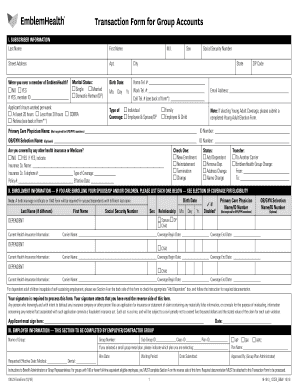
The Dental Enrollment Form is a healthcare document used by members of TWU Local 100 to enroll in dental coverage through EmblemHealth.
pdfFiller scores top ratings on review platforms




Who needs Dental Enrollment?
Explore how professionals across industries use pdfFiller.

Dental Enrollment is needed by:
-
Members of TWU Local 100 seeking dental insurance
-
Individuals applying for dental coverage under EmblemHealth
-
Dependents of TWU Local 100 members needing dental enrollment
-
Human resources departments managing employee benefits
-
Insurance agents assisting with dental enrollment
Comprehensive Guide to Dental Enrollment
What is the Dental Enrollment Form?
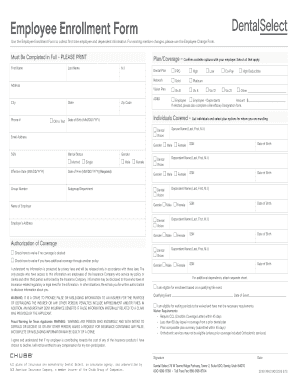
The Dental Enrollment Form is a crucial document for members of TWU Local 100 who seek dental coverage through EmblemHealth. This form serves as the primary tool for initiating coverage and ensuring that members and their dependents are properly enrolled in the dental benefits program. Completing the form is essential to receive comprehensive dental insurance, which aids in maintaining oral health and accessing necessary treatments.
Purpose and Benefits of the Dental Enrollment Form
Completing the Dental Enrollment Form is vital for enrolling in dental coverage. This enrollment not only provides access to preventive care but also covers necessary treatments, contributing significantly to overall health and well-being. The benefits of having dental coverage offer peace of mind, knowing that you and your family can access quality dental care when needed.
Who Needs the Dental Enrollment Form?
Members of TWU Local 100 are required to complete the Dental Enrollment Form to enroll in their dental coverage. Additionally, dependents of these members may also need to be included in the form for enrollment. Each dependent’s information must be accurately represented to ensure they receive the right coverage alongside the member.
Eligibility Criteria for the Dental Enrollment Form
Eligibility to fill out the Dental Enrollment Form primarily extends to TWU Local 100 members. Certain employment status conditions may affect eligibility, such as active membership or new hire status. It is essential to understand these requirements fully to avoid delays in processing your enrollment.
Required Documents and Supporting Materials
When filling out the Dental Enrollment Form, several key documents are required to complete the process effectively. You will need to provide personal information, including:
-
Name
-
Address
-
Social Security number
-
Dependent details
Supporting documents, like marriage certificates and birth certificates, should also be included for dependents. Ensuring that all required paperwork is submitted correctly is crucial for successful enrollment.
How to Fill Out the Dental Enrollment Form Online (Step-by-Step)
Filling out the Dental Enrollment Form online through pdfFiller can streamline the process. Here’s how to do it:
-
Access the Dental Enrollment Form through the pdfFiller platform.
-
Fill in all necessary fields accurately.
-
Review the information provided for any mistakes.
-
Utilize pdfFiller’s features to enhance usability, such as saving progress or using fillable fields.
Common Errors and How to Avoid Them
Users often encounter specific common errors when submitting the Dental Enrollment Form. Missing fields, incorrect information, and lack of required signatures can cause delays. To avoid these pitfalls, double-check every section for completeness and accuracy before submission. Taking the time to ensure every detail is correct helps facilitate a smoother enrollment process.
Submission Methods and Delivery
After completing the Dental Enrollment Form, understanding the submission methods is crucial for timely enrollment. Options include:
-
Submitting online through pdfFiller
-
Printing the form and mailing it
It is important to be aware of submission deadlines and tracking options to confirm that your form has been received and processed accurately.
Security and Compliance for the Dental Enrollment Form
When submitting sensitive personal information through the Dental Enrollment Form, security is paramount. pdfFiller adheres to stringent security standards, including GDPR and HIPAA compliance, ensuring that personal data is handled securely and in compliance with legal requirements. Users can trust that their information is protected throughout the submission process.
Your Path to Easy Enrollment with pdfFiller
Using pdfFiller for your Dental Enrollment Form offers a user-friendly experience. The platform provides features designed to simplify the completion and submission processes, ensuring that members can enroll efficiently. Its emphasis on security and ease of use makes pdfFiller an ideal choice for filling out the Dental Enrollment Form.
How to fill out the Dental Enrollment
-
1.Start by accessing pdfFiller and locating the Dental Enrollment Form. You can use the search function or navigate through the healthcare forms category to find it quickly.
-
2.Once you've opened the form, familiarize yourself with the layout. pdfFiller allows you to click on the fields where you need to input information.
-
3.Before filling out the form, gather all necessary personal details, including your name, address, social security number, and information for any dependents you wish to enroll.
-
4.Begin completing the form by filling in your personal information. Click on the designated fields and type in the relevant details directly, ensuring accuracy as you go.
-
5.If you have dependents, be sure to input their names and dates of birth in the provided sections. Consult your documents to confirm this information is correct.
-
6.Review the section that requires your signature. Make sure you understand your employment affirmation and premium payment responsibility before signing.
-
7.After filling out the form, review all entries for accuracy. Look for any filled fields that may require adjusting or additional input.
-
8.Finalize the form by clicking the save or download option in pdfFiller to keep a copy for your records. You may also choose to submit the form electronically through the platform for processing.

Who is eligible to use the Dental Enrollment Form?
The Dental Enrollment Form is primarily for members of TWU Local 100. Eligibility extends to their dependents as well, provided they meet the coverage guidelines set by EmblemHealth.
Is there a deadline for submitting the Dental Enrollment Form?
Deadlines may vary based on your specific enrollment period and benefits coordinator. It’s advisable to check with your HR department or EmblemHealth for precise submission dates to avoid missed coverage.
How can I submit the completed Dental Enrollment Form?
You can submit the completed form electronically through pdfFiller or print it out for submission by mail or in person. Ensure all required fields are filled out before submitting.
What supporting documents are required with the form?
When submitting the Dental Enrollment Form, you will need to include supporting documents such as marriage certificates for spouses and birth certificates for dependents. Confirm specific requirements with EmblemHealth.
What are common mistakes to avoid when filling out the form?
Common mistakes include missing signatures, incorrect social security numbers, and inaccurate dependent information. Always double-check each section before submission to prevent processing delays.
How long does processing take for the Dental Enrollment Form?
Processing times can vary. Typically, you should allow a few weeks for your form to be reviewed and approved. Monitor any communications from EmblemHealth for updates on your enrollment status.
What if I need to make changes to my completed form?
If you need to make changes to your completed Dental Enrollment Form, contact your HR department or EmblemHealth directly for guidance on how to amend your submissions effectively.
Related Forms




Get the latest insights from our blog


If you believe that this page should be taken down, please follow our DMCA take down process
here
.
This form may include fields for payment information. Data entered in these fields is not covered by PCI DSS compliance.