
Last updated on
Oct 19, 2026

Get the free Annuity Contract Internal Exchange Agreement
We are not affiliated with any brand or entity on this form

Fill out
Complete the form online in a simple drag-and-drop editor.

eSign
Add your legally binding signature or send the form for signing.

Share
Share the form via a link, letting anyone fill it out from any device.

Export
Download, print, email, or move the form to your cloud storage.
Why pdfFiller is the best tool for your documents and forms


End-to-end document management
From editing and signing to collaboration and tracking, pdfFiller has everything you need to get your documents done quickly and efficiently.
Accessible from anywhere
pdfFiller is fully cloud-based. This means you can edit, sign, and share documents from anywhere using your computer, smartphone, or tablet.
Secure and compliant
pdfFiller lets you securely manage documents following global laws like ESIGN, CCPA, and GDPR. It's also HIPAA and SOC 2 compliant.
What is Annuity Exchange Agreement
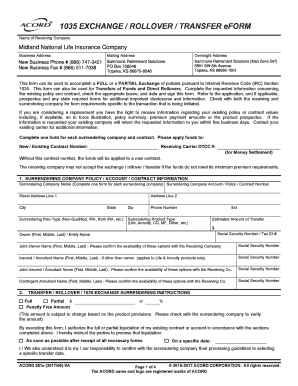
The Annuity Contract Internal Exchange Agreement is a service agreement used by individuals to transfer funds internally between annuity contracts or mutual fund accounts.
pdfFiller scores top ratings on review platforms




Who needs Annuity Exchange Agreement?
Explore how professionals across industries use pdfFiller.

Annuity Exchange Agreement is needed by:
-
Owners or Participants of annuity contracts
-
Beneficiaries of annuity funds
-
Joint Owners of investment accounts
-
Former Employers or Trustees
-
New Employers or Trustees
-
Spouses of contract holders
Comprehensive Guide to Annuity Exchange Agreement
What is the Annuity Contract Internal Exchange Agreement?
The Annuity Contract Internal Exchange Agreement is a crucial document for transferring funds between annuity contracts. This agreement plays a significant role in financial planning by facilitating efficient fund management and tax-deferred growth, ensuring compliance with both federal and state regulations. By utilizing this form, individuals can navigate the complexities of annuity fund transfers without incurring immediate tax liabilities.
This agreement emphasizes the importance of strategic fund allocation within the retirement planning process. Completing the annuity fund transfer form enables smoother transitions, allowing owners to optimize their investments.
Purpose and Benefits of the Annuity Contract Internal Exchange Agreement
The primary purpose of the Annuity Contract Internal Exchange Agreement is to streamline the process of transferring funds between different annuity contracts. This form offers vital benefits that include improved efficiency in managing financial portfolios and maintaining tax advantages during the transfer process.
Some notable advantages of using the internal exchange statement and agreement include:
-
Tax-deferred growth potential during the transfer.
-
Reduced complexity in transferring funds between contracts.
-
Protection of the original investment’s tax benefits.
Who Needs the Annuity Contract Internal Exchange Agreement?
Individuals and entities involved in annuity transactions frequently require the Annuity Contract Internal Exchange Agreement. Typical parties that complete this form include:
-
Owner/Participant
-
Beneficiary
-
Joint Owner
-
Former Employer/Trustee/TPA
-
New Employer/Trustee/TPA
-
Spouse
These roles may be applicable under various circumstances, especially during changes in employment, inheritance, or estate planning.
Key Features of the Annuity Contract Internal Exchange Agreement
The Annuity Contract Internal Exchange Agreement consists of critical sections designed to guide users through the transfer process. Required fields typically include:
-
Account information such as owner's details and account numbers.
-
Transfer options specifying how funds will be allocated.
-
Terms and disclosures outlining fees or penalties.
It is also essential to note the requirements for notarization and spousal consent, particularly in cases involving ERISA plans, to ensure valid processing.
How to Fill Out the Annuity Contract Internal Exchange Agreement Online
Completing the Annuity Contract Internal Exchange Agreement online involves several straightforward steps. First, gather necessary pre-filling information, which typically includes personal details such as name, address, and financial information relevant to the annuity.
Follow these instructions for accuracy:
-
Access the form on the relevant platform.
-
Input general account information in the required fields.
-
Specify transfer options based on your needs.
-
Review all terms and disclosures carefully.
-
Provide required signatures where indicated.
Signing and Notarizing the Annuity Contract Internal Exchange Agreement
When completing the Annuity Contract Internal Exchange Agreement, understanding the signing requirements is crucial. This includes differentiating between digital signatures and traditional wet signatures, which may vary based on the submitting institution's policies.
The following individuals typically need to sign the form:
-
Owner/Participant
-
Beneficiary
-
Joint Owner
Additionally, specific consent from a spouse may be necessary for certain plans to fulfill legal obligations.
Submission Process for the Annuity Contract Internal Exchange Agreement
Once the Annuity Contract Internal Exchange Agreement is filled out, it is important to submit it correctly. The completed form must often be mailed directly to Security Benefit in Topeka, Kansas. Submission options may vary, and it’s advisable to check for:
-
Methods of submission (e.g., mail or fax).
-
Any possible processing fees.
-
Deadlines for submission to ensure timeliness.
What Happens After You Submit the Annuity Contract Internal Exchange Agreement?
After submitting the Annuity Contract Internal Exchange Agreement, users can expect confirmation of receipt from the processing institution. Tracking options may also be available, allowing individuals to monitor the status of their submission.
If any issues arise, knowing how to check the application status through the appropriate channels ensures a smooth follow-up process.
Security and Compliance for the Annuity Contract Internal Exchange Agreement
Concerns regarding the privacy and security of sensitive information are paramount when dealing with the Annuity Contract Internal Exchange Agreement. It is essential to highlight the protective measures implemented to safeguard user data.
Compliance with standards such as HIPAA and GDPR ensures the confidentiality of personal information, reinforcing trust in the handling process.
Experience Hassle-Free Document Management with pdfFiller
Utilizing pdfFiller for managing the Annuity Contract Internal Exchange Agreement streamlines the process of filling out, signing, and storing documents securely. The platform offers an intuitive interface for easy completion of forms, along with benefits like cloud storage and efficient sharing of important documents.
With pdfFiller, users can focus more on their financial plans and less on paperwork, enhancing their overall experience.
How to fill out the Annuity Exchange Agreement
-
1.To access the Annuity Contract Internal Exchange Agreement on pdfFiller, visit the platform's website and search for the form using the title.
-
2.Once located, open the form by clicking on it to load the online editing interface where you can begin filling it out.
-
3.Gather all necessary information beforehand, including your personal identification data, account numbers, and any relevant terms or disclosures related to your annuity contracts.
-
4.Navigate through the form fields, which may include checkboxes and blank spaces for your name, address, Social Security Number, and other required details.
-
5.Carefully fill in each section of the form, ensuring accuracy to avoid potential delays in processing your request.
-
6.Review the completed form thoroughly to confirm that all sections are finished and that your information is correct.
-
7.Once satisfied with your entries, utilize pdfFiller’s options to save or download the completed form to your device.
-
8.You can then submit the form through the specified mailing instructions—ensure it is sent to Security Benefit in Topeka, Kansas—and if applicable, include any notarization or spousal consent documentation.

Who is eligible to fill out the Annuity Contract Internal Exchange Agreement?
Eligible individuals include the Owner/Participant, Beneficiaries, Joint Owners, and authorized representatives like Former and New Employers or Trustees.
What are the deadlines for submitting this form?
While there are no universal deadlines mentioned, it’s advisable to submit the form as soon as possible to ensure timely processing of your annuity transfer.
How do I submit the completed Annuity Contract Internal Exchange Agreement?
You must print the completed agreement and mail it to Security Benefit in Topeka, Kansas. Verify if notarization or spousal consent is required before mailing.
What supporting documents may be required with this form?
Depending on the specifics of your ERISA plan, you might need to include notarization or spousal consent documents along with the completed form.
What common mistakes should I avoid while filling out the form?
Ensure all fields are completed accurately, particularly Social Security Numbers and account information, to avoid delays. Double-check for required signatures.
What is the processing time for the Annuity Contract Internal Exchange Agreement?
Processing times may vary based on Security Benefit's workload, but generally expect a response within a few weeks after mailing.
Is the Annuity Contract Internal Exchange Agreement IRS-specific?
No, this form is not an IRS form. It is specifically designed for internal exchanges of annuity contracts and does not require IRS filing.
Related Forms


Get the latest insights from our blog


If you believe that this page should be taken down, please follow our DMCA take down process
here
.
This form may include fields for payment information. Data entered in these fields is not covered by PCI DSS compliance.