
Last updated on
Oct 10, 2026

Get the free Claim for Travel and Incidental Expenses
We are not affiliated with any brand or entity on this form

Fill out
Complete the form online in a simple drag-and-drop editor.

eSign
Add your legally binding signature or send the form for signing.

Share
Share the form via a link, letting anyone fill it out from any device.

Export
Download, print, email, or move the form to your cloud storage.
Why pdfFiller is the best tool for your documents and forms


End-to-end document management
From editing and signing to collaboration and tracking, pdfFiller has everything you need to get your documents done quickly and efficiently.
Accessible from anywhere
pdfFiller is fully cloud-based. This means you can edit, sign, and share documents from anywhere using your computer, smartphone, or tablet.
Secure and compliant
pdfFiller lets you securely manage documents following global laws like ESIGN, CCPA, and GDPR. It's also HIPAA and SOC 2 compliant.
What is Travel Expense Claim
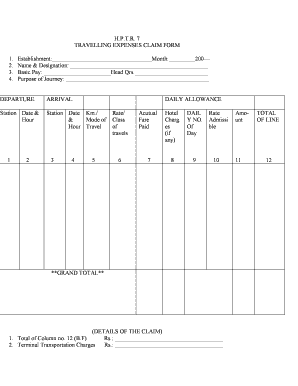
The Claim for Travel and Incidental Expenses is an expense report form used by employees in Northern Ireland to request reimbursement for travel-related costs incurred during business activities.
pdfFiller scores top ratings on review platforms




Who needs Travel Expense Claim?
Explore how professionals across industries use pdfFiller.

Travel Expense Claim is needed by:
-
Employees traveling for business in Northern Ireland
-
HR departments managing employee reimbursements
-
Finance teams reviewing expense claims
-
Managers overseeing travel-related budgets
-
Accountants processing financial reports
Comprehensive Guide to Travel Expense Claim
What is the Claim for Travel and Incidental Expenses?
The Claim for Travel and Incidental Expenses form is specifically designed for employees to report and seek reimbursement for travel-related costs incurred during business duties in Northern Ireland. This form includes coverage for various expense types such as transportation fares, parking fees, subsistence, and sundries. To successfully claim these expenses, employees need to complete the form accurately to initiate the reimbursement process.
This process involves detailing required information, including the travel purpose, dates of travel, and supporting receipts. Utilizing an employee expense form ensures clarity and proper documentation, essential for seamless reimbursement.
Purpose and Benefits of Using the Travel Expense Claim Form
The travel expense claim form offers significant advantages for both employees and businesses in Northern Ireland. For employees, it facilitates prompt reimbursement, promoting financial well-being during business trips. Moreover, a well-structured claim process enhances transparency and ensures that all expenditures are adequately documented.
By implementing a systematic approach to business travel reimbursement, businesses can foster increased employee satisfaction, reflecting positively on overall workplace morale and operational efficiency.
Key Features of the Claim for Travel and Incidental Expenses
-
Fillable fields for various expense categories including fares, car park costs, subsistence, and sundries.
-
Requirement to specify the travel purpose and journey details clearly.
-
Signature and certification requirements ensuring authenticity and accuracy.
The comprehensive structure of the Claim for Travel and Incidental Expenses form allows users to clearly outline their incurred costs, which is critical for effective mileage expense reporting.
Who Needs to Use the Claim for Travel and Incidental Expenses?
Eligible claimants for the Claim for Travel and Incidental Expenses include employees and contractors who have undertaken trips as part of their business responsibilities. This process is essential for anyone who incurs expenses while carrying out work-related travel.
Understanding the specific requirements and guidelines outlined in the employee expense form aids in effectively navigating the reimbursement process.
How to Complete the Claim for Travel and Incidental Expenses Form Online
To fill out the travel expense claim form using pdfFiller, follow these steps:
-
Access the form within the pdfFiller platform.
-
Complete each fillable field, entering accurate details for your expenses and travel purpose.
-
Attach any required receipts and documentation to support your claim.
-
Review all entries for accuracy to prevent delays in reimbursement.
-
Sign and certify your submission per the requirements.
By ensuring precision in your entries, you will enhance the timeliness of reimbursements, making the entire process more efficient.
Common Errors and How to Avoid Them When Filling Out the Form
Many claimants encounter errors while completing the Claim for Travel and Incidental Expenses form. Common mistakes include:
-
Omitting necessary details such as travel dates or purposes.
-
Providing incorrect receipt information.
-
Failing to sign or certify the document.
To avoid these pitfalls, double-check your entries before submitting the form. Ensuring completeness will enhance the likelihood of quick approval.
Submission Methods for the Claim for Travel and Incidental Expenses
Once the form is completed, there are several submission methods available, including:
-
Emailing the completed form to the designated department.
-
Submitting through an online portal provided by the employer.
Be mindful of any applicable fees or processing times associated with submission. It is also crucial to retain copies of your submitted forms for your personal records.
What Happens After You Submit the Claim for Travel and Incidental Expenses?
After submitting your claim, it proceeds through a review process where the circumstances and accuracy of the entries are evaluated. During this period, you can track the status of your claims through your employer's designated channels.
Possible outcomes include approval, requests for additional information, or rejection based on the completeness of the submission and adherence to guidelines.
Security and Compliance When Handling Your Travel Expense Claims
Handling travel expense claims necessitates strict adherence to security and compliance protocols to protect sensitive information. pdfFiller offers robust security features, including encryption and compliance with regulations such as HIPAA and GDPR.
Safeguarding your personal and financial data is paramount, especially when submitting employee expense forms that contain confidential information.
Fill Out Your Claim for Travel and Incidental Expenses with pdfFiller
Utilize pdfFiller for a secure and convenient solution to complete your Claim for Travel and Incidental Expenses form. The platform is equipped with user-friendly features that simplify the document handling process.
Experience the benefits of fast reimbursements coupled with effective document management when you choose pdfFiller to assist with your expense claims.
How to fill out the Travel Expense Claim
-
1.Access the Claim for Travel and Incidental Expenses form on pdfFiller by searching for the form name in the template section or by entering the exact link provided by your organization.
-
2.Once the form is open, familiarize yourself with the fillable fields clearly labeled for your convenience. Click on each field to enter your information.
-
3.Gather all necessary documents, such as receipts and mileage logs, before starting. Ensure that you have the trip details, dates, and expenses ready for easy reference.
-
4.Fill in the purpose of your journey, specific dates traveled, total mileage, and any other travel-related costs such as fares, car park costs, subsistence, and sundries in the respective fields.
-
5.Review your entries to ensure accuracy, particularly details concerning the vehicle insurance for business use and your valid driving license. Double-check the total amounts for accuracy.
-
6.Once all sections are completed, sign the form electronically in the designated signature area. This step is crucial, as your signature certifies the accuracy of the information provided.
-
7.After completing and reviewing the form, save your progress. You can download a copy for your records or submit the form directly through pdfFiller’s submission options available on the dashboard.

Who is eligible to use the Claim for Travel and Incidental Expenses form?
The form is designed for employees based in Northern Ireland who incur travel-related expenses as part of their job responsibilities. Ensure to have a valid driving license and insurance for business use.
What documentation is required to submit the form?
You must attach relevant receipts, mileage logs, and any other supporting documents that substantiate your expenses incurred during business travel when submitting the form.
Are there deadlines for submitting the travel expense form?
Typically, claims must be submitted within a specific timeframe, such as monthly, depending on your organization's policy. Check with your HR department for definitive deadlines.
What are common mistakes to avoid when filling out the form?
Ensure that all fields are accurately filled out, especially mileage and expense totals. Double-check for signatures, as missing them can lead to processing delays.
How do I submit the form after completion?
After filling and reviewing your Claim for Travel and Incidental Expenses form, you can submit it directly through pdfFiller. Alternatively, download the final copy and email it to the appropriate department.
What is the processing time for travel expense claims?
Processing times may vary based on your organization's policies, but typically, expect a few business days to a couple of weeks for reimbursement after submission.
Can I edit my submission after it's been sent?
Once submitted, alterations typically aren't allowed. Contact your HR or finance department promptly if you realize you need to make adjustments after submission.
Related Forms





Get the latest insights from our blog


If you believe that this page should be taken down, please follow our DMCA take down process
here
.
This form may include fields for payment information. Data entered in these fields is not covered by PCI DSS compliance.