
Last updated on
Oct 15, 2026

Get the free Animal Keeping Approval Application - Dogs
We are not affiliated with any brand or entity on this form

Fill out
Complete the form online in a simple drag-and-drop editor.

eSign
Add your legally binding signature or send the form for signing.

Share
Share the form via a link, letting anyone fill it out from any device.

Export
Download, print, email, or move the form to your cloud storage.
Why pdfFiller is the best tool for your documents and forms


End-to-end document management
From editing and signing to collaboration and tracking, pdfFiller has everything you need to get your documents done quickly and efficiently.
Accessible from anywhere
pdfFiller is fully cloud-based. This means you can edit, sign, and share documents from anywhere using your computer, smartphone, or tablet.
Secure and compliant
pdfFiller lets you securely manage documents following global laws like ESIGN, CCPA, and GDPR. It's also HIPAA and SOC 2 compliant.
What is Animal Keeping Approval
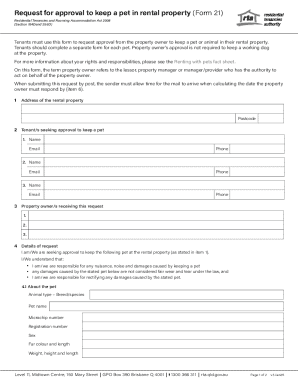
The Animal Keeping Approval Application - Dogs is a government form used by Queensland residents to request permission to keep dogs on their property.
pdfFiller scores top ratings on review platforms




Who needs Animal Keeping Approval?
Explore how professionals across industries use pdfFiller.

Animal Keeping Approval is needed by:
-
Queensland property owners looking to keep dogs.
-
Residents applying for a dog permit in Logan City.
-
Individuals requiring pet ownership approval for additional dogs.
-
Dog owners seeking to register their pets legally.
-
Tenants seeking consent from property owners for pet keeping.
-
Animal management and compliance officials in Queensland.
Comprehensive Guide to Animal Keeping Approval
What is the Animal Keeping Approval Application - Dogs?
The Animal Keeping Approval Application - Dogs is a crucial form utilized in Queensland, Australia, for individuals seeking permission to keep dogs on their property. This application not only facilitates compliance with local dog ownership regulations, but also outlines the necessary steps involved in the application process. Understanding the specifics of this application is vital for dog owners to adhere to community standards and avoid potential legal issues.
Purpose and Benefits of the Animal Keeping Approval Application - Dogs
The primary purpose of the Animal Keeping Approval Application - Dogs is to provide legal permission for residents to keep dogs. This application serves to uphold community standards regarding pet ownership and ensures responsible dog management. By obtaining this approval, applicants can avoid future legal complications while promoting a safe and pleasant living environment for themselves and their neighbors.
Who Needs to Submit the Animal Keeping Approval Application - Dogs?
This application is necessary for various individuals within Queensland. Homeowners and tenants wishing to keep multiple dogs must complete this form. It is also essential for those who already have dogs and are looking to expand their canine family. Certain circumstances, such as zoning regulations or the number of dogs already kept, may require applicants to submit this application.
Eligibility Criteria for the Animal Keeping Approval Application - Dogs
Applicants must meet specific criteria to successfully complete the Animal Keeping Approval Application. Key requirements include:
-
Minimum property size and suitable zoning classification.
-
Submission of essential documentation, such as proof of identity and microchip details.
-
Adherence to regulations regarding the breeds and total number of dogs permitted.
These eligibility criteria are crucial to ensure that the application complies with local animal management policies.
How to Fill Out the Animal Keeping Approval Application - Dogs Online
Completing the Animal Keeping Approval Application online is straightforward. Follow these steps for a successful submission:
-
Access the application form and enter personal details, including your name and address.
-
Provide information concerning your current dogs, including breeds and registration status.
-
Attach any required documents, such as proof of ownership and microchip details.
-
Review all fields carefully for accuracy before submitting.
Ensuring the information is complete and precise will aid in a smooth approval process.
Common Errors and How to Avoid Them
Applicants should be aware of frequent mistakes made during the submission of the Animal Keeping Approval Application. Common errors include:
-
Omitting necessary fields or documents in the application form.
-
Inaccurate information regarding property details or dog ownership.
-
Failing to double-check for completeness before submission.
To minimize errors, consider using a validation checklist to ensure all requirements are met successfully.
Submission Methods and Fees for the Animal Keeping Approval Application - Dogs
There are multiple methods available for submitting the Animal Keeping Approval Application. Applicants can choose from the following options:
-
Online submission through the designated government portal.
-
In-person delivery at local council offices.
Fees associated with the application may vary based on the jurisdiction, with additional information on payment methods often available through local council guidelines.
What Happens After You Submit the Animal Keeping Approval Application - Dogs
Once the application is submitted, applicants can expect a typical processing time, which may vary depending on the council. Following submission, inspections may be arranged to assess compliance with local regulations. If granted, understanding the renewal process is essential for maintaining legal dog ownership status.
Security and Compliance for the Animal Keeping Approval Application - Dogs
Security and data protection are paramount during the completion of the Animal Keeping Approval Application. The handling of personal information complies with relevant local laws and regulations, such as privacy laws in Queensland. Safeguarding user data is crucial when filling out sensitive forms, ensuring applicants can confidently provide their information.
Using pdfFiller to Complete Your Animal Keeping Approval Application - Dogs Effortlessly
pdfFiller offers a user-friendly solution for completing the Animal Keeping Approval Application. With editable fields and the option for eSigning, pdfFiller streamlines the form-filling process. By utilizing a cloud-based platform, applicants can easily manage documents from anywhere, encouraging the use of pdfFiller for a seamless application experience.
How to fill out the Animal Keeping Approval
-
1.Access the Animal Keeping Approval Application - Dogs form on pdfFiller by searching for its title or navigating directly to the provided link.
-
2.Open the form to view all fillable fields. Familiarize yourself with the structure of the document before starting.
-
3.Gather all necessary information, such as your property details, the number of current dogs, breeds, microchip numbers, and desexing status of any additional dogs.
-
4.Begin completing the form by entering your personal details, including your name, address, and contact information in the designated fields.
-
5.Provide transparency by outlining your reasons for wanting to keep additional dogs in the provided section.
-
6.Fill in the dog details, ensuring accurate information about breeds, microchip details, and whether the dogs are desexed.
-
7.Don’t forget to include proof of identity and get consent from your landlord or the body corporate if applicable. You may need to upload these documents through pdfFiller.
-
8.Review the form carefully to ensure all fields are filled in correctly and all necessary documents are included.
-
9.Once you are satisfied the form is complete, navigate to the options for saving or downloading. Select the appropriate format based on your submission method.
-
10.Finally, submit the form as directed, or download it for mailing. Follow any provided instructions for payment of the application fee.

Who is eligible to apply for the Animal Keeping Approval Application - Dogs?
Eligibility typically includes Queensland residents who own properties and wish to keep dogs. Applicants must provide proof of identity and may need consent from property owners or body corporate.
What supporting documents are required for the application?
Applicants must provide proof of identity, details about current dogs, and consent from property owners or body corporate. Additional documents may include microchip details and desexing certificates for the dogs.
How do I submit the completed form?
The completed form can be submitted electronically through pdfFiller, or downloaded and mailed to the appropriate local authority. Ensure any required fees are included with the submission.
What common mistakes should I avoid when filling out the form?
Common mistakes include missing required fields, providing incorrect information about dogs, and failure to attach supporting documentation. Ensure all sections are completed thoroughly.
How long does it take to process the application?
Processing times can vary, but generally, applications may take a few weeks. It’s advisable to submit your application well in advance of when you wish to acquire or keep additional dogs.
Are there fees associated with the application?
Yes, there is typically a fee associated with the Animal Keeping Approval Application - Dogs. The exact amount may vary by location. Check your local council's website for precise details.
Can I edit the form after submitting it?
Once the form is submitted, you may not be able to edit it directly. If you realize an error, contact the authority to see if adjustments can be made before processing.
Related Forms




Get the latest insights from our blog



If you believe that this page should be taken down, please follow our DMCA take down process
here
.
This form may include fields for payment information. Data entered in these fields is not covered by PCI DSS compliance.