
Last updated on
Oct 15, 2026

Get the free Measurement Form 28704
We are not affiliated with any brand or entity on this form

Fill out
Complete the form online in a simple drag-and-drop editor.

eSign
Add your legally binding signature or send the form for signing.

Share
Share the form via a link, letting anyone fill it out from any device.

Export
Download, print, email, or move the form to your cloud storage.
Why pdfFiller is the best tool for your documents and forms


End-to-end document management
From editing and signing to collaboration and tracking, pdfFiller has everything you need to get your documents done quickly and efficiently.
Accessible from anywhere
pdfFiller is fully cloud-based. This means you can edit, sign, and share documents from anywhere using your computer, smartphone, or tablet.
Secure and compliant
pdfFiller lets you securely manage documents following global laws like ESIGN, CCPA, and GDPR. It's also HIPAA and SOC 2 compliant.
What is Measurement Form
The Measurement Form 28704 is a fillable document used by individuals to record clothing measurements for custom or tailored garments.
pdfFiller scores top ratings on review platforms




Who needs Measurement Form?
Explore how professionals across industries use pdfFiller.

Measurement Form is needed by:
-
Tailors and custom clothiers
-
Fashion designers and garment makers
-
Individuals seeking tailored clothing
-
Retailers offering custom clothing options
-
Sewing enthusiasts and hobbyists
Comprehensive Guide to Measurement Form
What is the Measurement Form 28704?
The Measurement Form 28704 is a crucial document used to accurately record clothing measurements for custom garments. Its primary purpose is to ensure that tailored clothing fits perfectly, highlighting the significance of precise measurements in bespoke tailoring. By utilizing this measurement form, users can achieve a level of fit that off-the-rack garments often fail to provide.
Purpose and Benefits of the Measurement Form 28704
This form serves several essential functions that greatly enhance the garment fitting experience. First, it simplifies the process of ordering tailored clothing, making it easier for users to communicate their specific sizing needs. Additionally, this body measurement template assists in selecting fabric and style options, ensuring users receive garments that meet their personal preferences. Overall, using the Measurement Form 28704 leads to significantly improved clothing satisfaction.
Key Features of the Measurement Form 28704
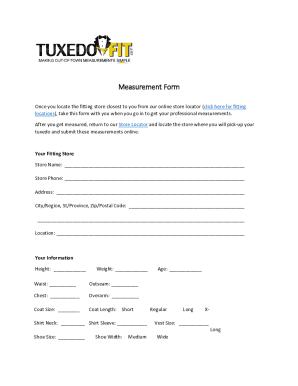
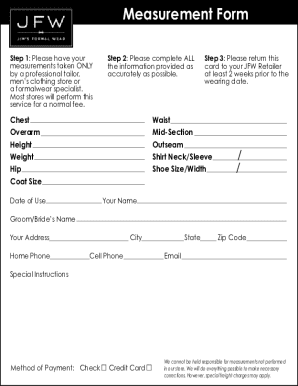
The Measurement Form 28704 includes various fields to capture essential body measurements such as the chest/bust, waist, hips, neck, and sleeve length. Additionally, it offers options for selecting fabric color, piping color, and coat or jacket style. Designed with ease of use in mind, this clothing measurement form is fillable, enabling users to enter data directly, which streamlines the measurement process.
Who Needs the Measurement Form 28704?
This form is particularly beneficial for a variety of individuals and groups that require bespoke clothing solutions. Tailors and fashion designers frequently use this measurement form to deliver garments tailored to individual dimensions. Furthermore, those involved in event planning, performers needing custom outfits, and anyone seeking tailored garments can all benefit greatly from utilizing the Measurement Form 28704.
How to Fill Out the Measurement Form 28704 (Step-by-Step)
Completing the Measurement Form 28704 requires careful attention to detail. Here’s a field-by-field walkthrough:
-
Measure the chest or bust width accurately, ensuring the measuring tape is level.
-
Record the waist measurement using a flexible measuring tape, taking care to measure at the natural waistline.
-
Measure the hips at the widest part, ensuring a snug fit without compressing skin.
-
Take the neck measurement by placing the tape around the base of the neck.
-
Determine sleeve length by measuring from the shoulder seam down to the wrist.
-
Choose your preferred fabric and piping colors, noting them on the form.
-
Select your desired coat or jacket style from the provided options.
Following these steps will help ensure accurate and effective filling of the form.
Review and Validation Checklist for the Measurement Form 28704
To ensure accuracy before submission, users should pay attention to common areas where errors may arise:
-
Double-check that all body measurements are entered correctly.
-
Verify the chosen fabric and style options correspond with your preferences.
-
Ensure that no fields are left blank, especially essential measurement fields.
-
Review your entries against a second set of measurements if possible.
Where and How to Submit the Measurement Form 28704
Submitting the Measurement Form 28704 can be done through various methods, which may include digital submissions via email or online platforms. If choosing to print and submit the form, ensure it is printed clearly and legibly. Follow any specific submission guidelines provided by your tailor or garment maker to facilitate a smooth process.
Security and Privacy When Using the Measurement Form 28704
When handling personal information, data security is crucial. pdfFiller employs robust security protocols to protect users' sensitive information during the form-processing stages. Compliance with regulations such as GDPR and HIPAA ensures that user data is treated with the utmost care and respect, providing peace of mind when filling out the form.
How to Use pdfFiller to Easily Manage the Measurement Form 28704
pdfFiller enhances the user experience by allowing easy access to fill, edit, and sign the Measurement Form 28704 online. Users can utilize advanced features for efficient form management, ensuring that their tailored garment experience is as seamless as possible.
Start Your Custom Garment Journey with the Measurement Form 28704
Filling out the Measurement Form 28704 using pdfFiller makes the process straightforward and user-friendly. By getting started now, you can enjoy the benefits of precisely tailored garments that fit you perfectly, all while utilizing the advantages of pdfFiller for efficient form management.
How to fill out the Measurement Form
-
1.To access the Measurement Form 28704, visit pdfFiller's website and use the search feature to locate the form by its name.
-
2.Once located, click on the form to open it within pdfFiller’s editing interface, where you'll find all necessary fields and options.
-
3.Before you begin filling out the form, gather all relevant measurement information including your bust, waist, hips, neck, and sleeve lengths to ensure accuracy.
-
4.Start by filling in the required measurement fields; simply click on each field and enter the corresponding data.
-
5.For choices like fabric color and coat/jacket style, use the provided checkboxes and dropdown menus to make your selections.
-
6.Refer to the instructions accompanying the form for guidance on how to take body measurements accurately for the best fit.
-
7.After completing all fields, review the filled form thoroughly for accuracy and completeness.
-
8.When satisfied with your entries, save your progress using the ‘Save’ option in pdfFiller, or download the completed form as a PDF to your device.
-
9.If needed, submit the form directly through pdfFiller if instructed, or follow the specific submission guidelines provided.

Who is eligible to use the Measurement Form 28704?
Anyone looking to have custom or tailored clothing made can use the Measurement Form 28704, including fashion designers, tailors, and individual customers.
What measurements do I need to provide?
You will need to provide various body measurements such as chest/bust, waist, hips, neck, and sleeve length to ensure a proper fit for tailored garments.
How should I submit the completed Measurement Form 28704?
You can submit the completed form by downloading it and sending it to your tailor or custom clothier via email or by following specific submission instructions provided by your service provider.
Are there common mistakes to avoid while filling out this form?
Common mistakes include providing inaccurate measurements, neglecting to fill out all required fields, or misinterpreting the instructions for taking measurements.
How long does it take to process the form once submitted?
Processing times can vary based on the tailor or service provider's workload, but it's generally good to allow a few days to a week for processing custom garment orders.
What if I need assistance while filling out the form?
If you require assistance, consult the instructional guide provided with the form or contact customer support for help while using pdfFiller.
Can I save my progress while filling out the form?
Yes, pdfFiller allows you to save your progress as you complete the Measurement Form 28704, so you can return to it later without losing any entered information.
Related Forms



Get the latest insights from our blog


If you believe that this page should be taken down, please follow our DMCA take down process
here
.
This form may include fields for payment information. Data entered in these fields is not covered by PCI DSS compliance.