
Last updated on
Oct 19, 2026

Get the free Verification of Income Earned - Parent 2026-2027
We are not affiliated with any brand or entity on this form

Fill out
Complete the form online in a simple drag-and-drop editor.

eSign
Add your legally binding signature or send the form for signing.

Share
Share the form via a link, letting anyone fill it out from any device.

Export
Download, print, email, or move the form to your cloud storage.
Why pdfFiller is the best tool for your documents and forms


End-to-end document management
From editing and signing to collaboration and tracking, pdfFiller has everything you need to get your documents done quickly and efficiently.
Accessible from anywhere
pdfFiller is fully cloud-based. This means you can edit, sign, and share documents from anywhere using your computer, smartphone, or tablet.
Secure and compliant
pdfFiller lets you securely manage documents following global laws like ESIGN, CCPA, and GDPR. It's also HIPAA and SOC 2 compliant.
What is Parent Income Verification
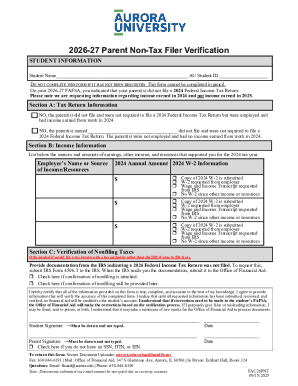
The Verification of Income Earned - Parent 2026-2027 is a financial aid application form used by parents to verify income for the University of South Florida’s financial aid process.
pdfFiller scores top ratings on review platforms




Who needs Parent Income Verification?
Explore how professionals across industries use pdfFiller.

Parent Income Verification is needed by:
-
Parents of students applying for financial aid at USF
-
Individuals not required to file a 2024 income tax return
-
Families seeking clarity on financial contributions for education
-
Students needing aid to continue their education
-
Financial aid offices at educational institutions
Comprehensive Guide to Parent Income Verification
What is the Verification of Income Earned - Parent 2?
The Verification of Income Earned - Parent 2 form is an essential document used by the University of South Florida (USF) to assess parental income for financial aid eligibility. This form is specifically for parents who are not mandated to file a 2024 income tax return with the IRS, thus ensuring equitable access to financial support for students. The significance of this document in the financial aid process cannot be overstated, as it helps establish a clear picture of a family's financial situation.
Completing this form accurately is crucial for parents applying for financial aid at USF. The data provided in the Verification of Income Earned form directly influences the aid package that a student may receive, affecting their educational opportunities.
Purpose and Benefits of the Verification of Income Earned - Parent 2
This form serves a dual purpose: verifying income for financial aid eligibility and providing substantial benefits for students and their families. By accurately reporting income, parents can maximize the financial assistance available to their children. Additionally, submitting this form ensures that families are considered for all possible financial aid programs, thereby reducing the burden of educational costs.
-
It verifies income, crucial for assessing financial aid eligibility.
-
Accurate reporting enhances the chances of receiving adequate financial support.
-
Late or missing submissions may lead to reduced financial aid options.
Who Needs the Verification of Income Earned - Parent 2?
The target audience for this form includes parents of students applying to USF. It's particularly relevant for those who qualify as non-tax filers, who may need to provide proof of income through this form rather than through a standard tax return. Understanding the eligibility criteria is vital, as particular situations necessitate the completion of the Verification of Income Earned - Parent 2 form.
-
Parents whose children are applying for financial aid.
-
Non-tax filers needing to verify income details.
-
Families experiencing unique financial situations that affect standard income reporting.
How to Fill Out the Verification of Income Earned - Parent 2 (Step-by-Step)
Filling out the Verification of Income Earned - Parent 2 form online is straightforward. Begin by accessing the form through the USF website or the pdfFiller platform, where step-by-step guidance is available. Instructions include entering required information like 'Parent’s Name' and 'Employer's Name'. Each section must be filled out meticulously to ensure accuracy.
-
Access the Verification of Income Earned form online.
-
Fill in the 'Parent’s Name' and 'Employer's Name' fields.
-
Complete the required sections, following the prompts carefully.
-
Review the information for accuracy before submission.
-
Submit the form via the accepted methods outlined by USF.
Field-by-Field Instructions for the Verification of Income Earned - Parent 2
Each field in the Verification of Income Earned - Parent 2 form requires specific pieces of information. It is crucial to understand what details to provide in order to avoid common errors that may delay the financial aid process. Key fields include 'Student’s Name', 'USF ID', and 'Parent’s Signature'. Paying close attention to each requirement will facilitate a smoother submission process.
-
'Student’s Name' must match the name on the application.
-
'USF ID' should be obtained from the student's admission documents.
-
Ensure the 'Parent’s Signature' is included to validate the information.
Submission Methods and Important Deadlines
The completed Verification of Income Earned - Parent 2 form can be submitted through various methods, including online submissions and mail. Adhering to the deadlines set by USF is essential, as timely submission can significantly impact financial aid outcomes. Missing these deadlines may result in lost financial aid opportunities for students, so parents should mark their calendars accordingly.
-
Online submission through the USF platform or pdfFiller.
-
Mailing the completed form to the designated USF office.
-
Key deadlines should be noted on the academic calendar for financial aid.
What Happens After You Submit the Verification of Income Earned - Parent 2?
Upon submission of the Verification of Income Earned form, parents can expect a confirmation of receipt from USF. This is followed by a processing period during which the information will be reviewed. Parents should stay informed about the status of their application by checking the USF financial aid portal, which provides updates on processing times and outcomes.
-
Confirmation will be sent electronically or via mail.
-
Processing times vary, so patience is necessary.
-
Application status can be checked through the USF portal.
Security and Compliance for Handling the Verification of Income Earned - Parent 2
Ensuring the security of sensitive information is paramount when handling the Verification of Income Earned - Parent 2 form. pdfFiller adopts rigorous security measures, including 256-bit encryption that complies with privacy laws such as HIPAA and GDPR. Parents can trust that their personal and financial data is secure throughout the document management process.
-
256-bit encryption safeguards your information.
-
Compliance with HIPAA and GDPR protects user data.
-
Regular audits ensure ongoing security and reliability.
Maximizing Your Experience with pdfFiller
Utilizing pdfFiller for filling out the Verification of Income Earned - Parent 2 form offers many advantages. This platform allows users to easily edit, sign, and share documents in a secure environment. Parents are encouraged to explore the features of pdfFiller to simplify their form-filling experience, making the process more efficient and less stressful.
-
Edit text and images seamlessly within the form.
-
eSign documents directly from any device.
-
Share completed forms with ease for transparency and record-keeping.
How to fill out the Parent Income Verification
-
1.Access pdfFiller and log in to your account. If you do not have an account, create one and sign in.
-
2.Locate the Verification of Income Earned - Parent 2026-2027 form by searching for it in the pdfFiller template library.
-
3.Open the form to begin filling it out. Familiarize yourself with the different fields available.
-
4.Before starting, gather all necessary information such as your name, employer's name, and any previous IRS Form W-2 documents.
-
5.Begin filling in the required fields. Click on each field to type in the information directly.
-
6.Complete all sections, including 'Student’s Name,' 'USF ID,' and 'Date of Birth.' Ensure all details are accurate and true.
-
7.Read carefully through the form to find the signature field at the end. Make sure to sign it electronically using pdfFiller’s signature feature.
-
8.Review your completed form carefully for any mistakes or missing information. It is crucial that all entries are correct and clear.
-
9.Once you have reviewed your form, save it in your pdfFiller account for easy access in the future.
-
10.You can download a copy of your completed form to your device or submit it directly through pdfFiller if required.
-
11.Follow any additional submission instructions provided by USF regarding where and how to send the completed form.

Who needs to fill out the Verification of Income Earned - Parent form?
This form is necessary for parents who are not required to file a 2024 income tax return and need to verify income for their child’s financial aid at the University of South Florida.
What information do I need to complete this form?
You will need to provide your name, employer's name, details of your 2024 income, and any relevant IRS Form W-2 documents to complete the form accurately.
How do I submit the Verification of Income Earned - Parent form?
Once completed, you can submit the form directly through pdfFiller to USF or download it for manual submission according to the university's guidelines.
Is there a deadline for submitting the form?
While the specific deadline may vary, it is crucial to check USF's financial aid guidelines as submission is typically required before the financial aid priority deadline.
What common mistakes should I avoid when filling out the form?
Ensure all personal information is accurate and double-check that you have signed the form. Common mistakes include missing fields and incorrect income reporting.
How long does it take to process the Verification of Income form?
Processing times may vary; typically, it may take a few weeks for USF to review and process your verification once it is submitted. Always consult USF for the most accurate timeline.
What should I do if I realize I've made a mistake after submitting the form?
If you identify an error after submission, contact the USF financial aid office immediately to rectify the situation. They can guide you on the steps to correct your form.
Related Forms






Get the latest insights from our blog


If you believe that this page should be taken down, please follow our DMCA take down process
here
.
This form may include fields for payment information. Data entered in these fields is not covered by PCI DSS compliance.