
Last updated on
Oct 20, 2026

Get the free Residential Property Data Form
We are not affiliated with any brand or entity on this form

Fill out
Complete the form online in a simple drag-and-drop editor.

eSign
Add your legally binding signature or send the form for signing.

Share
Share the form via a link, letting anyone fill it out from any device.

Export
Download, print, email, or move the form to your cloud storage.
Why pdfFiller is the best tool for your documents and forms


End-to-end document management
From editing and signing to collaboration and tracking, pdfFiller has everything you need to get your documents done quickly and efficiently.
Accessible from anywhere
pdfFiller is fully cloud-based. This means you can edit, sign, and share documents from anywhere using your computer, smartphone, or tablet.
Secure and compliant
pdfFiller lets you securely manage documents following global laws like ESIGN, CCPA, and GDPR. It's also HIPAA and SOC 2 compliant.
What is Property Data Form
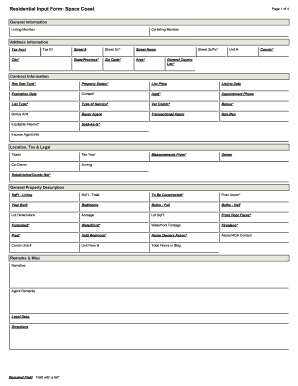
The Residential Property Data Form is a property data document used by real estate agents and property owners to collect comprehensive information about a residential property for listing purposes.
pdfFiller scores top ratings on review platforms




Who needs Property Data Form?
Explore how professionals across industries use pdfFiller.

Property Data Form is needed by:
-
Real estate agents listing properties
-
Property owners preparing for a sale
-
Real estate brokers managing listings
-
Real estate firms handling transactions
-
Homeowners applying for permits or assessments
-
Investors evaluating potential purchases
-
Property managers coordinating with agents
Comprehensive Guide to Property Data Form
What is the Residential Property Data Form?
The Residential Property Data Form is a structured document used primarily for gathering comprehensive information on residential properties. This form is essential for real estate agents and property owners who wish to provide accurate data during property listings. By using this property information template, users can ensure that details regarding the property are clearly presented and easily accessible by interested parties.
Purpose and Benefits of the Residential Property Data Form
Collecting thorough property data is crucial for creating successful listings in the real estate market. The Residential Property Data Form serves multiple purposes, including improving the accuracy of property information and facilitating smoother transactions. Benefits of using this form include:
-
Ensures all relevant details about the property are captured.
-
Enhances the visibility and appeal of listings.
-
Aids in compliance with real estate regulations.
Key Features of the Residential Property Data Form
The Residential Property Data Form encompasses several main sections designed to cover all critical aspects of a property. Key features include:
-
Agent information to identify listing representatives.
-
Detailed property descriptions to better showcase features.
-
Room descriptions, ensuring potential buyers understand the layout.
Special features like fillable fields and instructional sections enhance user experience, making it easier to complete the form accurately.
Who Needs the Residential Property Data Form?
This form is primarily utilized by real estate agents, brokers, and property owners. Additionally, stakeholders such as investors and potential buyers can also benefit from its comprehensive property data. Situations that necessitate its use include property listings, open houses, and various real estate transactions, thereby helping all parties involved.
How to Fill Out the Residential Property Data Form Online (Step-by-Step)
Filling out the Residential Property Data Form online using pdfFiller is straightforward. Here’s how to do it:
-
Access the form through the pdfFiller platform.
-
Begin populating the fillable fields with accurate information.
-
Use the provided instructional sections to guide you through any complex areas.
-
Once complete, utilize the eSigning feature to finalize your document.
-
Save and share the form through pdfFiller's secure options.
Common Errors and How to Avoid Them
While filling out the Residential Property Data Form, several mistakes can arise. Common errors include:
-
Incorrect property details such as square footage.
-
Inadvertent omissions, especially in disclosure sections.
-
Failure to update agent information.
To prevent these errors, double-check your entries and utilize the form's instructional guidance effectively. Accuracy in these details is vital for maintaining transparency in transactions.
Submission Methods and Deadlines for the Residential Property Data Form
Submitting the completed Residential Property Data Form can be done through various methods. Users can choose between electronic submission via pdfFiller or traditional mail. Adhering to submission deadlines is crucial, as they often align with specific real estate transaction timelines to ensure smooth processes.
Security and Compliance for Handling the Residential Property Data Form
When handling the Residential Property Data Form, security and compliance are paramount. pdfFiller employs robust security measures such as 256-bit encryption and is compliant with HIPAA and GDPR regulations. This guarantees that sensitive property data is preserved safely, minimizing risks associated with data breaches.
Get Started with the Residential Property Data Form Today!
Using pdfFiller to manage the Residential Property Data Form can simplify your real estate dealings. With its user-friendly features and secure platform, you can easily fill out, edit, and store this essential property information template efficiently.
How to fill out the Property Data Form
-
1.To access the Residential Property Data Form on pdfFiller, visit the pdfFiller website and log in or create an account if you don't have one.
-
2.Once logged in, use the search bar to type 'Residential Property Data Form' and select it from the results to open.
-
3.Navigate through the form by clicking on each fillable field. Use the clear labels to understand required information.
-
4.Before filling out the form, gather all necessary documents, including property ownership details, previous listings, and any relevant financial information.
-
5.Complete the agent and office information first, inputting your name, agency name, and contact information accurately.
-
6.Proceed to fill in the property details, including location, square footage, and essential features, ensuring all data is correct.
-
7.Take time to describe each room using the provided fields, detailing features that would appeal to buyers.
-
8.For broker and disclosure information, indicate any required disclosures about the property to ensure compliance with local regulations.
-
9.Continue with areas like finance and warranty details, along with HOA information if applicable, making sure to include all necessary figures.
-
10.While filling the form, utilize any available tooltips on pdfFiller for assistance with definitions or explanations of various fields.
-
11.After completing all sections, review the information you provided by scrolling through the entire form carefully.
-
12.Once you're satisfied that everything is accurate and complete, click on the review or finalize button to check for any errors.
-
13.To save your filled form, click on the 'Save' option on pdfFiller; you can also download it in your preferred format or share it via email directly.
-
14.If you need to submit, follow the prompts on pdfFiller to send your form to the appropriate recipient easily.

Who needs to fill out the Residential Property Data Form?
The Residential Property Data Form is designed for real estate agents, property owners, brokers, and anyone involved in the selling or assessment of residential properties.
Are there any eligibility requirements for using this form?
Generally, there are no specific eligibility requirements, but it is most useful for individuals directly involved in real estate transactions, such as agents or property owners.
How can I submit the completed Residential Property Data Form?
You can submit the Residential Property Data Form through pdfFiller by using the integrated sharing features, or you can download it and submit via email or traditional mail as per your needs.
What supporting documents do I need to complete this form?
You should gather necessary documents such as property title information, previous listings, financial details, and HOA documents if applicable, before filling out the form.
What are common mistakes to avoid when filling out the form?
Common mistakes include missing vital information, mislabeling property features, and failing to check compliance with local disclosure regulations. Always review all sections before finalizing.
How long does it take to process the form once submitted?
Processing time can vary depending on the recipient's office; however, it typically may take anywhere from a few days to several weeks depending on local regulations and requirements.
What to do if I need to make changes after submitting?
If you need to make changes after submission, contact the recipient directly to discuss how to withdraw or amend the submitted form to ensure your updates are considered.
Related Forms




Get the latest insights from our blog


If you believe that this page should be taken down, please follow our DMCA take down process
here
.
This form may include fields for payment information. Data entered in these fields is not covered by PCI DSS compliance.