
Last updated on
Oct 24, 2026

Get the free Commercial Property Data Form
We are not affiliated with any brand or entity on this form

Fill out
Complete the form online in a simple drag-and-drop editor.

eSign
Add your legally binding signature or send the form for signing.

Share
Share the form via a link, letting anyone fill it out from any device.

Export
Download, print, email, or move the form to your cloud storage.
Why pdfFiller is the best tool for your documents and forms


End-to-end document management
From editing and signing to collaboration and tracking, pdfFiller has everything you need to get your documents done quickly and efficiently.
Accessible from anywhere
pdfFiller is fully cloud-based. This means you can edit, sign, and share documents from anywhere using your computer, smartphone, or tablet.
Secure and compliant
pdfFiller lets you securely manage documents following global laws like ESIGN, CCPA, and GDPR. It's also HIPAA and SOC 2 compliant.
What is Commercial Property Form
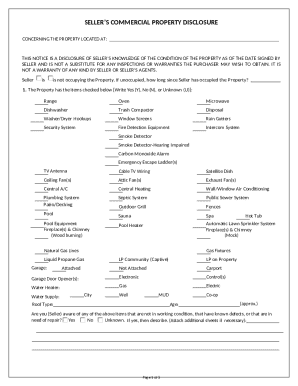
The Commercial Property Data Form is a property data document used by sellers and agents to collect detailed information about commercial properties for sale or lease.
pdfFiller scores top ratings on review platforms




Who needs Commercial Property Form?
Explore how professionals across industries use pdfFiller.

Commercial Property Form is needed by:
-
Commercial property sellers looking to list their property.
-
Listing agents preparing a property for sale or lease.
-
Real estate companies managing commercial property listings.
-
Investors seeking detailed property information.
-
Property appraisers needing data for evaluation.
Comprehensive Guide to Commercial Property Form
What is the Commercial Property Data Form?
The Commercial Property Data Form serves as a critical resource in real estate transactions, specifically aimed at gathering comprehensive details about a commercial property. This form collects vital information that aids sellers, listing agents, and listing companies in presenting properties effectively. Key data captured includes agent and office information, property location, financing options, and essential disclosures.
By utilizing the commercial property listing form, stakeholders can ensure that all relevant information is accurately recorded, facilitating smoother transactions in the commercial real estate market.
Purpose and Benefits of the Commercial Property Data Form
This form significantly benefits sellers and listing agents by streamlining the information collection process that is essential for real estate transactions. Sellers can present their properties with high-quality documentation, enhancing visibility among potential buyers or renters. Listing agents can leverage the detailed insights gathered to market properties more effectively.
Accurate information is crucial in real estate transactions, reducing misunderstandings and potential legal issues. The property data form template promotes transparency, making it easier for all parties involved to engage successfully.
Key Features of the Commercial Property Data Form
The Commercial Property Data Form includes several essential sections, ensuring all aspects of property information are captured. Key sections feature details such as:
-
Agent and office information
-
Property location details
-
Financing options
-
Lease and showing information
-
Contract and disclosure data
It also incorporates fillable fields and checkboxes for user convenience, along with signature lines for the seller, listing agent, and listing company, making it a comprehensive template for real estate transactions.
Who Needs the Commercial Property Data Form?
The target users of the Commercial Property Data Form include sellers, listing agents, and listing companies. Each role plays a crucial part in completing the form, ensuring that all necessary information is provided accurately.
Common scenarios in which the form is utilized include selling or leasing commercial properties, which require detailed and organized data to facilitate successful negotiations.
How to Fill Out the Commercial Property Data Form Online (Step-by-Step)
To complete the Commercial Property Data Form online using pdfFiller, users can follow these step-by-step instructions:
-
Access the form on the pdfFiller platform.
-
Fill in the required fields, such as 'List Price/Monthly Rent'.
-
Provide necessary agent and office details.
-
Enter the seller's information and obtain their signature/date.
-
Review all fields for accuracy before submission.
By following these steps, users can efficiently fill out and manage the commercial property data form template.
Common Errors and How to Avoid Them
When completing the Commercial Property Data Form, users may encounter several common errors, including:
-
Providing incorrect property information
-
Missing signatures from required parties
-
Overlooking specific fillable fields
To avoid these pitfalls, users should validate all entries and review the completed form carefully before submission. A validation checklist can help ensure that no critical elements are overlooked.
Security and Compliance for the Commercial Property Data Form
Handling sensitive information is a top priority when using the Commercial Property Data Form. pdfFiller utilizes 256-bit encryption to safeguard user data while ensuring compliance with HIPAA and GDPR regulations. This commitment to security is essential, as real estate transactions often involve personal and financial details that must be protected.
Users can trust that their information will be securely managed throughout the process, contributing to a safe transaction experience.
How to Submit the Commercial Property Data Form
Upon completing the Commercial Property Data Form, users have several submission methods available. These methods may include:
-
Online submission through pdfFiller
-
Emailing the form to relevant parties
-
Printing the form for physical submission
Users should also follow specific instructions provided by their agents or companies to verify how to track the submission status effectively.
What Happens After You Submit the Commercial Property Data Form?
After submitting the Commercial Property Data Form, users can anticipate several developments, including confirmation of receipt and potential follow-ups from listing agents or companies. It is important to manage and store the submitted document securely for any future reference.
Being prepared for common rejection reasons can also assist in crafting a stronger submission on the next attempt.
Maximize Your Experience with pdfFiller
Using pdfFiller can greatly enhance the efficiency of completing and submitting the Commercial Property Data Form. The platform offers numerous features, including eSigning, text and image editing, and form creation capabilities. By utilizing pdfFiller, users can streamline their document workflow, ensuring a smooth experience while handling property data forms.
This all-in-one solution simplifies the complexities associated with real estate documentation, allowing for a more organized and professional approach.
How to fill out the Commercial Property Form
-
1.To start, access pdfFiller and log into your account.
-
2.Use the search bar to find the 'Commercial Property Data Form'.
-
3.Select the form from the search results to open it in the editor.
-
4.Begin by filling out the agent details, including 'Agent ID' and 'Office Name'.
-
5.Next, input the listing information such as 'List Price/Monthly Rent'.
-
6.Ensure you gather necessary documents and previous data to complete sections accurately.
-
7.Continue filling sections for property location, contract details, and lease terms as needed.
-
8.Add any additional remarks and directions pertinent to the property.
-
9.Review the filled-out fields for accuracy, making sure all necessary fields are completed.
-
10.Check if the designated signatories have signed under 'Seller Sign / Date' and 'Listing Agent Sign / Date'.
-
11.Once complete, you can save your work by clicking the save option on pdfFiller.
-
12.To download or print the form, select the download option in your pdfFiller dashboard.
-
13.If ready to submit, choose a submission method provided by pdfFiller that suits your needs.

Who is eligible to use the Commercial Property Data Form?
The form is designed for sellers, listing agents, and listing companies involved in the sale or lease of commercial properties in the US.
What information do I need to complete the form?
Gather details such as property location, lease terms, seller information, and financial details before starting to fill out the form.
How do I submit the Commercial Property Data Form?
Once completed, you can submit the form via email or directly through pdfFiller's submission options, depending on your real estate practices.
What are common mistakes to avoid when filling out the form?
Ensure all required fields are filled out, double-check for accuracy, and verify that all necessary signatures are obtained to avoid submission delays.
Is notarization required for this form?
No, the Commercial Property Data Form does not require notarization, simplifying the process for users.
How long does it take to process this form?
Processing times can vary; however, typical processing for submission and review usually takes between a few days to a week depending on the context.
Where can I find the Commercial Property Data Form?
You can find the form on pdfFiller by searching its name in the search bar once logged into your pdfFiller account.
Related Forms




Get the latest insights from our blog


If you believe that this page should be taken down, please follow our DMCA take down process
here
.
This form may include fields for payment information. Data entered in these fields is not covered by PCI DSS compliance.