
Last updated on
Oct 22, 2026

Get the free New Zealand Tax Residency Self-Certification Form
We are not affiliated with any brand or entity on this form

Fill out
Complete the form online in a simple drag-and-drop editor.

eSign
Add your legally binding signature or send the form for signing.

Share
Share the form via a link, letting anyone fill it out from any device.

Export
Download, print, email, or move the form to your cloud storage.
Why pdfFiller is the best tool for your documents and forms


End-to-end document management
From editing and signing to collaboration and tracking, pdfFiller has everything you need to get your documents done quickly and efficiently.
Accessible from anywhere
pdfFiller is fully cloud-based. This means you can edit, sign, and share documents from anywhere using your computer, smartphone, or tablet.
Secure and compliant
pdfFiller lets you securely manage documents following global laws like ESIGN, CCPA, and GDPR. It's also HIPAA and SOC 2 compliant.
What is NZ Tax Residency Form
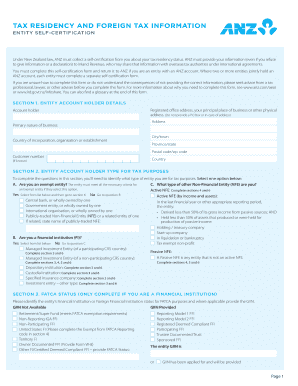
The New Zealand Tax Residency Self-Certification Form is a tax compliance document used by individuals to declare their tax residency status under the Common Reporting Standard (CRS) and FATCA.
pdfFiller scores top ratings on review platforms




Who needs NZ Tax Residency Form?
Explore how professionals across industries use pdfFiller.

NZ Tax Residency Form is needed by:
-
Individuals seeking to establish tax residency in New Zealand.
-
Account owners needing to comply with tax reporting laws.
-
Controlling persons managing accounts for tax purposes.
-
Financial institutions verifying client tax status.
-
Entities involved in international financial transactions.
Comprehensive Guide to NZ Tax Residency Form
What is the New Zealand Tax Residency Self-Certification Form?
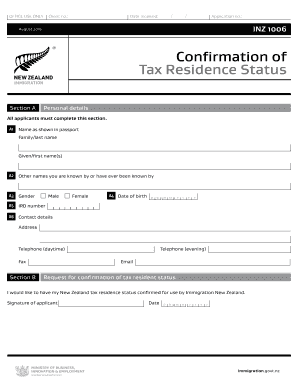
The New Zealand Tax Residency Self-Certification Form is a crucial document for individuals looking to comply with local and international tax regulations. This form is essential for meeting obligations under the Common Reporting Standard (CRS) and the Foreign Account Tax Compliance Act (FATCA). Key information required on the form includes your full legal name, date of birth, IRD number, and tax residency status.
By accurately completing this form, taxpayers can affirm their residency status, which helps in avoiding unnecessary complications with tax compliance. Understanding the importance of this tax form aids in maintaining good standing with the New Zealand tax authorities.
Purpose and Benefits of the New Zealand Tax Residency Self-Certification Form
Completing the New Zealand Tax Residency Self-Certification Form provides several advantages. Primarily, it verifies your tax residency, helping ensure compliance with New Zealand's tax laws. This proactive approach minimizes the risk of incurring penalties and interest that may arise from non-filing or inaccuracies.
Moreover, maintaining good standing with tax authorities is vital for individuals, particularly those with international connections. Engaging in the process of tax residency declaration fosters trust and transparency between taxpayers and authorities.
Who Needs the New Zealand Tax Residency Self-Certification Form?
The New Zealand Tax Residency Self-Certification Form is designed for a specific audience, including Account Owners and Controlling Persons. Eligibility is particularly relevant for those with financial accounts in New Zealand or investments requiring tax residency verification.
Situations that necessitate filling out this form often involve financial institutions requiring documentation for compliance purposes. Additionally, international clients and expatriates who earn income or have assets in New Zealand must ensure they meet the criteria outlined by tax regulations.
How to Fill Out the New Zealand Tax Residency Self-Certification Form Online (Step-by-Step)
Filling out the New Zealand Tax Residency Self-Certification Form online involves several steps:
-
Access the online form through the regulatory portal.
-
Begin with your personal details—enter your full legal name and date of birth accurately.
-
Provide your IRD number, ensuring it's correctly entered.
-
Indicate your tax residency status clearly in the designated fields.
-
Review all information for accuracy before submission.
Before you start, gather necessary supporting documents such as proof of identity and residency. Common errors, like typos in your IRD number or missing signatures, can delay processing, so take caution to double-check your entries.
Required Documents and Supporting Materials
When submitting the New Zealand Tax Residency Self-Certification Form, you must include specific documentation to validate your identity and residency. Required documents typically include:
-
A government-issued identification document (e.g., passport).
-
Proof of residency, such as utility bills or bank statements.
Prepare these documents in advance to streamline the form submission process. Verification may require that all documents are current and clearly show your name and address, supporting your residency claim.
How to Sign the New Zealand Tax Residency Self-Certification Form
The signing process for the New Zealand Tax Residency Self-Certification Form entails understanding the requirements for different roles. Both Account Owners and Controlling Persons must sign, yet the methods for doing so can vary.
Digital signatures, particularly through platforms like pdfFiller, offer convenience, while wet signatures may be required in some cases. Utilizing pdfFiller can simplify the eSigning process, making it easy to affix your signature electronically and ensure that your form is submitted without delay.
Submission Methods and What Happens After You Submit
Once you have completed the New Zealand Tax Residency Self-Certification Form, several submission methods are available to you:
-
Online submission through the designated portal.
-
Email submission to the relevant tax authority.
-
Postal delivery if required by your financial institution.
Please note that after submission, tracking your form's status can provide peace of mind. You may receive confirmation of receipt, and if there are any issues, follow-up steps will usually be clearly outlined by the tax authority.
Privacy and Data Protection for Tax Forms
Your privacy is paramount when dealing with tax documents. pdfFiller employs robust security measures, including 256-bit encryption, to protect sensitive personal information. This compliance with regulations such as HIPAA and GDPR ensures that your data remains confidential throughout the process.
Understanding data retention policies and user rights further enhances your peace of mind when using this platform to handle your tax forms securely.
Example of a Completed New Zealand Tax Residency Self-Certification Form
For users seeking clarity on how to complete the form accurately, a sample New Zealand Tax Residency Self-Certification Form can serve as an invaluable resource. This example highlights where to input your information correctly.
Annotated sections within the sample indicate common entries and important details, providing guidance that can assist in achieving completion of your form without errors.
Maximize Your Tax Compliance with pdfFiller
Utilizing pdfFiller to fill out the New Zealand Tax Residency Self-Certification Form increases your efficiency in managing required documentation. The platform's comprehensive features allow you to edit, eSign, and securely share your forms, ensuring compliance without hassle.
Take advantage of pdfFiller's capabilities to maintain accuracy and security when handling sensitive tax documents, empowering you to achieve full compliance with ease.
How to fill out the NZ Tax Residency Form
-
1.Access the New Zealand Tax Residency Self-Certification Form by searching for it on pdfFiller's homepage and selecting the document from the options available.
-
2.Once open, review the form layout carefully, ensuring you understand where to input your details, such as full legal name, date of birth, and IRD number.
-
3.Before filling out the form, gather necessary supporting documents like proof of identity and any prior tax residency certificates to ensure you can provide accurate information.
-
4.Fill in each section of the form sequentially, beginning with personal details and tax residency status, using pdfFiller's text boxes for ease of entry.
-
5.Remember to complete all required fields marked with an asterisk to avoid submission delays. Use the Fill & Sign feature if you need to add your signature.
-
6.Once all fields are completed, carefully review each entry for accuracy, ensuring names and numbers match your official documents.
-
7.Finalize your form by utilizing pdfFiller's review tools to check for any missed sections or errors and correct them before exiting.
-
8.After review, save your work using the Save option on pdfFiller. You may also download the completed form or submit it directly, following the on-screen prompts for submission.

What are the eligibility requirements to use this form?
To use the New Zealand Tax Residency Self-Certification Form, individuals must be residents of New Zealand or under relevant tax obligations in the country. It's essential for account owners and controlling persons to verify their residency status.
Are there deadlines for submitting this form?
While specific deadlines can vary, it is advisable to submit your New Zealand Tax Residency Self-Certification Form as soon as possible when required by financial institutions, especially during annual tax reviews or account setups.
How should I submit the completed form?
You can submit the form by downloading it after completion and emailing it to the relevant authorities or your financial institution. Alternatively, some institutions might allow direct submission through their online portals.
What supporting documents are needed with this form?
Typically, you will need to provide proof of identity, such as a passport or driver's license, and possibly previous tax residency certificates, depending on your situation. Check with your financial institution for specific requirements.
What are common mistakes to avoid when filling out this form?
Common pitfalls include leaving required fields blank, using incorrect personal information, and failing to provide signed declarations. Double-check all entries to ensure they match your documents.
How long does it take to process this form after submission?
Processing times can vary by institution; however, it generally takes a few days to a few weeks for the form to be reviewed, depending on their workload and your account type.
What if I find errors after submitting my form?
If you identify mistakes post-submission, contact your financial institution immediately to rectify the information. Depending on their process, they may require you to resubmit the form or provide additional documentation.





Get the latest insights from our blog


If you believe that this page should be taken down, please follow our DMCA take down process
here
.
This form may include fields for payment information. Data entered in these fields is not covered by PCI DSS compliance.