
Last updated on
Oct 31, 2026

Get the free 2025 Tax Organizer
We are not affiliated with any brand or entity on this form

Fill out
Complete the form online in a simple drag-and-drop editor.

eSign
Add your legally binding signature or send the form for signing.

Share
Share the form via a link, letting anyone fill it out from any device.

Export
Download, print, email, or move the form to your cloud storage.
Why pdfFiller is the best tool for your documents and forms


End-to-end document management
From editing and signing to collaboration and tracking, pdfFiller has everything you need to get your documents done quickly and efficiently.
Accessible from anywhere
pdfFiller is fully cloud-based. This means you can edit, sign, and share documents from anywhere using your computer, smartphone, or tablet.
Secure and compliant
pdfFiller lets you securely manage documents following global laws like ESIGN, CCPA, and GDPR. It's also HIPAA and SOC 2 compliant.
What is Tax Organizer 2025
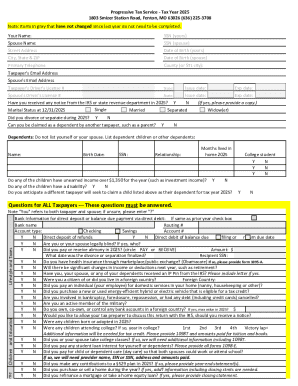
The 2025 Tax Organizer is a tax document used by taxpayers to compile necessary information for their 2025 income tax return preparation.
pdfFiller scores top ratings on review platforms




Who needs Tax Organizer 2025?
Explore how professionals across industries use pdfFiller.

Tax Organizer 2025 is needed by:
-
Individuals preparing their personal income taxes for 2025.
-
Self-employed professionals needing to report income and expenses.
-
Students and parents managing tuition and education expenses.
-
Property owners listing real estate for tax purposes.
-
Investors documenting income from investments during the tax year.
-
Business owners needing to organize financial information.
Comprehensive Guide to Tax Organizer 2025
What is the 2025 Tax Organizer?
The 2025 Tax Organizer is a crucial document designed for taxpayers to gather and report essential information necessary for preparing their 2025 income tax return. This organizer encompasses various key sections, including income, savings, investments, and more. By utilizing a tax organizer, taxpayers can streamline the process of tax return preparation, ensuring that all relevant data is collected efficiently. A well-structured tax organizer facilitates accurate reporting and compliance, thereby simplifying the overall tax filing process.
Why Use the 2025 Tax Organizer?
Using the 2025 Tax Organizer offers numerous advantages, primarily simplifying tax return preparation. It provides a clear framework for gathering tax-related information, which significantly enhances accuracy. Additionally, the organizer assists taxpayers in compiling necessary supporting documentation required by the IRS, ensuring a thorough and compliant submission. A structured approach to tax preparation can alleviate the stress often associated with filing taxes, making the process smoother for everyone involved.
Key Features of the 2025 Tax Organizer
The 2025 Tax Organizer boasts several user-friendly features to aid taxpayers in completing their forms accurately. Key features include:
-
Fillable fields for essential tax forms like W-2, 1099, and K-1, allowing users to input their information directly.
-
Detailed instructions for submitting supporting documentation alongside the organizer, ensuring compliance with IRS regulations.
-
Availability as a fillable PDF which facilitates easy online access and use.
Who Needs the 2025 Tax Organizer?
The 2025 Tax Organizer is beneficial for a wide range of individuals and groups, including individual taxpayers, freelancers, and business owners. Different financial situations determine varying eligibility criteria for utilizing the tax organizer, such as specific income thresholds and filing statuses. Understanding these distinctions helps ensure that all relevant taxpayers can effectively use this organizer for their specific circumstances.
How to Fill Out the 2025 Tax Organizer Online (Step-by-Step)
To successfully complete the 2025 Tax Organizer online, follow these steps:
-
Open the fillable PDF of the 2025 Tax Organizer from pdfFiller.
-
Fill out each section systematically, ensuring accuracy in your reported income and expenses.
-
Carefully review all entries before finalization to minimize errors.
-
Save the completed form securely on your device.
-
Download the finalized document for your records or submission.
Required Documents and Supporting Materials
To fill out the 2025 Tax Organizer efficiently, gathering the necessary documents and supporting materials is essential. Key forms and materials to collect include:
-
W-2 forms from employers, which report annual wages and taxes withheld.
-
1099 forms, highlighting income received from freelance or contractual work.
-
Receipts and documentation for all deductible expenses to optimize tax savings.
Submitting the 2025 Tax Organizer: Delivery and Compliance
Submitting the 2025 Tax Organizer requires adherence to specific methods and deadlines. Taxpayers can choose to submit their completed organizer online or via mail, depending on their preference. It is vital to be aware of important deadlines to avoid any penalties and understand potential processing times. Additionally, the organizer needs to meet IRS requirements for e-filing and maintaining accurate records post-submission.
Security and Compliance for the 2025 Tax Organizer
Data security is paramount when using the 2025 Tax Organizer. pdfFiller employs robust security measures, including 256-bit encryption and compliance with federal regulations such as HIPAA and GDPR. Protecting sensitive tax information during the filing process is critical, and users should ensure that their data remains secure both during submission and after by maintaining proper record-keeping practices.
Example of a Completed 2025 Tax Organizer
To assist users in understanding how to fill out the 2025 Tax Organizer, an example of a completed form can be invaluable. Screenshots or examples of each section filled with pertinent information can guide taxpayers in their own form completion. By reviewing these common practices, users can avoid mistakes and increase their confidence in accurately filling out their own tax organizers.
Experience Stress-Free Tax Preparation with pdfFiller
Using pdfFiller to fill out the 2025 Tax Organizer maximizes efficiency and ease during the tax preparation process. With user-friendly tools available for editing, eSigning, and securely managing your forms, you can navigate tax filing stress-free. Start taking advantage of these solutions to ensure your tax documents are prepared accurately and securely today.
How to fill out the Tax Organizer 2025
-
1.To access the 2025 Tax Organizer on pdfFiller, visit the website and log into your account. Use the search bar to locate the form quickly.
-
2.Once opened, you will see various sections and fields within the form. Familiarize yourself with the layout to understand where each type of information is required.
-
3.Before you start filling out the organizer, gather all necessary documents such as Form W-2, Form 1099, and any supporting documentation related to income and expenses.
-
4.Begin by entering your personal information in the designated fields. This information typically includes your name, address, and Social Security number.
-
5.Next, move to the income sections. Fill in the details from your income statements such as W-2s and 1099s. Use the navigation tools to move between sections smoothly.
-
6.As you complete each section, check for any required supporting documents that you need to upload or reference.
-
7.Once all fields are completed, review the organizer thoroughly. Make sure all information is correct and matches your documentation.
-
8.If there are sections where you need to provide additional information, use the available text fields to add notes or explanations.
-
9.Once you are satisfied with your completed organizer, save your work on pdfFiller. You can also download the form to your computer in PDF format.
-
10.If you're ready to submit your tax return, follow pdfFiller’s instructions for e-filing or print the completed organizer to mail it along with your tax documents.

Who needs to complete the 2025 Tax Organizer?
Anyone preparing their 2025 income tax return can benefit from completing the 2025 Tax Organizer. This includes individuals, self-employed persons, and property owners who need to gather their financial information.
What documents do I need to provide with this form?
You will need to provide various supporting documents such as Form W-2, Form 1099, and proof of any deductions you plan to claim, including education costs, real estate details, and other income sources.
Is there a deadline for submitting the 2025 Tax Organizer?
While the 2025 Tax Organizer itself can be completed anytime, the actual tax returns must typically be filed by April 15, 2026. Make sure to check for any changes in submission deadlines based on specific circumstances.
How can I submit my tax return after completing the organizer?
After completing the 2025 Tax Organizer, you can submit your tax return electronically through e-filing options provided by tax software or print the completed organizer and mail it to your tax authority.
What are some common mistakes to avoid when filling out the organizer?
Ensure that all information is accurate and matches your supporting documentation. Common mistakes include incorrect Social Security numbers, misreported income figures, and missing signatures on required forms.
Can I save my progress while filling out the form on pdfFiller?
Yes, pdfFiller allows you to save your progress at any point. This feature is beneficial as it lets you gather additional information before finalizing the form.
How can I access the 2025 Tax Organizer if I can't find it?
If you can't find the 2025 Tax Organizer, use the search feature on pdfFiller's homepage. Enter '2025 Tax Organizer' in the search bar to locate the form directly.
Related Forms





Get the latest insights from our blog


If you believe that this page should be taken down, please follow our DMCA take down process
here
.
This form may include fields for payment information. Data entered in these fields is not covered by PCI DSS compliance.