
Last updated on
Oct 22, 2026

Get the free CPA Tax Filing Portal Setup Form
We are not affiliated with any brand or entity on this form

Fill out
Complete the form online in a simple drag-and-drop editor.

eSign
Add your legally binding signature or send the form for signing.

Share
Share the form via a link, letting anyone fill it out from any device.

Export
Download, print, email, or move the form to your cloud storage.
Why pdfFiller is the best tool for your documents and forms


End-to-end document management
From editing and signing to collaboration and tracking, pdfFiller has everything you need to get your documents done quickly and efficiently.
Accessible from anywhere
pdfFiller is fully cloud-based. This means you can edit, sign, and share documents from anywhere using your computer, smartphone, or tablet.
Secure and compliant
pdfFiller lets you securely manage documents following global laws like ESIGN, CCPA, and GDPR. It's also HIPAA and SOC 2 compliant.
What is CPA Portal Form
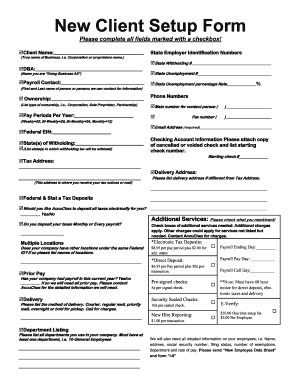
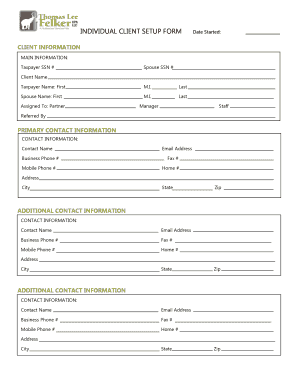
The CPA Tax Filing Portal Setup Form is a fillable document used by CPA firms to establish a secure portal for clients to share tax-related information safely.
pdfFiller scores top ratings on review platforms




Who needs CPA Portal Form?
Explore how professionals across industries use pdfFiller.

CPA Portal Form is needed by:
-
Individual taxpayers looking to share tax documents securely
-
Spouses needing to sign and submit tax-related forms
-
CPA firms needing clients to select document delivery preferences
-
Accountants assisting clients with tax filing processes
-
Business owners managing tax returns for their companies
Comprehensive Guide to CPA Portal Form
What Is the CPA Tax Filing Portal Setup Form?
The CPA Tax Filing Portal Setup Form serves as an essential tool for CPA firms, allowing them to establish a secure portal tailored for clients to share tax-related information. By facilitating secure document sharing, this form enhances the safety of sensitive data. Key features include customizable preferences for receiving tax organizers and returns, ensuring a streamlined experience for both taxpayers and CPA firms.
Why Use the CPA Tax Filing Portal Setup Form?
This form provides numerous benefits to tax filers and CPA firms alike. Firstly, it allows for the secure exchange of tax organizers and returns, significantly reducing the risk of data breaches. The fillable format enhances the user experience, making it easy for clients to manage their preferences effectively. Utilizing the CPA client portal form helps reinforce the secure handling of vital tax documents.
Who Needs the CPA Tax Filing Portal Setup Form?
The primary users of the CPA Tax Filing Portal Setup Form include both taxpayers and their spouses. Scenarios where the form becomes necessary include engaging with CPA firms or when clients wish to ensure secure processing of their sensitive financial documents. By understanding who needs the form, users can take proactive steps to protect their tax information.
How to Fill Out the CPA Tax Filing Portal Setup Form Online (Step-by-Step)
-
Access the form through your CPA's designated link.
-
Gather necessary information, such as personal details and document delivery preferences.
-
Fill out each section of the form, focusing on required fields.
-
Double-check your entries for accuracy before submission.
-
Sign the form digitally, ensuring compliance with submission requirements.
Digital Signatures and Document Security
Digital signatures from both the taxpayer and spouse are required for the CPA Tax Filing Portal Setup Form. pdfFiller ensures document security and compliance through state-of-the-art measures, such as 256-bit encryption. The advantages of using digital signatures include enhanced security and convenience, compared to traditional wet signatures, allowing for a more efficient submission process.
Submission Methods and Delivery Options
Once you have completed the CPA Tax Filing Portal Setup Form, various submission methods are available to you. Options for delivering the form include secure electronic transfers or traditional mail, depending on your preferences. Employing proper submission and tracking techniques plays a crucial role in ensuring that your documents reach the CPA firm without issues.
Consequences of Not Submitting the CPA Tax Filing Portal Setup Form
Failing to submit the CPA Tax Filing Portal Setup Form or submitting it late can lead to several repercussions. Potential issues include delays in tax processing and sharing necessary documents with CPA firms. Timely submission is critical to facilitate a seamless tax filing experience and can significantly impact the overall efficiency of your tax-related processes.
Maintaining Security and Compliance with Your Tax Documents
Maintaining privacy and data protection for sensitive documents is paramount. pdfFiller employs robust security measures, including compliance with regulations such as HIPAA and GDPR. Users are encouraged to practice careful record retention and safe document handling to further safeguard their tax information and maintain compliance.
Getting Started with pdfFiller for Your CPA Tax Filing Portal Setup Form
Engaging with pdfFiller simplifies the process of filling out the CPA Tax Filing Portal Setup Form. Users can enjoy features such as editing, digital signing, and secure sharing—all designed to enhance usability. Start utilizing pdfFiller's services for efficient and secure completion of your forms, ensuring a smooth experience in managing your tax documents.
How to fill out the CPA Portal Form
-
1.Access the CPA Tax Filing Portal Setup Form on pdfFiller by searching for it in the document library or by using a direct link provided by your CPA firm.
-
2.Once opened, familiarize yourself with the layout. Use the editing tools on the right side of the interface to navigate to different fields.
-
3.Before starting, gather all necessary information, including tax-related documents, personal identification details, and preferences regarding document handling.
-
4.Begin filling in the required fields. Make sure to check off relevant options and complete all sections that apply to your situation.
-
5.Pay attention to the signature lines designated for both tax payer and spouse. Ensure both parties provide their signatures using the signature tool available on pdfFiller.
-
6.After completing the form, review all filled-in data for accuracy with the built-in reviewing options. Ensure all preferences for document delivery are selected correctly.
-
7.Once you are satisfied with the completed form, save your progress and choose the option to download or submit directly through pdfFiller, adhering to the submission instructions provided.

Who is eligible to use the CPA Tax Filing Portal Setup Form?
Any individual taxpayer and their spouse who need to share tax-related information securely with their CPA can use this form.
What are the deadlines for submitting this form?
The CPA Tax Filing Portal Setup Form should ideally be submitted before the tax filing deadline to ensure timely processing of your tax documents.
How can I submit the completed form?
You can submit the completed form directly through pdfFiller via online submission or download it and send it to your CPA firm via email or postal mail.
What supporting documents do I need to attach?
You may need to attach tax-related documents, such as previous tax returns, income statements, and any specific documents requested by your CPA firm.
What common mistakes should I avoid when filling out this form?
Be careful to avoid leaving required fields blank, neglecting to sign, and misinterpreting document delivery preferences, which could delay processing.
How long does it take to process this form?
Processing times can vary based on your CPA firm's workload, but forms submitted accurately and on time are generally processed faster.
Does this form need notarization?
No, the CPA Tax Filing Portal Setup Form does not require notarization; however, both the taxpayer and spouse must sign it.
Related Forms



Get the latest insights from our blog


If you believe that this page should be taken down, please follow our DMCA take down process
here
.
This form may include fields for payment information. Data entered in these fields is not covered by PCI DSS compliance.